
Introduction
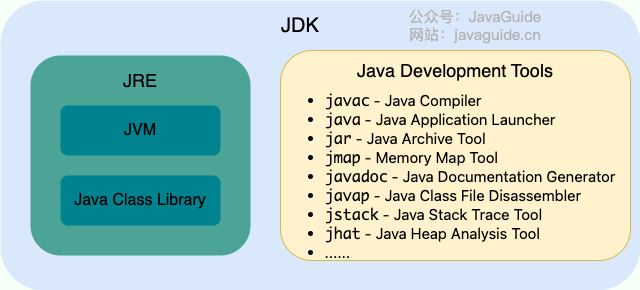
Java JDK
Java development toolkit
Versions of JDK get released every 6 months
Release a LTS version every 3 years
Java is a hybrid language
javac- compilejava- interpret
JVM
- Java virtual machine
- Make Java platform independent
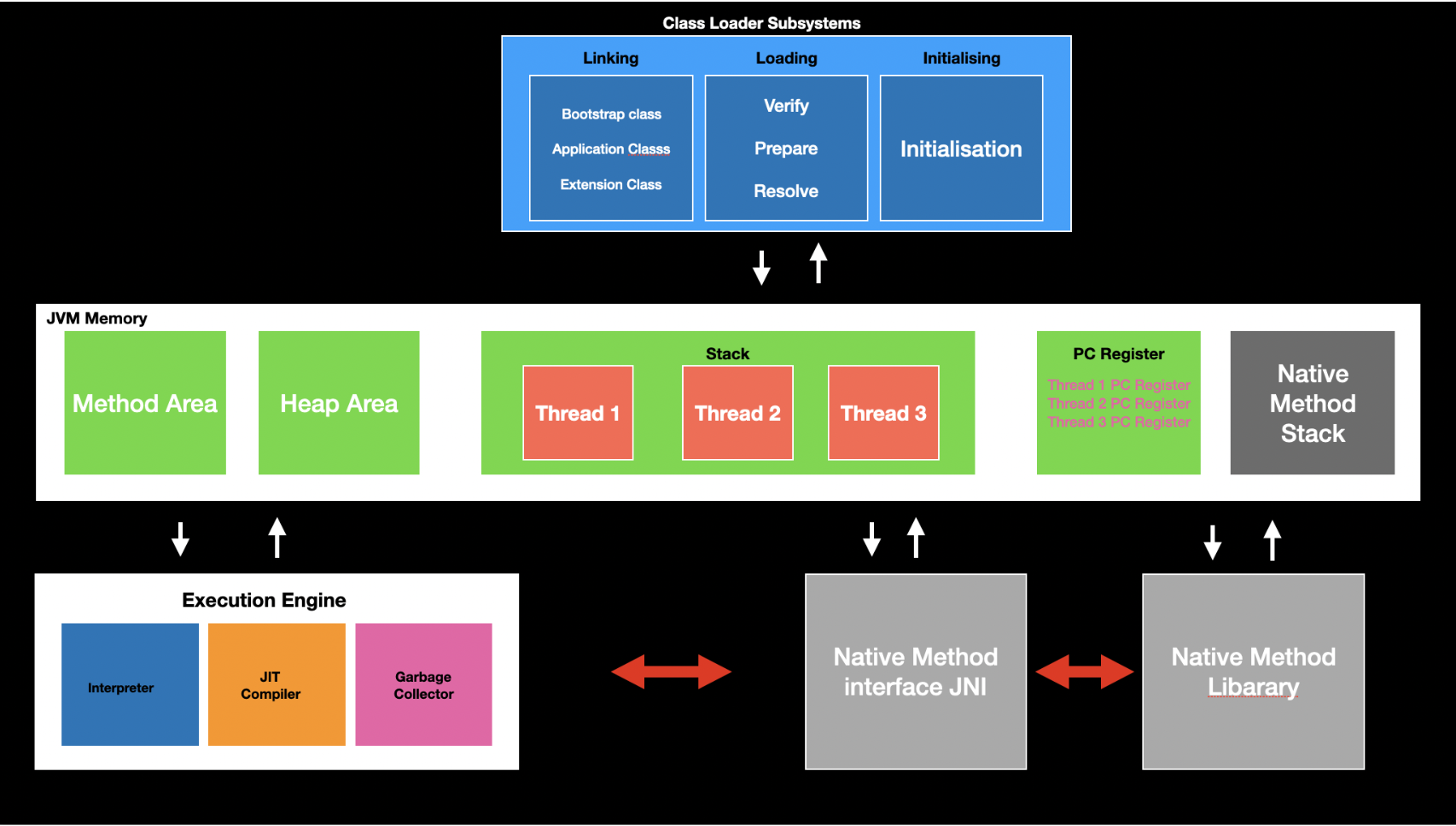
JVM
Basic Syntax and Concepts
- Java is case-sensitive
Variables
Three types of variables
Fields - member variables in a class
Local variables - variables in a method or block of code
Parameters - variables in method declarations
NOTE: No global variables in Java
Data type
- Primitive data type
boolean,byte,short,int,long,float,double,char- Overflow and underflow
BigDecimalclass overcomes the precision issues of the floating number typescharin Java is 2 bytes to allow you to store Unicode characters- e.g.
'\u0040' == 'A'
- e.g.
- Class data type
- Casting
- Primitive data type
Declaration and Initialisation
Literals
- Good habit: add appropriate data type suffix
Operators
- Operator and operand
- Mathematical operators
- Only overriding operator in Java:
+,+=- Other data type variables will be automatically casted to a String
- Only overriding operator in Java:
- Assignment operator
- Abbreviating operators
++,--- Relational operators
- Logical operators
- Bitwise operators
- Ternary operator
- Casting operators
,- Operator precedence
Expressions and Statements
Expression is formed by combining variables, literals, method return values and operators
Statement is an executable line or code block
Declaration statement
Expression statement
- Assignment expressions
++,--- Method calls
- Object creation
Control flow statement
Code organisation: whitespace and indentation
Flow control
if-elseswitchStringcan be used- Enhanced switch
whiledo whileforforeach
Method
Function in Java
Java method is pass-by-value
A parameter is a variable in a method definition. When a method is called, the arguments are the data you pass into the method's parameters
Method Overloading
- Methods have the same name, but take a unique list of argument types
- Overloaded methods CANNOT differ only by return type
- Type promotion
- Can cause compile time error if there are more than one methods matched
Variable Arguments
Variable numbers of inputs
Must be the last parameter
void show(int... x) {
  for (int e : x)
    System.out.println(e);
}

// All valid
show();
show(10);
show(10, 20);
show(10, 20, 30);
int[] x = {1, 2, 3};
show(x);
Command-line Arguments
String[] argsinmain()
String
- String is an object
- String is immutable
Creating String
String str = "Hello world!";- Point to an object in string pool
- Constructors
String(char [])String(byte [])String(String)- Point to an object in heap
Common String Methods
int length()String toLowerCase()String toUpperCase()String trim()String substring(int begin)String substring(int begin, int end)[begin, end)
String replace(char old, char new)String replaceAll(String regex, String replacement)boolean startsWith(String s)boolean endsWith(String s)char charAt(int index)int indexOf(char c)int indexOf(String s)int lastIndexOf(char c)boolean equals(String s)boolean equalsIgnoreCase(String s)int compareTo(String s)- Compares two strings lexicographically
boolean matches(String regex)String[] split(String regex, int limit)String[] split(String regex)- This method works as if by invoking the two-argument
splitmethod with the given expression and a limit argument of zero - Trailing empty strings will therefore be discarded
- This method works as if by invoking the two-argument
static String String.join(CharSequence delimiter, CharSequence... elements)char[] toCharArray()static String String.valueOf(int i)- Convert other data type value to a string
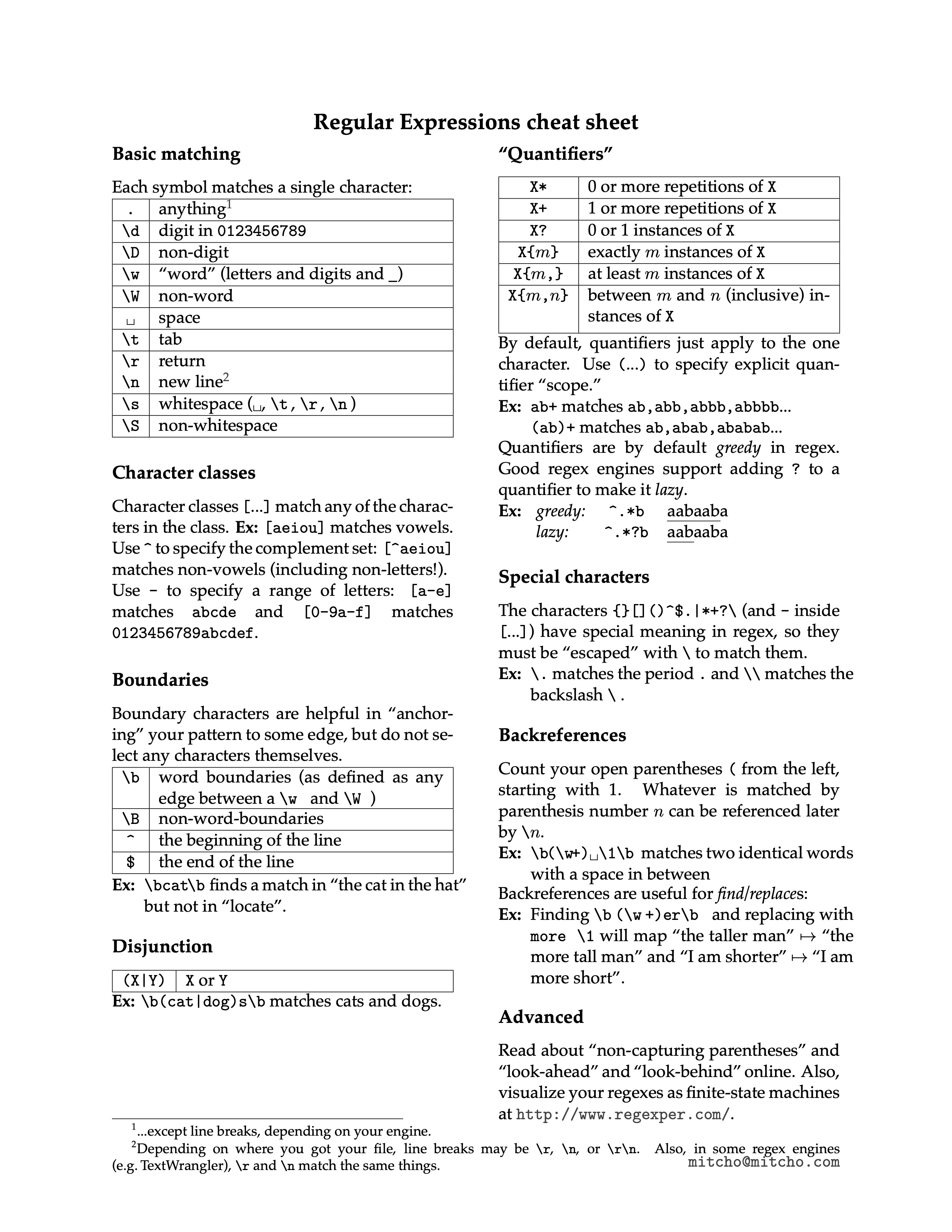
Regualr Expression
StringBuffer & StringBuilder
StringBuffer- "Mutable String"
append(),insert()- Initially will have a size of 16 capacity
- It is thread-safe
StringBuilder- Basically same as
StringBuffer - It is not thread-safe, but faster
+, +=is actually implemented byStringBuilder, one operator creates a newStringBuilderobject
- Basically same as
Printing
// Only take one parameter
System.out.print()
System.out.println()

// Formatted output
System.out.printf()
System.out.format()
Array
- Initialisation
<type>[] varArr = new <type>[size];- All elements will be initialized to
0,false, ornull
- All elements will be initialized to
<type>[] varArr = {element1, element2, };- Must combine with the declaration
- For loop
- Array is an object
- Array has a field
length - Array utilities -
Arraysint binarySearch()int compare()T[] copyOf()boolean equals()void fill()void sort()String toString()List<T> asList()
OOP
Classes and Objects
Class is the blueprint, objects are the instances of their class
Class - fields and methods
Object - properties and behaviors
Constructor
- A special method is required to create a new instance of the class
- No return type
- Every objects has a default constructor
- Constructors can be overloaded, using
thiskeyword to overload to avoid duplication this()must be the first statement in the overloaded constructor body- If a class doesn't explicitly declare any constructor, Java compiler automatically provides a no-argument constructor. This default constructor calls the class parent's no-argument constructor, or the
Objectconstructor if the class has no parent. If the parent doesn't have no-argument constructor, compiler will reject the program. - It's good to always define a default constructor
The
getterandsettercan also have additional validations instead of just setting or getting the fields valuesReference vs. Object
All other types which are not one of the primitive types are reference types
References --- pointers
The only operators allowed for reference type are assignment via
=and equality comparison via==and!=(Strings can use+,+=)instance ofoperator: verify that an particular object is of a certain type- Typically used before performing a type casting
newoperator instantiates a class by allocating memory for a new object and returning a reference to that memoryIn Java, there is no way to access an object directly (no pointer), everything is done using a reference
statickeyword- Fields that have
staticmodifier are called static fields or class variables - They are associated with the class, rather than with any object. Every instance of the class shares a class variable, which is in one fixed location in memory
staticmethods can't access instance methods and instance variables directly, and can't usethiskeyword- If a method doesn't use instance variables that method should be declared as a static method
- Referring to static fields or methods with an object instance is not encouraged
staticblock: a code block that will be executed before the creation of any object of that class
- Fields that have
finalkeywordFinal variables
finalmeans a value cannot be changed after initialisation at run-time- Blank finals -> a final field inside a class can be different from each other, and yet it remains its immutablility
static finalmeans compile-time constant
Final arguments
- Inside the method you cannot change the argument
Final methods
- Prevent the method being overridden by the subclass
- Any private methods in a class are implicitly
final
Final classes
- Prevent the class from being inherited
Reusing classes
Inheritance
"is-a" relationship
extendsExcepting
Object, every class has one and only direct superclassInheritance chain
A subclass inherits all the members (fields, methods, and nested classes) from its super class
A subclass doesn't "inherit" (cannot directly access) the
privatemembers of its parent classValues of the inheritance:
- To handle the complexity of the large project
- Keep common behaviors in one class
- Split different behaviors into separate classes
- Keep all of the objects in a single data structure
thisvs.supersuperis used to access/call the parent class membersthisis used to access/call the current class members- Both of them can be used anywhere in a class except static areas, any attempt to do so will lead to compile-time errors
thisis commonly used with constructors and setterssuperis commonly used with method overridingthis()call a constructor from another overloaded constructor in the same classsuper()call a parent constructor- Java compiler puts a default call to
super()if we don't add it, and it's always the no-argumentsuperwhich is inserted by compiler - A constructor can have a call to
super()orthis()but never both
Method overloading vs. method overriding
Method overloading means providing two or more separate methods in a class with the same name but different parameters
We can overload static and instance methods
Overloading rules
- Methods must have the same method name
- Methods must have different parameters
- If methods follow the rules above then they may or may ont
- Have different return types
- Have different access modifiers
- Throw different checked or unchecked exceptions
Method overriding means defining a method in a child class that already exists in the parent class with same signature
Overriding rules
It must have same name and same arguments
Return type can be a subclass of the return type in the parent class
Covariant return types
We can't override static methods only instance methods
Constructors and private methods cannot be overridden
Methods that are final cannot be overridden
It can't have a lower access modifier
Must not throw a new or broader checked exception
Composition
- "has-a" relationship
- Use class type variables as fields
- Consider to use composition prior to inheritance
Encapsulation
- Separate the implementation and the interface
Polymorphism
Compile Time Rules
- Compiler ONLY knows reference type
- Can only look in reference type class for method
- Outputs a method signature
Runtime Rules
- Follow exact runtime type of object to find the method
- Must match compile time method signature to appropriate method in actual object's class
Interfaces and Abstract Classes
- Interfaces and abstract classes provide a more structured way to separate interface from implementation
- Inheritance is specialisation; interface is generalisation
Interfaces
implementsAn interface is a contract of what the classes can do
An abstract class taken to the extreme,thus more flexibility (complete decoupling)
Refer to different types of objects with one identical interface type
- Generalisation
- Capability of putting different types of objects into one data structure
- Less effort for code alteration
One class can implement several interfaces
- "Multiple inheritance": A class can be upcast to more than one base type with interfaces
Interface cannot be instantiated
Methods in interfaces are implicitly
publicFields in interfaces are implicitly constant (
public static final)SInce Java 8 interface can have
staticmethodsAn interface can extend another interface
Interface can have
defaultmethods which can have method body- Java 8 feature
- Make refactoring interface easier
- Java 9 allows
privatemethods in interface that can be used indefaultmethods inside interface
Type of Interface
Normal interface
Functional Interface
- Has only one abstract function
Marker Interface
- Has no member fields or methods
- Eg.
Serializable,Cloneable,RandomAccess
Abstract Classes
- An abstract class is a class that is declared
abstract - Contain a mix of methods with or without implementation
- An abstract method is a method that is declared
abstractwithout an implementation - Abstract class cannot be instantiated, but can be subclassed
- When an abstract class is subclassed, the subclass usually provides implementations for all of the abstract methods in its superclass. However, if it doesn't, then the subclass must also be declared
abstract - A subclass of a non-abstract superclass can be
abstract
Interfaces vs. Abstract Classes
- Abstract Classes
- Purpose is to provide a common definition of a base class that multiple derived classes can share
- Share code among several closely related classes
- Expect classes that extend your abstract class to have many common methods or fields or required access modifier other than
public - Want to declare non static or non final fields
- Provide default implementations of certain methods but leave other methods open to being overridden
- Interfaces
- Purpose is abstraction
- Expect unrelated classes will implement your interface
- Want to specify the behavior of a particular data type, but not concern about who implements its behavior
- Want to separate different behaviors
Access Control
Package
- A collection of similar classes, interfaces, or other packages
package,import- Create a library and import it
- Extract the package to
.jar(Java ARchive) file in the project structure - Import the
.jarfile into the new project libraries in the project structure
- Extract the package to
Scope
Naming Convention
- Reversed url
Access control
At the top level: public or package-private (no explicit modifiers)
At the member level: public, private, protected, or package-private
A class declared with
publicis visible to all classes everywhere; A class with no modifier is visible only within its packageModifier Class Package Subclass outside the package World publicY Y Y Y protectedY Y Y N no modifier Y Y N N privateY N N N
Nested Classes
- Place a class definition within another class definition
- Nested classes are divided into two categories: non-static and static
- Non-static nested classes are called inner classes
- Nested classes that are declared
staticare called static nested classes
Inner Classes
Inside the outer class, inner class can access the members of outer class directly (even if it's
private)Inside the outer class, you can create inner class objects
If you want to make an object of the inner class anywhere except from within a non-static method of the outer class, you must specify the type of the object as
Outer.Inner// Inner class is public Outer outer = new Outer(); Outer.Inner inner = outer.new Inner();Produce the reference to the outer class object within the inner class definition:
Outer.thisThe inner class will be compiled to
Outer$Inner.classInner class cannot have
staticmembers or nested classes
Local and Anonymous Inner Classes
Local inner class: an inner class defined inside a code block, typically in a method
- A local class can access local variables and parameters of the enclosing block that are final or effectively final
Anonymous inner class: an inner class defined at the time of creation of itself
In other words, we can say that it a class without the name and can have only one object that is created by its definition
Useful when you want a class inheriting from a superclass or implementing an interface which only used in a specific method
interface Eatable {
 	void eat();
}
class TestAnnonymousInner1 {
   public static void main(String args[]) {
   		Eatable e = new Eatable() {
    		public void eat() {System.out.println("nice fruits");}
   		};
   		e.eat();
   }
}
Static Nested Classes
The static member of outer class
In effect, a static nested class is behaviorally a top-level class that has been nested in another top-level class for packaging convenience
You instantiate a static nested class the same way as a top-level class
StaticNestedClass staticNestedObject = new StaticNestedClass();
Why Nested Classes?
- It is a way of logically grouping classes that are only used in one place
- It increases encapsulation
- It can lead to more readable and maintainable code
- Nature of the problem
Exception Handling
Type of Errors
- Syntax error
- Identified by compiler
- Logical error
- Identified by debugging
- Runtime error
- Bad inputs
- Unavailable resources
- Etc.
Exception Class
Methods
String getMessage()String toString()void printStackTrace()- Prints this throwable and its backtrace to the standard error stream
Error
Error cause the program to exit since they are not recoverable
Considered as unchecked exceptions
Checked exceptions: you must handle them at compile time
RuntimeExceptionUnchecked exceptions: you don't have to handle them
They’re always thrown automatically by Java and you don’t need to include them in your exception specifications
If a
RuntimeExceptiongets all the way out tomain( )without being caught,printStackTrace( )is called for that exception as the program exits; the output is reported toSystem.errCreating your own exceptions
class MinBalanceException extends Exception {
  public String toString() {
    return "Minimal balance should be 5000. Try again!"
  }
}
How to Handle Exceptions
try {
  // logic that might generate exceptions
} catch () {
  // handling exception if it occurs
} finally {
  // activities happen every time even if a method is returned (executed before return)
  // cleanup
}
There can be zero, one, or multiple
catchblockstry catchblock can be nestedfinallyblock is necessary when you need to set something other than memory (garbage collector is responsible for releasing heap memories) back to its original state (releasing resources)
Objects in heap are also resources, the real composition of the program are the references on stack
The finally block will not be executed if program exits (either by calling
System.exit()or by causing a fatal error that causes the process to abort)Try with resources
Java 7 feature
Support multiple resources, separated by
;try (Scanner scanner = new Scanner(new File("test.txt"))) { while (scanner.hasNext()) { System.out.println(scanner.nextLine()); } } catch (FileNotFoundException fnfe) { fnfe.printStackTrace(); } // no finally block // For objects which implement AutoClosable interface
Java supports termination exception handling instead of resumption
Throwing an exception
throw new Exception("");- Exceptions can be rethrown
- Happen in the
catchblock - Exception chaining: Often you want to catch one exception and throw another, but still keep the information about the originating exception
- Happen in the
- Exception propagation
- Exception bubbles up through the call stack if it is not caught
There is a pitfall in Java Exception implementation: lost exception
returninsidefinallyblock
Exception Specification
- Politely tell the client programmer what exceptions the method throws, so the client programmer can handle them
throws- Unchecked exceptions can be omitted
- The "exception specification interface" for a particular method may narrow during inheritance and overriding, but it may not widen
Multiprogramming
Multiprogramming
Running more than one programs on a single computer
Go read the Concurrency chapter of Thinking in Java
- By multiprogramming CPU's idle time is minimised
- A Thread of execution is the smallest sequence of programmed instructions that can be managed independently
- In many cases, a thread is a component of a process
- Useful for web server, GUI, animation, etc.
How to Implement Multithreading
extendsorimplementsor lambda expression- Depends on whether the subclass is inherited a superclass or not
ThreadclassRunnableinterface
Overriding the
run()methodrun()is the starting point of a thread
Start the thread
- If
implements Runnable,Thread t = new Thread(new Object()); t.start(); - If
extends Thread,o.start();
- If
Thread class
States of Thread
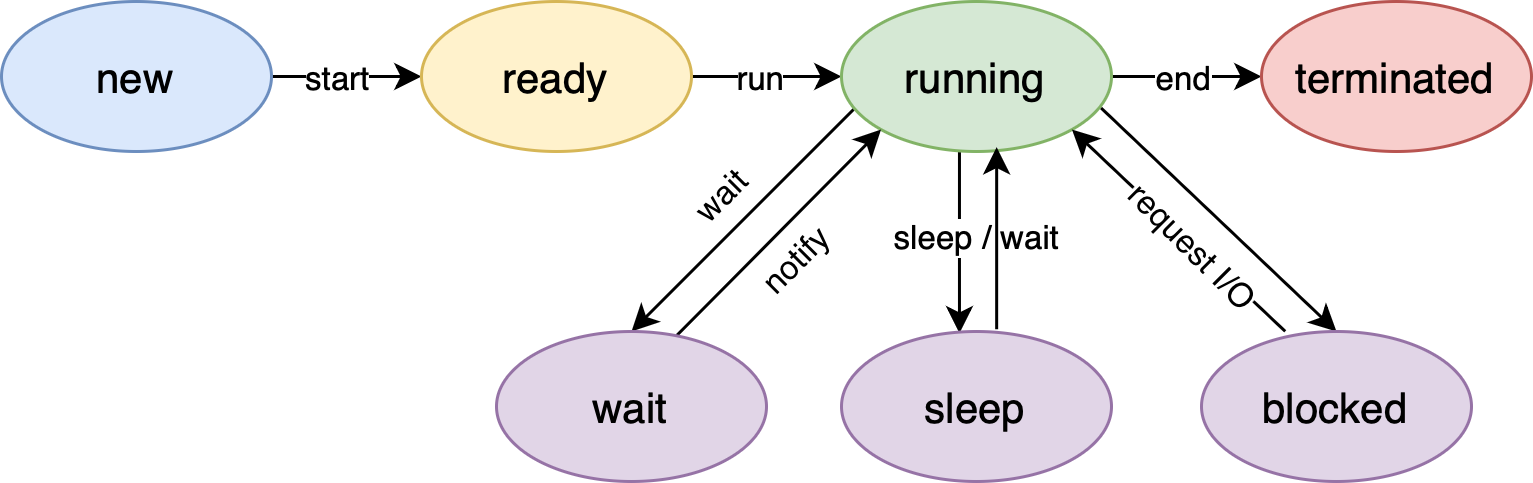
thread-states
Thread priority
- Scheduler in JVM maintains a thread ready queue
- The exact behaviour depends on the JVM
Constructors
Thread()Thread(Runnable r)Thread(Runnable r, String name)Thread(ThreadGroup g, String name)
Getter and setter
long getId()String getName()int getPriority()- Default priority of a thread (
NORM_PRIORITY) in Java is 5;MIN_PRIORITYis 1 andMAX_PRIORITYis 10
- Default priority of a thread (
ThreadState getState()ThreadGroup getThreadGroup()void setName(String name)void setPriority(int p)void setDaemon(boolean b)- A daemon thread is the background thread with least priority
- An example: garbage collector
Enquiry methods
boolean isAlive()boolean isDaemon()boolean isInterrupted()
Instance methods
void inerrupt()void join()- Wait for this thread to die
void join(long milli)void run()void start()
Static methods
int activeCount()- Returns an estimate of the number of active threads in the current thread's
ThreadGroupand its subgroups
- Returns an estimate of the number of active threads in the current thread's
Thread currentThread()- Returns a reference to the currently executing thread object.
void sleep(long milli)- Causes the currently executing thread to sleep
void yield()- A hint to the scheduler that the current thread is willing to yield its current use of a processor
void dumpStack()- Prints a stack trace of the current thread to the standard error stream
Synchronisation
- Shared resources
- Critical section
- Mutual exclusion
- Locking / mutex
- Semaphore
- Monitor
- Race condition
- Inter-thread communication
- How Java achieve synchronisation
- Object monitor
sychronized- Guard the critical section
- Synchronised method
- Synchronised block
- How Java achieve ITC
wait(),notify(),notifyAll()
Java.lang
- A default package which will be automatically imported
Object
The root of the class hierarchy
Every class is a subclass, direct or indirect, of the
Objectclass/** * native 方法,用于返回当前运行时对象的 Class 对象,使用了 final 关键字修饰,故不允许子类重写。 */ public final native Class<?> getClass() /** * native 方法,用于返回对象的哈希码,主要使用在哈希表中,比如 JDK 中的HashMap。 */ public native int hashCode() /** * 用于比较 2 个对象的内存地址是否相等,String 类对该方法进行了重写以用于比较字符串的值是否相等。 */ public boolean equals(Object obj) /** * native 方法,用于创建并返回当前对象的一份拷贝。 */ protected native Object clone() throws CloneNotSupportedException /** * 返回类的名字实例的哈希码的 16 进制的字符串。建议 Object 所有的子类都重写这个方法。 */ public String toString() /** * native 方法,并且不能重写。唤醒一个在此对象监视器上等待的线程(监视器相当于就是锁的概念)。如果有多个线程在等待只会任意唤醒一个。 */ public final native void notify() /** * native 方法,并且不能重写。跟 notify 一样,唯一的区别就是会唤醒在此对象监视器上等待的所有线程,而不是一个线程。 */ public final native void notifyAll() /** * native方法,并且不能重写。暂停线程的执行。注意:sleep 方法没有释放锁,而 wait 方法释放了锁 ,timeout 是等待时间。 */ public final native void wait(long timeout) throws InterruptedException /** * 多了 nanos 参数,这个参数表示额外时间(以纳秒为单位,范围是 0-999999)。 所以超时的时间还需要加上 nanos 纳秒。。 */ public final void wait(long timeout, int nanos) throws InterruptedException /** * 跟之前的2个wait方法一样,只不过该方法一直等待,没有超时时间这个概念 */ public final void wait() throws InterruptedException /** * 实例被垃圾回收器回收的时候触发的操作 */ protected void finalize() throws Throwable { }
Override
equals()andhashcode()- If two objects are equal according to the
equals()method, then calling thehashCodemethod on each of the two objects must produce the same integer result - If two objects are equivalent then their hashcode must be equal; if two objects' hashcode are equal, it doesn't mean that these two objects are necessarily equivalent
- Default implementation of
equals()simply teststhis == obj - If logical equivalent is important, override
equals() - Principles
- Reflexive
- Symmetric
- Transitive
- Consistent
- For non-null reference
x,x.equals(null) == false
- If two objects are equal according to the
Wrapper Class
Java supports primitive types using classes
Wrapper objects are immutable
Initialisation
Integer myInteger = new Integer(56);Integer myInteger = 56;- Will be converted to
Integer myInteger = Integer.valueOf(56);at compile time
- Will be converted to
int myInt = myInteger- Will be converted to
int myInt = myInteger.intValue()
- Will be converted to
It's a good practice using
equals()method to compare wrapper class objectsInterfaces
Autoboxing ---
Integer.valueOf(int)Unboxing ---
intValue()Parsing values from a string
String strNum = "2048";
int num = Integer.parseInt(strNum);
BigDecimal- Constructor
BigDecimal(String value)BigDecimal.valueOf(double value)
- Methods
BigDecimal add(BigDecimal val)BigDecimal substract(BigDecimal val)BigDecimal multiply(BigDecimal val)BigDecimal divide(BigDecimal divisor, int scale, RoundingMode roundingMode)int compareTo(BigDecimal val)- Omit comparison on scale
- DON'T use
equals()
- Constructor
Math
- All static methods
Enum
- Work like a class with static final fields, each identifier is an object
- It can have a constructor but only
privateor default - It can also have other members
Java.lang.reflect
Helpful to get information of a class
Four ways to get a
ClassobjectClass alunbarClass = TargetObject.class; TargetObject o = new TargetObject(); Class alunbarClass2 = o.getClass(); // Below two will not initialise the class, // static fields and static code blocks will not be executed Class alunbarClass1 = Class.forName("cn.javaguide.TargetObject"); ClassLoader.getSystemClassLoader().loadClass("cn.javaguide.TargetObject");
Example
package cn.javaguide;

public class TargetObject {
    private String value;

    public TargetObject() {
        value = "JavaGuide";
    }

    public void publicMethod(String s) {
        System.out.println("I love " + s);
    }

    private void privateMethod() {
        System.out.println("value is " + value);
    }
}
package cn.javaguide; public class Main { public static void main(String[] args) throws ClassNotFoundException, NoSuchMethodException, IllegalAccessException, InstantiationException, InvocationTargetException, NoSuchFieldException { Class<?> targetClass = Class.forName("cn.javaguide.TargetObject"); TargetObject targetObject = (TargetObject) targetClass.newInstance(); Method[] methods = targetClass.getDeclaredMethods(); for (Method method : methods) { System.out.println(method.getName()); } Method publicMethod = targetClass.getDeclaredMethod("publicMethod", String.class); publicMethod.invoke(targetObject, "JavaGuide"); Field field = targetClass.getDeclaredField("value"); field.setAccessible(true); field.set(targetObject, "JavaGuide"); Method privateMethod = targetClass.getDeclaredMethod("privateMethod"); privateMethod.setAccessible(true); privateMethod.invoke(targetObject); } }
Serializabale
Date and Time API
- Starting time:
1 Jan 1970; starting year for a calendar:1900 - Old APIs in
java.util- Keep timestamp in a
longvalue in milliseconds - Is mutable
java.util.Dateis deprecatedjava.util.Calendar- An abstract class
- The standard calendar:
GregorianCalendar
java.util.TimeZone- An abstract class
- Keep timestamp in a
- New APIs: Joda Date and Time APIs in
java.time- Date and time are separated
- Keep timestamp in seconds and nano seconds
- Is immutable
Instant- A timestamp
LocalDate,LocalTime,LocalDateTime,ZonedDateTime,ZoneIDDuration,Period- A
Durationis a simple measure of time along the time-line in nanoseconds - A
Periodexpresses an amount of time in units meaningful to humans, such as years or days between()
- A
Month,DayOfWeek,Year,YearMonth,MonthDay,OffsetTime,OffsetDateTime,ZoneOffset- Methods
of- static factory methodnow- static factory methodparse- static factory method focused on parsingget- gets the value of somethingis- checks if something is truewith- the immutable equivalent of a setterplus- adds an amount to an objectminus- subtracts an amount from an objectto- converts this object to another typeat- combines this object with another
- All calculations should check for numeric overflow and throw either an
ArithmeticExceptionor aDateTimeException DateTimeFormatterofPattern(String pattern)- doc
ChronoField
Lamda Expression
Java 8 feature
Anonymous function whose definition is not bound to an identifier
To replace anonymous inner class
Only works for
FunctionalInterface@FunctionalInterface interface MyLambda { void display(String s); } public class Main { public static void main(String[] args) { MyLambda m = (s) -> { System.out.println("Hello " + s); }; m.display("David"); } }Acting as an object
Local variables referenced from a lambda expression must be final or effectively final (not modified)
Instance variables can be accessed and modified
Use cases
RunnableComparatorListenerCollections
Very similar to arrow function in JavaScript
Method references
Sometimes, a lambda expression does nothing but call an existing method. In those cases, it's often clearer to refer to the existing method by name
Kind Syntax Examples Reference to a static method ContainingClass::staticMethodNamePerson::compareByAgeMethodReferencesExamples::appendStringsReference to an instance method of a particular object containingObject::instanceMethodNamemyComparisonProvider::compareByNamemyApp::appendStrings2Reference to an instance method of an arbitrary object of a particular type ContainingType::methodNameString::compareToIgnoreCaseString::concatReference to a constructor ClassName::newHashSet::new
Java IO Streams
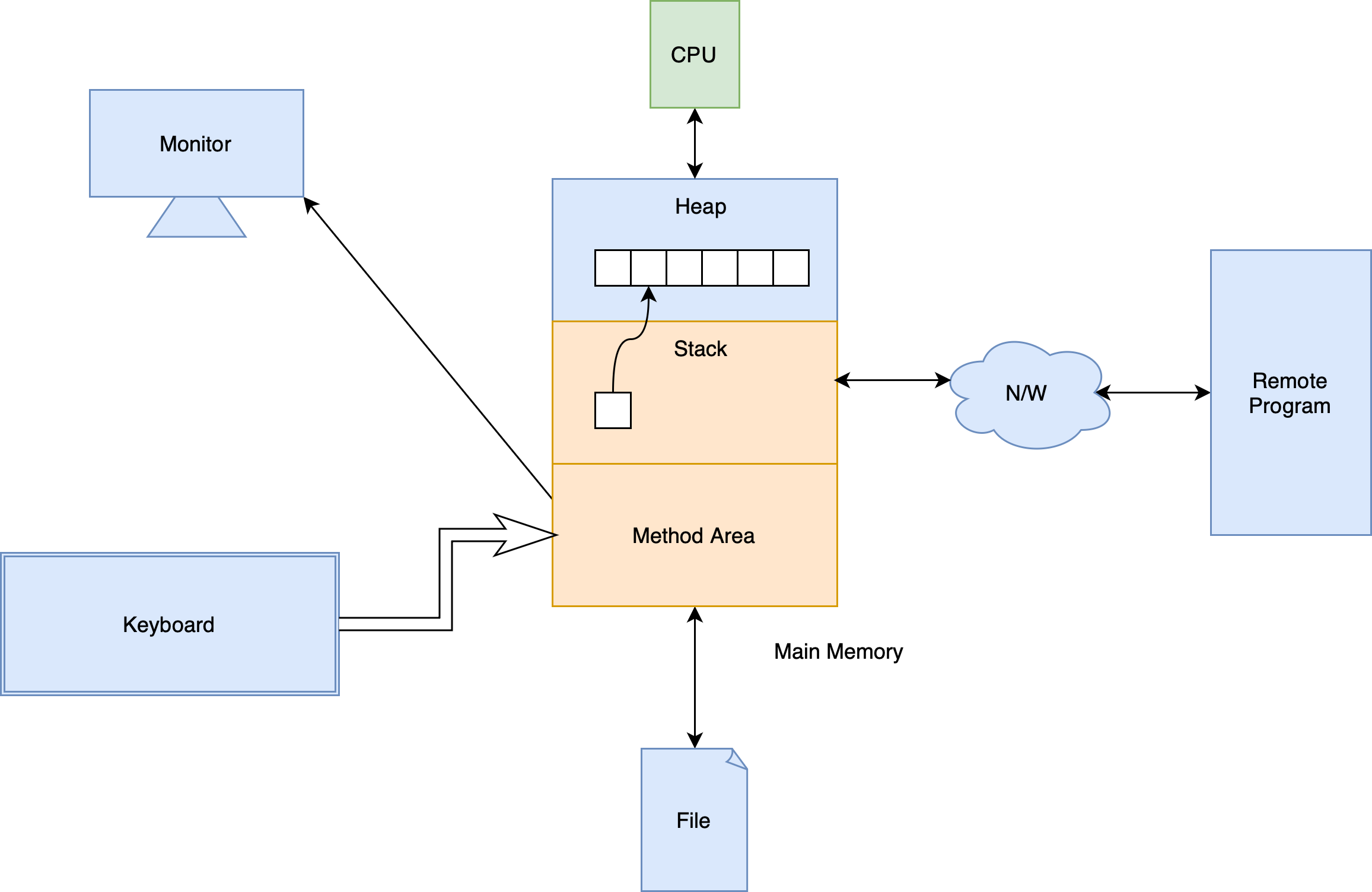
- Stack and method area is the context of a program; others are the resources
java.iopackage hierarchy- Java Stream Tutorial
Stream
- Stream is a flow of data
- An I/O Stream represents an input source or an output destination
- Streams support many different kinds of data, including simple bytes, primitive data types, localized characters, and objects
- Some streams simply pass on data; others manipulate and transform the data in useful ways
- The basic principle
- A stream is a sequence of data
- A program uses an input stream to read data from a source, one item at a time
- A program uses an output stream to write data to a destination, one item at time
Byte Streams
- Handle I/O of raw binary data
- All byte stream classes are descended from
InputStreamandOutputStream(abstract class) InputStreammethodsint read()- Reads the next byte of data from the input stream
- The only abstract method
- Returns the next byte of data, or
-1if the end of the stream is reached - This method blocks until input data is available, end of file is detected, or an exception is thrown
int read(byte[] b)- Reads some number of bytes from the input stream and stores them into the buffer array
b
- Reads some number of bytes from the input stream and stores them into the buffer array
int read(byte[]b, int off, int len)- Reads up to
lenbytes of data from the input stream into buffer arrayb - The first byte read is stored into element
b[off], the next one intob[off+1], and so on
- Reads up to
byte[] readAllBytes()- Reads all remaining bytes from the input stream
long transferTo(OutputStream out)- Reads all bytes from this input stream and writes the bytes to the given output stream in the order that they are read
- Returns the number of bytes transferred
int available()- Returns an estimate of the number of bytes that can be read (or skipped over) from this input stream without blocking or
0when it reaches the end of the input stream
- Returns an estimate of the number of bytes that can be read (or skipped over) from this input stream without blocking or
long skip(long n)- Skips over and discards
nbytes of data from this input stream - Returns the actual number of bytes skipped
- Skips over and discards
void mark(int limit)- Marks the current position in this input stream. A subsequent call to the
resetmethod repositions this stream at the last marked position so that subsequent reads re-read the same bytes - Only works for buffered streams
- Marks the current position in this input stream. A subsequent call to the
void reset()- Repositions this stream to the position at the time the
markmethod was last called on this input stream
- Repositions this stream to the position at the time the
boolean markSupported()- Tests if this input stream supports the
markandresetmethods
- Tests if this input stream supports the
void close()- Closes this input stream and releases any system resources associated with the stream
OutputStreammethodsvoid write(int b)- Writes the specified byte to this output stream
- The byte to be written is the eight low-order bits of the argument
b. The 24 high-order bits ofbare ignored - The only abstract method
void write(byte[] b)- Writes
b.lengthbytes from the specified byte array to this output stream
- Writes
void write(byte[] b, int off, int len)- Writes
lenbytes from the specified byte array starting at offsetoffto this output stream
- Writes
void flush()- Flushes this output stream and forces any buffered output bytes to be written out
- Only works for buffered streams
void close()- Closes this output stream and releases any system resources associated with this stream
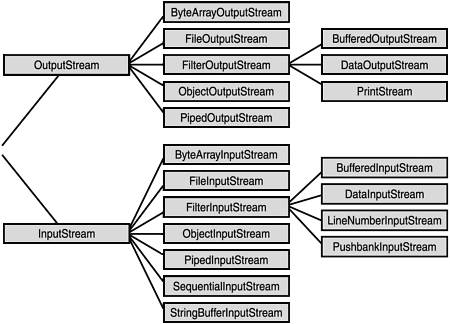
- Hierarchy of byte streams
ByteArrayInputStreamByteArrayInputStream(byte[] buf)- Creates a
ByteArrayInputStreamso that it usesbufas its buffer array
- Creates a
ByteArrayInputStream(byte[] buf, int offset, int length)
ByteArrayOutputStreamByteArrayOutputStream()ByteArrayOutputStream(int size)byte[] toByteArray()void writeTo(OutputStream out)- Writes the complete contents of this byte array output stream to the specified output stream argument
FileInputStreamandFileOutputStream
Character Streams
- Working with that Java stores character in 2 bytes
- Character streams are often "wrappers" for byte streams
- The character stream uses the byte stream to perform the physical I/O, while the character stream handles translation between characters and bytes
Readermethods- Similar to
InputStream - Don't have
available()
- Similar to
WritermethodsWriter append(char c)- Appends the specified character to this writer
out.append(c)behaves exactly the same asout.write(c)
Writer append(CharSequence csq)Writer append(CharSequence csq, int start, int end)
- Hierarchy of character stream
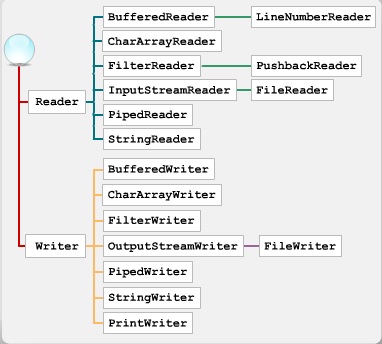
reader_writer
CharArrayReaderandCharArrayWriterFileReaderandFileWriter
Buffered Streams
For unbuffered steams, each read or write request is handled directly by the underlying OS
This can make a program much less efficient, since each such request often triggers disk access, network activity, or some other operation that is relatively expensive
Buffer
- A temporary memory object for holding the data
- The native input and output APIs are called only when the buffer is empty or full
- It often makes sense to write out a buffer at critical points, without waiting for it to fill. This is known as flushing the buffer
A program can convert an unbuffered stream into a buffered stream using the wrapping idiom
in = new BufferedReader(new FileReader("xanadu.txt"));
out = new BufferedWriter(new FileWriter("characteroutput.txt"));
BufferedInputStreamandBufferedOutputStreamBufferedReaderandBufferedWriter
Formatting Streams
PrintWriter,PrintStream- The only
PrintStreamobjects you are likely to need areSystem.outandSystem.error - When you need to create a formatted output stream, instantiate
PrintWriter, notPrintStream PrintStreamnever throws anIOExceptionPrintStreamcan be created so as to flush automatically; this means that theflushmethod of the underlying output stream is automatically invoked after a byte array is written, one of theprintlnmethods is invoked, or a newline character or byte ('\n') is writtenvoid print()String.valueOf()is invoked, and then the string's characters are converted into bytes according to the default charset, and these bytes are written in exactly the manner of thewrite(int).
void println()PrintStream printf(),PrintStream format()- They behave the same
- The only
Scanner- Useful for breaking down formatted input into tokens and translating individual tokens according to their data type
- By default, a scanner uses white space (include blanks, tabs, and line terminators) to separate tokens
Scanner useDelimiter(String pattern)Scanner useDelimiter(Pattern pattern)
- A scanning operation (
next()orhasNext()) may block waiting for input - Even though a scanner is not a stream, you need to close it to indicate that you're done with its underlying stream
Data Streams
DataInputStream,DataOutputStream- Created as a wrapper for an existing byte stream object
- The input stream consists of simple binary data, with nothing to indicate the type of individual values, or where they begin in the stream (not readable)
- Each specialized
writeinDataStreamsis exactly matched by the corresponding specializedread. It is up to the programmer to make sure that output types and input types are matched in this way DataStreamsuses one very bad programming technique: it uses floating point numbers to represent monetary values
Object Streams
- Serialisation and deserialisation
- Serialization in Java is a mechanism of writing the state of an object into a byte stream
- Storing and retrieving the state of an object
- Most, but not all, standard classes support serialization of their objects
- Rules
- Implement the marker interface
Serializable - There must be a non-parametarized constructor
staticortransientmembers will not be serialised
- Implement the marker interface
ObjectInputStream,ObjectOutputStream- A single invocation of
writeObject()can cause a large number of objects to be written to the stream - A stream can only contain one copy of an object, though it can contain any number of references to it
- If a single object is written to two different streams, it is effectively duplicated
- Type casting after
readObject()is needed
- A single invocation of
RandomAccessFile
A random access file behaves like a large array of bytes stored in the file system
There is a kind of cursor, or index into the implied array, called the file pointer
Implements
DataInputandDataOutputConstructor
RandomAccessFile(File file, String mode)RandomAccessFile(String name, String mode)Value Meaning "r"Open for reading only. Invoking any of the writemethods of the resulting object will cause anIOExceptionto be thrown."rw"Open for reading and writing. If the file does not already exist then an attempt will be made to create it. "rws"Open for reading and writing, as with "rw", and also require that every update to the file's content or metadata be written synchronously to the underlying storage device."rwd"Open for reading and writing, as with "rw", and also require that every update to the file's content be written synchronously to the underlying storage device.
Methods
long getFilePointer()- Returns the current offset in this file
void seek(long pos)- Sets the file-pointer offset, measured from the beginning of this file, at which the next read or write occurs
long length()- Returns the length of this file, measured in bytes
Piped Streams
- Communicate producer and consumer instead of using shared objects
- Typically, data is written to a
PipedOutputStreamobject by one thread and data is read from the connectedPipedInputStreamby some other thread connect()
File I/O
PathA
Pathis NOT system independentYou can think of the
Pathas storing these name elements as a sequencePaths.get(String first, String... more)Creating a
PathPath p1 = Paths.get("/tmp/foo"); // Paths.get() is a shorthand of Path p2 = FileSystems.getDefault().getPath("/tmp/foo");
Path getFileName()Path getName(int index)int getNameCount()Path subpath(int beginIndex, int endIndex)- Not including a root element
Path getParent()Path getRoot()URI toUri()Path toAbsolutePath()- The file does not need to exist for this method to work
Path toRealPath(LinkOption... option)- If
trueis passed to this method and the file system supports symbolic links, this method resolves any symbolic links in the path - If the
Pathis relative, it returns an absolute path - If the
Pathcontains any redundant elements, it returns a path with those elements removed - This method throws an exception if the file does not exist or cannot be accessed
- If
Path resolve(Path p)Path resolve(String s)- Join two paths
Path relativize(Path other)- Constructs a relative path between this path and a given path
FileFiles
Generics
One of the most significant change in Java SE5
The concept of parameterized types: you tell what type you want to use, and it takes care of the details
// generic class or interface
public class ClassName<T> {}
public interface InterfaceName<A, B, C, D> {}

// generic methods
public <T> void func(T x) {}
If you don't specify the type explicitly when declaring the instance, it will be an
ObjecttypeGenerics class, generics interface, generics method
Static generic method cannot use the generic type declared by its class because that type is only accessible after instantiation
Bounds
Allow you to place constraints on the parameter types that can be used with generics
class A {}
class B extends A {}

// always extends whenever A is a class or an interface
class Test<T extends A> {}

public class Main {
  public static void main(String[] args) {
    // both allowed
    Test<A> t = new Test<>();
    Test<B> t = new Test<>();
  }
}
Wildcard
Type arguments of parameterized types
// upper bound
? extends B
// lower bound
? super B
class Test { static void printCollection(Collection<?> c) { // a wildcard collection for (Object o : c) { System.out.println(o); } } public static void main(String[] args) { Collection<String> cs = new ArrayList<String>(); cs.add("hello"); cs.add("world"); printCollection(cs); } }If the type parameter is only used in method signature, in the absence of such interdependency between the type(s) of the argument(s), the return type and/or throws type, generic methods are considered bad style, and wildcards are preferred
Java generics are implemented using erasure, which means that any specific type information is erased when you use a generic
// This is not allowed
T[] t = new T[size]; // compile error

T[] t = (T[]) new Object[size]; // no error
Erasure is a compromise in the implementation of Java generics, reification would be a better choice if generics had been part of Java 1.0
Collections
Java Collection Framework

Collection
- Methods
boolean add(E e)boolean addAll(Collection<? extends E> c)boolean remove(Object o)boolean removeAll(Collection<?> c)boolean retainAll(Collection<?> c)boolean contains(Object o)boolean containsAll(Collection<?> c)void clear()boolean isEmpty()int size()Iterator<E> iterator()Object[] toArray()T[] toArray(T[] a)a- the array into which the elements of this collection are to be stored, if it is big enough; otherwise, a new array of the same runtime type is allocated for this purpose- The element in the array immediately following the end of the collection is set to
null
List
An ordered collection (a sequence)
Methods
void add(int index, E e)boolean addAll(int index, Collection<? extends E> c)E get(int index)E remove(int index)E set(int index, E e)- Returns the element previously at the specified position
int indexOf(Object o)int lastIndexOf(Object o)List<E> subList(int from, int to)from- low endpoint (inclusive) of the subListto- high endpoint (exclusive) of the subList
ListIterator<E> listIterator()ListIterator<E> listIterator(int index)static List<E> of(E... elements)- Returns an unmodifiable list containing an arbitrary number of elements
static List<E> copyOf(Collection<? extends E> coll)- Returns an unmodifiable list containing the elements of the given Collection, in its iteration order
- The given Collection must not be null, and it must not contain any null elements
More flexible iterator:
listIterator()Can move back
previous()- logically equivalent to
*(p--)
- logically equivalent to
hasPrevious()
ArrayList
- Resizable-array implementation of the
Listinterface - Cannot store primitive type variables
- Copy an
ArrayListaddAll(originalArrayList)ArrayList<E> copy = new ArrayList<>(originalArrayList)
LinkedList
- Doubly-linked list implementation of the
ListandDequeinterfaces - Suitable for large list with lots of insertion and deletion
Queue
FIFO
Methods
boolean add(E e)- Throws an
IllegalStateExceptionif no space is currently available
- Throws an
boolean offer(E e)- Returns false instead of throwing
IllegalStateException
- Returns false instead of throwing
E remove()- Retrieves and removes the head of this queue, or throws
NoSuchElementExceptionif this queue is empty
- Retrieves and removes the head of this queue, or throws
E poll()- Retrieves and removes the head of this queue, or returns
nullif this queue is empty
- Retrieves and removes the head of this queue, or returns
E element()- Retrieves, but does not remove, the head of this queue, or throws
NoSuchElementExceptionif this queue is empty
- Retrieves, but does not remove, the head of this queue, or throws
E peek()- Retrieves, but does not remove, the head of this queue, or returns
nullif this queue is empty
- Retrieves, but does not remove, the head of this queue, or returns
Throws exception Returns special value Insert add(e)offer(e)Remove remove()poll()Examine element()peek()
Deque
Double ended queue
A linear collection that supports element insertion and removal at both ends
It can be used as a queue or a stack
Methods
First Element (Head) Last Element (Tail) Throws exception Special value Throws exception Special value Insert addFirst(e)offerFirst(e)addLast(e)offerLast(e)Remove removeFirst()pollFirst()removeLast()pollLast()Examine getFirst()peekFirst()getLast()peekLast()
Comparison of
QueueandDequemethodsQueueMethodEquivalent DequeMethodadd(e)addLast(e)offer(e)offerLast(e)remove()removeFirst()poll()pollFirst()element()getFirst()peek()peekFirst()
Comparison of
StackandDequemethodsStack Method Equivalent DequeMethodpush(e)addFirst(e)pop()removeFirst()peek()getFirst()
ArrayDeque
- Resizable-array implementation of
Deque - This class is likely to be faster than
Stackwhen used as a stack, and faster thanLinkedListwhen used as a queue - Null elements are prohibited
- Most
ArrayDequeoperations run in amortized constant time
PriorityQueue
- An unbounded priority queue based on a priority heap
- The elements are ordered according to their natural ordering, or by a
Comparatorprovided at construction time
Set
- A collection that contains no duplicate elements, and at most one
nullelement. More formally, sets contain no pair of elementse1ande2such thate1.equals(e2) - No defined ordering
- No extra methods
HashSet
- This class implements the
Setinterface, backed by a hash table (actually aHashMapinstance) HashSet(int initialCapacity, float loadFactor)
LinkedHashSet
- Hash table and linked list implementation of the
Setinterface, with predictable iteration order - This linked list defines the iteration ordering, which is the order in which elements were inserted into the set (insertion-order)
TreeSet
- A
NavigableSetimplementation based on aTreeMap - The elements are ordered according to their natural ordering, or by a
Comparatorprovided at construction time - This implementation provides guaranteed
log(n)time cost for the basic operations - Methods
E ceiling(E e)E floor(E e)E higher(E e)E lower(E e)
Map
- An object that maps keys to values
- Java map cannot contain duplicate keys, and each key can only map to at most one value
- Methods
V put(K key, V value)- Returns the previous value associated with
key, ornullif there was no mapping forkey
- Returns the previous value associated with
V get(Object key)V getOrDefault(Object key, V defaultValue)V computeIfAbsent(K key, Function<? super K, ? extends V> mappingFunction)- Return the current (existing or computed) value associated with the specified key, or null if the computed value is null
V remove(Object key)V replace(K key, V value)boolean containsKey(Object key)boolean containsValue(Object value)Set<K> keySet()Collection<V> values()Set<Map.Entry<K, V>> entrySet()- Those returned collections are backed by the map, so changes to the map are reflected in the set, and vice-versa
- Map iterations
HashMap
- Hash table based implementation
LinkedHashMap
Hash table and linked list implementation
LRU Cache
Override the method
protected boolean removeEldestEntry(Map.Entry<K, V> eldest)private static final int MAX_ENTRIES = 100; protected boolean removeEldestEntry(Map.Entry eldest) { return size() > MAX_ENTRIES; }
TreeMap
- A red-black tree implementation
BitSet
- This class implements a vector of bits that grows as needed
- Each component of the bit set has a
booleanvalue - By default, all bits in the set initially have the value
false
Collections
Collectionsis a utility class- It contains only
staticmethods - Methods
<T extends Comparable<? super T>> void sort(List<T> l)<T> void sort(List<T> l, Comparator<? super T> c)void reverse(List<?> l)void rotate(List<?> l, int distance)void shuffle(List<?> l)void swap(List<?> l, int i, int j)min(),max()<T> int binarySearch(List<? extends Comparable<? super T>> list, T key)<T> int binarySearch(List<? extends T> list, T key, Comparator<? super T> c)- Returns the index of the search key, if it is contained in the list; otherwise,
(-(insertion point) - 1)
- Returns the index of the search key, if it is contained in the list; otherwise,
Iterator
An iterator over a collection
Iterators allow the caller to remove elements from the underlying collection during the iteration with well-defined semantics
Methods
boolean hasNext()E next()void remove()
fail-fast: if the list is structurally modified at any time after the iterator is created, in any way except through the iterator's own
remove()oradd()methods, the iterator will throw aConcurrentModificationException. Thus, in the face of concurrent modification, the iterator fails quickly and cleanly, rather than risking arbitrary, non-deterministic behavior at an undetermined time in the futureThe fail-fast behavior of iterators should be used only to detect bugs
Iterator is implemented as a private inner class in each collection class implementation
ListIterator- An iterator for lists that allows the programmer to traverse the list in either direction, modify the list during iteration, and obtain the iterator's current position in the list
- A
ListIteratorhas no current element; its cursor position always lies between the element that would be returned by a call toprevious()and the element that would be returned by a call tonext()
Comparable and Comparator
java.lang.Comparable<T>Method
int compareTo(T o)- Returns a negative integer, zero, or a positive integer as this object is less than, equal to, or greater than the specified object
Lists (and arrays) of objects that implement this interface can be sorted automatically by
Collections.sort(andArrays.sort). Objects that implement this interface can be used as keys in aSortedMapor as elements in aSortedSet, without the need to specify a comparatorIt is a functional interface but not one logically
- It is more like a trait of an object. "This thing can be compared", rather than "this thing does the comparing"
How to use
Comparable?- Implement the interface
java.util.Comparator<T>A functional interface
int compare(T o1, T o2)
Comparators can be passed to a sort method (such as
Collections.sortorArrays.sort) to allow precise control over the sort order. Comparators can also be used to control the order of certain data structures (such asSortedSetorSortedMap), or to provide an ordering for collections of objects that don't have a natural orderingWhen to use
Comparator?The objects in collections don't have natural ordering. E.g. their class is provided in an external library without write permission
The objects do have natural ordering but you want to sort it in a different logic
How to use
Comparator?- Create an anonymous class implementing
Comparatorand pass it as a parameter - Lamda expression
- Create an anonymous class implementing
Shallow Copy vs. Deep Copy
Shallow Copy Deep Copy Shallow Copy stores the references of objects to the original memory address. Deep copy stores copies of the object’s value. Shallow Copy reflects changes made to the new/copied object in the original object. Deep copy doesn’t reflect changes made to the new/copied object in the original object. Shallow Copy stores the copy of the original object and points the references to the objects. Deep copy stores the copy of the original object and recursively copies the objects as well. Shallow copy is faster. Deep copy is comparatively slower. Shallow copy
Collection<T> copy = new Collection<>(original);Deep copy
Deep copy of Java class
Implement the
Clonableinterface and override theclone()method (inherited fromObject) in the class of objects within the collectionNote:
Object.clone()isnativeMust implement
Cloneableto handleCloneNotSupportedException, more details referring to the Javadoc in the source codeHowever,
clone()is actually shallow copy not deep copyTherefore,
- All immutable fields or primitive fields can be used as it is. They don’t require any special treatment. e.g. primitive classes, wrapper classes and
Stringclass. - For all mutable field members, we must create a new object of member and assign it’s value to cloned object.
- All immutable fields or primitive fields can be used as it is. They don’t require any special treatment. e.g. primitive classes, wrapper classes and
@Override
public Person clone() {
    try {
        Person person = (Person) super.clone();
        person.setAddress(person.getAddress().clone());
        return person;
    } catch (CloneNotSupportedException e) {
        throw new AssertionError();
    }
}
Deep copy of Java Collections
- Create a new instance of collection
- Clone all elements from given collection to clone collection
Collections to Array
<T> T[] toArray(T[] array)- Practice: pass a specific type array of length 0
Array to Collections
List<T> Arrays.asList(T... a)The array should be an array of object instead of an array of primitive type values
int[] myArray = {1, 2, 3};
List myList = Arrays.asList(myArray);
System.out.println(myList.size());// 1
System.out.println(myList.get(0));// address of that array
System.out.println(myList.get(1));// ArrayIndexOutOfBoundsException
int[] array = (int[]) myList.get(0);
System.out.println(array[0]);// 1
The returned list implements the optional
Collectionmethods, except those that would change the size of the returned list. Those methods leave the list unchanged and throwUnsupportedOperationException- No
add(),remove(),clear()
- No
How to correctly transform an array to a list
List list = new ArrayList<>(Arrays.asList("a", "b", "c"))Integer[] myArray = { 1, 2, 3 }; List myList = Arrays.stream(myArray).collect(Collectors.toList()); // Also works for primitive array int[] myArray2 = { 1, 2, 3 }; List myList = Arrays.stream(myArray2).boxed().collect(Collectors.toList());List.of(array)- Unmodifiable list
Stream API
Networking Programming
Socket,ServerSocket- A socket is one endpoint of a two-way communication link between two programs running on the network
DatagramSocket,DatagramPacket
JDBC
- JDBC is an API used in java programming to interact with databases
- Java Database Connectivity
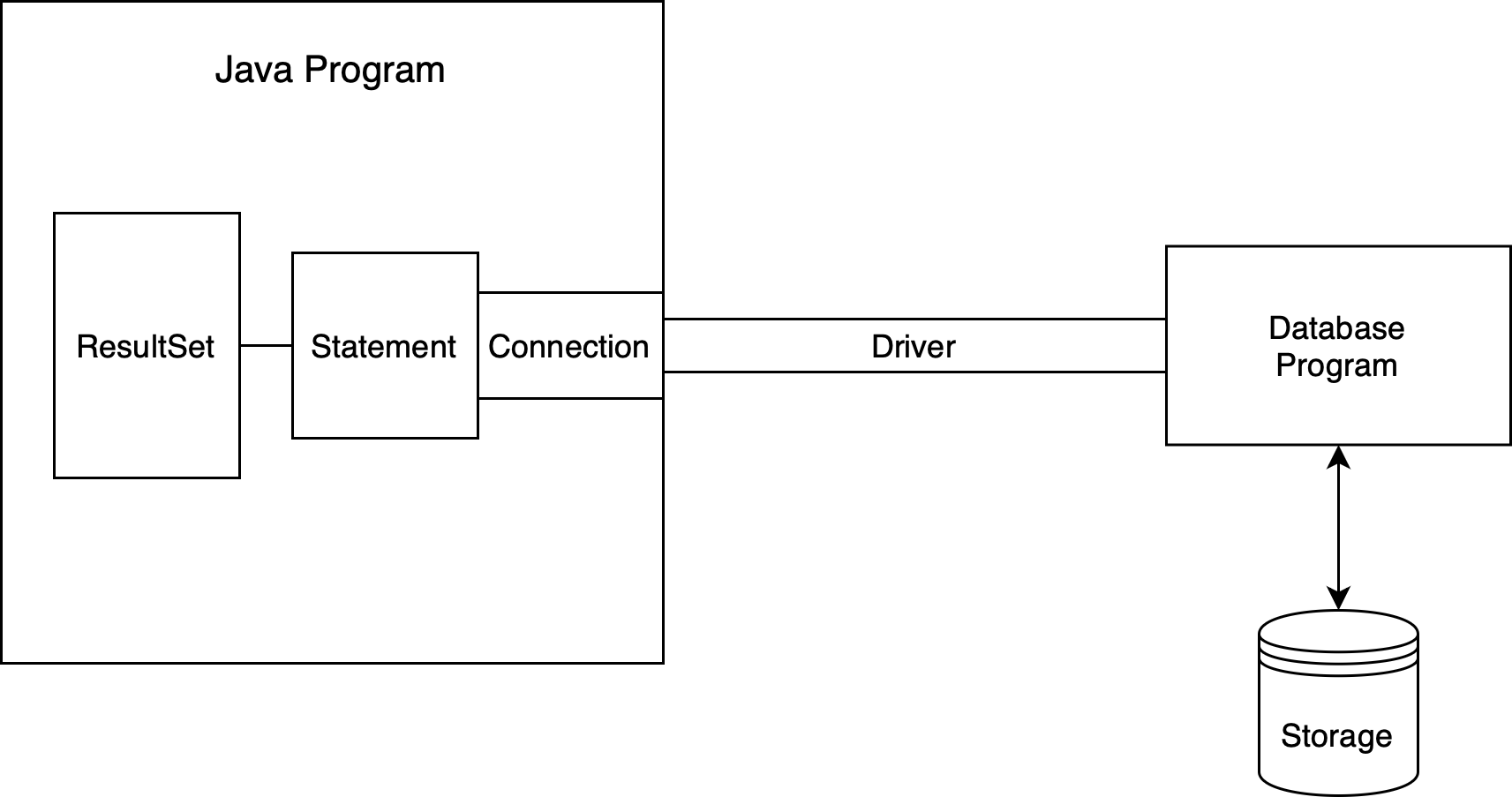
JDBC - Steps
- Import packages
- Load driver
- Register driver
- Create connection
- Create statement
- Execute statement
- Close
JDBC Drivers
Establish connection
Convert data types from Java language to database data types
Type-1 driver
- JDBC-ODBC bridge
- Open Database Connectivity (ODBC) is an open standard API that allows application programmers to access any database
- A layer between different program languages and different database systems
- Partial driver (not fully written in Java)
Type-2 driver
- Native-API
- API sitting on the database system
- Partial
Type-3 driver
- Java-Net protocol driver
- Use a server to talk to database
- Pure
Type-4 driver
- Thin driver
- Direct driver written in Java
- Pure
import java.sql.Connection;
import java.sql.DriverManager;
import java.sql.ResultSet;
import java.sql.SQLException;
import java.sql.Statement;

public class Sample
{
  public static void main(String[] args)
  {
    // NOTE: Connection and Statement are AutoClosable.
    //       Don't forget to close them both in order to avoid leaks.
    try
    (
      // create a database connection
      Connection connection = DriverManager.getConnection("jdbc:sqlite:sample.db");
      Statement statement = connection.createStatement();
    )
    {
      statement.setQueryTimeout(30);  // set timeout to 30 sec.

      statement.executeUpdate("drop table if exists person");
      statement.executeUpdate("create table person (id integer, name string)");
      statement.executeUpdate("insert into person values(1, 'leo')");
      statement.executeUpdate("insert into person values(2, 'yui')");
      ResultSet rs = statement.executeQuery("select * from person");
      while(rs.next())
      {
        // read the result set
        System.out.println("name = " + rs.getString("name"));
        System.out.println("id = " + rs.getInt("id"));
      }
    }
    catch(SQLException e)
    {
      // if the error message is "out of memory",
      // it probably means no database file is found
      e.printStackTrace(System.err);
    }
  }
}
Hibernate
- A Java-based ORM framework (Object-Ralational Mapping)
- Quick tutorial
Key Concepts
EntityclassAn entity class is a Java class that is mapped to a table in a database
Each instance of the entity class represents a row in the table
@Entity
@Table(name = "new_table_name")
public class Student {
    @Id		// primary key
    @GeneratedValue(strategy = GenerationType.IDENTITY)			// surrogate primary key
    private int id;
    @Column(name = "product_name")
    private String name;
    private int age;
  	@Transient		// this field will not be stored in the database
  	private String university;
  	private Address address;

    // Getters and Setters
}

// Embed those columns into Student table
@Embeddable
public class Address {
  	private int roomNo;
  	private String street;
  	private String city;
}
SessionFactoryThe
SessionFactoryis the main interface to interact with HibernateIt is responsible for creating
Sessionobjects that are used to perform operations on the databaseThe
SessionFactoryis usually created once during application startup and is used throughout the lifetime of the application (it is a heavyweight class)SessionFactory sessionFactory = new Configuration().configure("hibernate.cfg.xml").addAnnotatedClass(Product.class).buildSessionFactory();
SessionA
Sessionis a single-threaded unit of work in HibernateIt allows you to create, read, update, and delete objects from the database. You perform all database operations within the
SessionSession session = sessionFactory.getCurrentSession(); // or Session session = sessionFactory.openSession()Difference
Feature getCurrentSession()openSession()Session Lifecycle Tied to the current request or transaction context. Creates a new session each time it is called. Transaction Management Automatically associates with the ongoing transaction (if one exists). Transaction must be manually managed (begin, commit, rollback). Session Closing The session is automatically closed at the end of the transaction. The session must be explicitly closed by the developer. Common Use Case Typically used in web applications (e.g., within a request/response lifecycle). Used in more flexible, manual session management contexts (e.g., batch processing). Contextual Binding Uses a session-per-request or session-per-operation pattern. Can be used independently of the request/transaction lifecycle. Transaction Handling Managed by the container, typically no need to manually start or commit the transaction. Developer is responsible for managing transactions.
TransactionHibernate uses transactions to ensure the consistency and integrity of the database
Transactions are started using
beginTransaction(), and after performing the necessary operations, they are committed or rolled backsession.beginTransaction(); // Operations like save, update, delete session.getTransaction().commit();
HQL (Hibernate Query Language)
Criteria API
Lazy vs Eager loading
Lazy Loading: Associated entities are loaded only when they are accessed for the first time
Eager Loading: Associated entities are loaded immediately when the parent entity is loaded
Lazy loading can improve performance by fetching data only when needed, but it can cause issues with
LazyInitializationExceptionif an entity is accessed outside the session context@Entity public class Order { @OneToMany(fetch = FetchType.LAZY) private List<Product> products; }
Configuration
hibernate.cfg.xmlThe main configuration file for Hibernate, where you specify the database connection properties, dialect, and other Hibernate settings
<hibernate-configuration>
    <session-factory>
        <property name="hibernate.dialect">org.hibernate.dialect.MySQLDialect</property>
        <property name="hibernate.connection.driver_class">com.mysql.cj.jdbc.Driver</property>
        <property name="hibernate.connection.url">jdbc:mysql://localhost:3306/yourdb</property>
        <property name="hibernate.connection.username">root</property>
        <property name="hibernate.connection.password">password</property>
      	<!--Create the table when it is not there and update it instead of recreating it-->
        <property name="hibernate.hbm2ddl.auto">update</property>
      	<!--Print the sql on the console-->
        <property name="hibernate.show_sql">true</property>
      <property name="hibernate.format_sql">true</property>
    </session-factory>
</hibernate-configuration>
Mapping files
- Define the relationship between entities and the database tables
- Nowadays we use annotations
Features
CRUD methods
session.beginTransaction();
// create
session.persist(s1);

// read
Student s2 = session.get(Student.class, 101);

// update
// Merge a detached entity (assuming it's not currently attached to the session)
Student s3 = new Student();
s3.setId(101);
s3.setName("John");
s3.setAge(20);
// Merge the entity with the current session
session.merge(product);

// delete
if (s2 != null) {
    // Delete the student
    session.remove(s2);
} else {
    System.out.println("Student not found.");
}

s.getTransaction().commit();
s.close();
Mapping relationships
- One to One
@OneToOne
- One to Many & Many to One
@OneToMany,ManyToOne- Create a third join table by default
- Many to Many
@ManyToMany(mappedBy = "")
- One to One
Caching
- Hibernate provides caching mechanisms to reduce database access and improve performance. It supports both first-level cache (Session cache) and second-level cache (across Sessions)
- First-level cache is enabled by default, and it stores objects within the current session
- Second-level cache is an optional cache that works across sessions, and can be configured using cache providers like EHCache
- Hibernate provides caching mechanisms to reduce database access and improve performance. It supports both first-level cache (Session cache) and second-level cache (across Sessions)
JavaDoc
- Tags
- Class
@author@version@since@see
- Method
@param@return@throws@exception@deprecated@code
- Others
@link@value@serial
- Class
Annotations
Annotations provide information (metadata) that you need to fully describe your program to the compiler and JVM, but that cannot be expressed in Java
Java 5 feature
In fact, annotation is a special interface which extends
AnnotationinterfaceBuilt-in annotations
- Annotates the code (class, method, variable)
@Override@Deprecated- Methods can still be used
@SuppressWarnings()- To turn off inappropriate compiler warnings
@SafeVarargs- Useful for variable arguments
- Method must be
privateorfinal
@FunctionalInterface- Describe an interface that has only one method
- Annotates the annotation
@Retention(RetentionPolicy.CLASS)- Indicates how long annotations with the annotated type are to be retained
@Documented- Provides support to JavaDoc
@Target- Indicates the target of the annotation
@Inherited- Indicates the annocation can be used on subclasses
@Repeatable- Indicates the annotation can be used multiple times
- Annotates the code (class, method, variable)
User-defined annotations
@interface MyAnno {
  String name();
  String date();
  String version() default "1.0";
}

@MyAnno(name="David", date="01/01/1970")
public MyClass {}
Reference
- Thinking in Java, Bruce Eckel
- C notes
- Java Interview Questions