
Spring Core
The Spring Framework is a lightweight Java framework used to build scalable, maintainable enterprise applications. It offers a programming and configuration model for modern Java development.
Architecture of Spring Framework
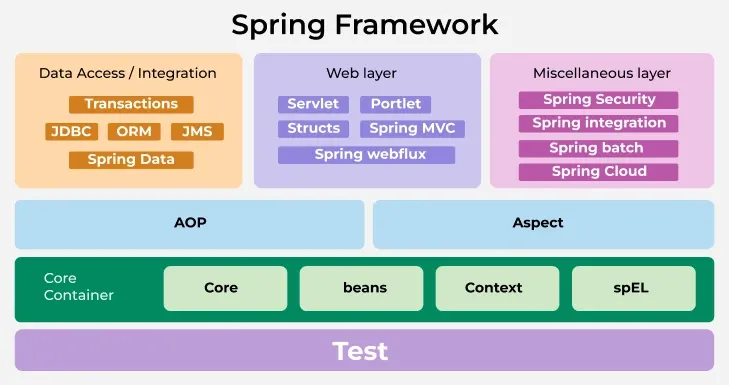
- Core Container
The Core Container provides the fundamental functionality of the Spring framework, including dependency injection and bean management.
- Spring Core: Provides the foundation of the IoC container. It manages object creation, wiring, and configuration through dependency injection.
- Spring Beans: Defines the BeanFactory, responsible for creating and managing bean instances. It also provides the BeanWrapper for configuring and accessing bean properties.
- Spring Context: Extends BeanFactory with enterprise-level services like internationalization, resource loading, event publication, and annotation-based configuration through ApplicationContext.
- Spring Expression Language (SpEL): Offers a powerful expression language to query and manipulate objects at runtime.
- Data Persistence
This layer provides modules for working with databases and other persistence technologies.
- Spring JDBC: Simplifies database interactions by eliminating boilerplate JDBC code. It supports declarative transaction management and exception translation.
- Spring ORM: Provides integration with ORM tools like Hibernate, JPA, and MyBatis. It simplifies ORM configuration and allows consistent transaction management.
- Spring Data: Offers a uniform programming model for working with various data stores including relational, NoSQL, and cloud-based databases.
- Spring Transaction: Manages transactions declaratively or programmatically. It provides abstraction over transaction APIs, integrating seamlessly with JDBC, JPA, and JTA.
- Web Layer
The Web layer provides a comprehensive set of modules for building both traditional and reactive web applications.
- Spring MVC: Implements the Model-View-Controller (MVC) design pattern. It provides tools for handling HTTP requests, validation, data binding, and supports multiple view technologies such as JSP and Thymeleaf.
- Spring WebFlux: Supports building reactive, non-blocking web applications using Project Reactor. Ideal for high-throughput, scalable applications leveraging event-driven programming.
- Spring Web Services: Simplifies the development of SOAP and RESTful web services. It supports WSDL contract-first design and provides tools for marshalling and unmarshalling XML-based web service messages.
- Miscellaneous Modules
This area includes modules that extend Spring’s capabilities beyond traditional application development.
- Spring Security: Provides authentication, authorization, and access control mechanisms. It supports role-based and expression-based security and integrates with OAuth2 and JWT for modern security standards.
- Spring Integration: Enables message-driven and event-driven architectures using enterprise integration patterns. It supports various messaging systems like JMS, AMQP, and Kafka.
- Spring Batch: Supports batch processing with reusable components for job scheduling, transaction management, and large-volume data handling.
- Spring Cloud: Provides tools for developing cloud-native microservices. It supports service discovery, distributed configuration, circuit breakers, and integration with cloud platforms.
- ...
IoC
What is IoC
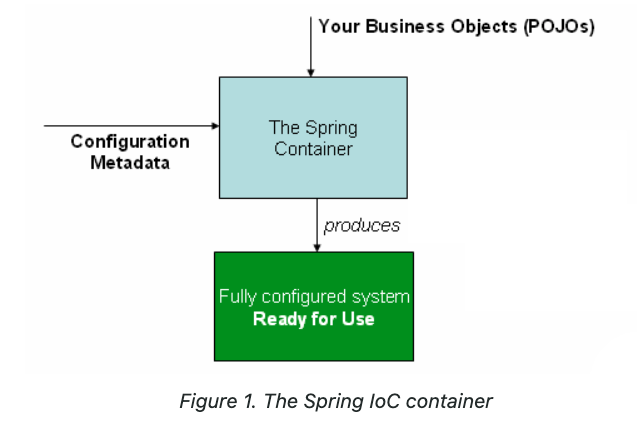
The Spring Inversion of Control (IoC) container is a core component of the Spring Framework, streamlining object creation and management. It promotes flexibility and maintainability by managing dependencies and configurations automatically, allowing developers to concentrate on core business logic.
- Configuration Metadata: Defines how beans should be created, configured, and wired.
- Bean Instantiation: The container creates instances of beans as per the configuration.
- Dependency Injection: Automatically resolves and injects the necessary dependencies into beans.
- Lifecycle Management: Manages bean initialization, destruction, and scope (singleton, prototype, etc.).
Inversion of Control is a design principle in which a software component is designed to receive its dependencies from an external source, rather than creating them itself. This is in contrast to traditional software design, where a component is responsible for creating and managing its own dependencies.
Types of IoC Containers
BeanFactory
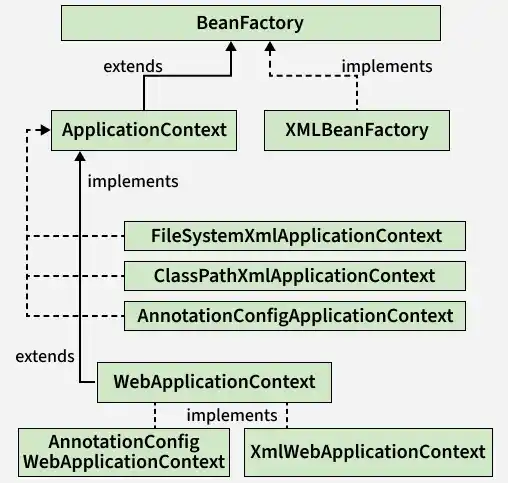
BeanFactory is the basic IoC container that provides fundamental features like dependency injection and bean lifecycle management. It loads bean definitions and their dependencies at runtime based on configuration metadata. It acts as the basic IoC container and is the parent of ApplicationContext.
- Instantiates, configures, and manages beans using XML or Java-based configuration.
- Supports lazy loading of beans, creating them only when requested.
- Does not support advanced features like annotation-based configuration (unlike ApplicationContext).
Syntax:
Resource resource = new ClassPathResource("beans.xml");
BeanFactory factory = new XmlBeanFactory(resource);
ApplicationContext
ApplicationContext is an advanced IoC container that extends BeanFactory and provides additional features such as event handling, internationalization, and annotation-based configuration.
- Supports advanced features like event publishing, i18n, and AOP integration.
- Provides eager bean initialization for better runtime performance.
- Enables easy integration with annotation-based configuration like
@Componentand@Autowired.
Tips
Due to its advanced features, developers generally prefer using ApplicationContext over BeanFactory. BeanFactory provides only basic functionalities and is suitable for lightweight applications or memory-constrained environments.
Syntax:
Using XML config:
ApplicationContext context = new ClassPathXmlApplicationContext("beans.xml");Using annotation based config:
ApplicationContext context = new AnnotationConfigApplicationContext(AppConfig.class);Configuration Registry
In software development, configuration means the values that control how your program behaves without changing the source code.
- Without IoC Container
This approach tightly couples the Mobile class to the Jio implementation. If we want to switch to Airtel, we need to modify the source code.
public interface Sim
{
    void calling();
    void data();
}public class Airtel implements Sim {
@Override
public void calling() {
System.out.println("Airtel Calling");
}
@Override
public void data() {
System.out.println("Airtel Data");
}
}public class Jio implements Sim {
@Override
public void calling() {
System.out.println("Jio Calling");
}
@Override
public void data() {
System.out.println("Jio Data");
}
}public class Mobile {
// Main driver method
public static void main(String[] args)
{
// Manually creating an instance of Jio
Sim sim = new Jio();
// Calling methods
sim.calling();
sim.data();
}
}- XML Configuration
<?xml version="1.0" encoding="UTF-8"?>
<beans xmlns="http://www.springframework.org/schema/beans"
xmlns:xsi="http://www.w3.org/2001/XMLSchema-instance"
xsi:schemaLocation="
http://www.springframework.org/schema/beans
https://www.springframework.org/schema/beans/spring-beans.xsd">
<!-- define beans by giving each a unique id and specifying the class name. -->
<bean id="sim" class="com.example.ioc.Jio"/>
</beans>package com.example.ioc;
import org.springframework.context.ApplicationContext;
import org.springframework.context.support.ClassPathXmlApplicationContext;
public class Mobile {
public static void main(String[] args) {
ApplicationContext context =
new ClassPathXmlApplicationContext("beans.xml");
Sim sim = context.getBean("sim", Sim.class);
sim.calling();
sim.data();
}
}And now if you want to use the Airtel you have to change only inside the beans.xml file. The main method is going to be the same.
<bean id="sim" class="com.example.ioc.Airtel"/>- Java-based Configuration
Modern Spring applications often use Java-based configuration instead of XML.
package com.example.ioc;
import org.springframework.context.annotation.Bean;
import org.springframework.context.annotation.Configuration;
@Configuration
public class AppConfig {
@Bean
public Sim sim() {
return new Jio(); // Change to new Airtel()
}
}package com.example.ioc;
import org.springframework.context.ApplicationContext;
import org.springframework.context.annotation.AnnotationConfigApplicationContext;
public class Mobile {
public static void main(String[] args) {
ApplicationContext context =
new AnnotationConfigApplicationContext(AppConfig.class);
Sim sim = context.getBean(Sim.class);
sim.calling();
sim.data();
}
}- Annotation-based Configuration
Spring also supports annotation-based configuration, which is widely used in modern applications.
// Enabling component scanning
import org.springframework.context.annotation.ComponentScan;
import org.springframework.context.annotation.Configuration;
@Configuration
@ComponentScan(basePackages = "com.example")
public class AppConfig {
}// Annotate classes with @Component
import org.springframework.stereotype.Component;
@Component
public class Airtel implements Sim {
    @Override
    public void calling() {
        System.out.println("Airtel Calling");
    }

    @Override
    public void data() {
        System.out.println("Airtel Data");
    }
}import org.springframework.stereotype.Component;
@Component
public class Jio implements Sim {

    @Override
    public void calling() {
        System.out.println("Jio Calling");
    }

    @Override
    public void data() {
        System.out.println("Jio Data");
    }
}// Inject the dependency using @Autowired
import org.springframework.beans.factory.annotation.Autowired;
import org.springframework.context.ApplicationContext;
import org.springframework.context.annotation.AnnotationConfigApplicationContext;
import org.springframework.stereotype.Component;
@Component
public class Mobile {
@Autowired
private Sim sim;
public void useSim() {
sim.calling();
sim.data();
}
public static void main(String[] args) {
ApplicationContext context = new AnnotationConfigApplicationContext(AppConfig.class);
Mobile mobile = context.getBean(Mobile.class);
mobile.useSim();
}
}Fixing the NoUniqueBeanDefinitionException:
When we run the above code, Spring will throw a NoUniqueBeanDefinitionException because it finds two beans (Airtel and Jio) of type Sim. To resolve this, we need to specify which bean to inject.
- Use
@PrimaryAnnotation: Mark one of the beans as the primary bean.
import org.springframework.context.annotation.Primary;
import org.springframework.stereotype.Component;

@Component
@Primary
public class Airtel implements Sim {
    public void calling() {
        System.out.println("Airtel Calling");
    }

    public void data() {
        System.out.println("Airtel Data");
    }
}- Use
@QualifierAnnotation: specify which bean to inject.
import org.springframework.beans.factory.annotation.Autowired;
import org.springframework.beans.factory.annotation.Qualifier;
import org.springframework.stereotype.Component;
@Component
public class Mobile {

    @Autowired
    @Qualifier("jio")
    private Sim sim;

    public void useSim() {
        sim.calling();
        sim.data();
    }
}- Explicit Bean Names
@Component("airtelBean")
public class Airtel implements Sim {
    // Methods implementation
}

@Component("jioBean")
public class Jio implements Sim {
    // Methods implementation
}@Component
public class Mobile {
@Autowired
@Qualifier("jioBean") // Use the explicit bean name
private Sim sim;
public void useSim() {
sim.calling();
sim.data();
}
public static void main(String[] args) {
ApplicationContext context = new AnnotationConfigApplicationContext(AppConfig.class);
Mobile mobile = context.getBean(Mobile.class);
mobile.useSim();
}
}Spring Beans
Spring writes code as POJOs (Plain Old Java Objects). A Spring Bean is simply a Java object created and managed by Spring IoC container. Spring Beans allow dependencies to be injected instead of instantiated inside a class, which enables loose coupling, easier unit testing, and better code reusability. Without Spring Beans, developers must manually create and manage objects, leading to tight coupling.
Spring Bean Life Cycle
- Container Initialization
- The Spring IoC container starts and loads configuration metadata (XML, annotations, or Java config).
- Bean definitions are registered, and infrastructure components (like processors) are prepared.
- Bean Instantiation
- The container creates the bean object using a constructor or factory method.
- At this stage, the bean exists in memory but dependencies are not yet injected.
- Dependency Injection
- The container resolves required dependencies from the IoC container.
- Dependencies are injected via constructor, setter, or field injection.
- Custom Init Method
- The custom init() method is called once all dependencies are injected.
- It is used to perform additional setup like initializing resources, validating properties, or starting connections.
- Custom Utility Method
- A Custom Utility Method is a normal business or helper method defined inside a Spring bean.
- The developer must manually call it through the bean reference.
- Destruction
- Cleanup logic is executed using @PreDestroy, destroy(), or custom destroy methods.
- Resources such as database connections or threads are released before bean removal.
- To trigger the destroy() method, we must explicitly close the Spring container.
Custom method names can be used instead of default lifecycle method names.
Scope
- Singleton
- By default beans are singleton scope (no matter what type of application is).
- Prototype
- A new instance is created every time it is requested.
- Request
- A new instance is created for each HTTP request (Web Applications).
- Session
- A new instance is created per HTTP session.
- Application
- A single instance shared across the entire web application.
Lazy Initialization
Beans can be initialized lazily when they are created not at application startup but only when they are first needed.
- XML-based Config
<bean id="laptop" class="com.example.Laptop" lazy-init="true"/>- Java-based Config
@Configuration
public class AppConfig {

  @Bean
  @Lazy
  public Laptop laptop() {
    return new Laptop();
  }
}
When to use lazy initialization?
- The bean is rarely used.
- The bean is resource-heavy (e.g., database connections, third-party APIs).
- You want faster application startup.
Dependency Injection
What is DI
Dependency Injection is a specialized form of IoC. Objects define their dependencies through constructor arguments, factory method arguments, or properties, and the Spring IoC container injects those dependencies when creating the bean.
It is necessary because directly creating dependencies inside classes can lead to several problems:
- Tight Coupling
- Classes that create their own dependencies are tightly coupled to specific implementations.
- Changes in one class may break dependent classes.
- Reduced Testability
- Directly created dependencies make unit testing difficult.
- DI allows injecting mock objects for testing individual components.
- Poor Maintainability
- Updating or replacing a dependency requires changes in multiple classes.
- DI centralizes dependency management in the Spring container, simplifying maintenance.
- Lack of Flexibility and Reusability
- Classes cannot easily switch to alternative implementations of a dependency.
- DI allows using interfaces or multiple implementations without modifying the dependent class.
- Centralized Object Management
- Spring IoC container handles object creation, configuration, and lifecycle, reducing boilerplate code and ensuring consistency across the application.
Types of DI
- Constructor DI
It is the recommended approach for injecting mandatory dependencies because it ensures that an object is always created with its required dependencies.
Steps:
- Spring creates an instance of the dependent class.
- It injects dependencies via the constructor.
- The bean is then ready for use.
- Setter DI
Setter injection is accomplished by the container calling setter methods on your beans after invoking a no-argument constructor to instantiate your bean. If the dependencies is not found, the dependent object will be null, so null check is required.
Steps:
- Spring creates an instance of the dependent class
- It injects dependencies using setter methods
- The bean is then ready for use
- Field DI
CDI vs. SDI
| Use Setter Injection When... | Use Constructor Injection When... |
|---|---|
| Dependency is optional (not always needed). | Dependency is mandatory for the object to function. |
| You want to allow modification after object creation. | You want to ensure immutability (no changes after construction). |
| The class has many dependencies, making constructor injection harder to manage. | The class has few dependencies, making constructor injection clearer. |
It is not recommended to use both Constructor Injection and Setter Injection for the same field in a Spring Bean.
if you define both Constructor Injection and Setter Injection for the same field, Spring will prioritize Constructor Injection if both are present.
How to DI
- XML-based Config
<beans xmlns="http://www.springframework.org/schema/beans"
       xmlns:xsi="https://www.w3.org/2001/XMLSchema-instance"
       xsi:schemaLocation="
       http://www.springframework.org/schema/beans
       http://www.springframework.org/schema/beans/spring-beans.xsd">

    <bean id="paymentService" class="com.example.StripePaymentService"/>

    <!-- Constructor DI -->
    <bean id="orderService" class="com.example.OrderService">
        <constructor-arg ref="paymentService"/>
    </bean>

    <!-- Vehicle using Setter DI -->
    <bean id="orderService" class="com.example.OrderService">
        <property name="paymentService" ref="paymentService"/>
    </bean>
</beans>- Java-based Config
@Configuration
public class AppConfig {

    @Bean
    public PaymentService paymentService() {
        return new StripePaymentService();
    }

    @Bean
    public OrderService orderService(PaymentService paymentService) {
        return new OrderService(paymentService);
    }

    @Bean
    public OrderService orderService(PaymentService paymentService) {
        OrderService orderService = new OrderService();
        orderService.setPaymentService(paymentService);
        return orderService;
    }
}- Annotation-based Config
@Service
public class OrderService {
    // Field DI
    @Autowired
    private final PaymentService paymentService;

    // Constructor DI
    // In modern Spring, if a class has only one constructor,
    // you do not need to write @Autowired on the constructor.
    // Spring can use it automatically.
    public OrderService(PaymentService paymentService) {
        this.paymentService = paymentService;
    }

    // Setter DI
    @Autowired
    public void setPaymentService(PaymentService paymentService) {
        this.paymentService = paymentService;
    }

    public void order() {
        paymentService.pay();
        System.out.println("Complete order.");
    }
}
Autowiring means: Spring automatically finds the required bean from the IoC container and injects it into another bean, instead of manually creating dependencies.
How Autowiring Works:
- Scan classes annotated with @Component, @Service, @Repository, @Controller, etc.
- Register them as bean definitions.
- Create bean instances.
- Inspect constructors, fields, and methods that need dependencies.
- Search the ApplicationContext for matching beans.
- Inject the selected beans.
- Manage the bean lifecycle.
Multi-bean Injection
Spring has default rules for multi-bean injection. The general rule is:
If you inject an array, collection, or Map, Spring finds all beans whose type matches the declared element/value type and injects them together. For Map, the key must be String, and Spring uses the bean name as the key.
@Service("stripe")
public class StripePaymentService implements PaymentService {
}
@Service("paypal")
public class PaypalPaymentService implements PaymentService {
}@Service public class OrderService {
private final Map<String, PaymentService> paymentServices;
public OrderService(Map<String, PaymentService> paymentServices) {
this.paymentServices = paymentServices;
}
public void placeOrder(String method) {
PaymentService paymentService = paymentServices.get(method);
if (paymentService == null) {
throw new IllegalArgumentException("Unsupported payment method: " + method);
}
paymentService.pay();
}
}{ "stripe" -> StripePaymentService, "paypal" -> PaypalPaymentService }Optional Dependencies
If a dependency may not exist, use Optional:
@Service
public class ReportService {
    private final Optional<Formatter> formatter;

    public ReportService(Optional<Formatter> formatter) {
        this.formatter = formatter;
    }
}
Or use ObjectProvider:
@Service
public class ReportService {
    private final ObjectProvider<Formatter> formatterProvider;

    public ReportService(ObjectProvider<Formatter> formatterProvider) {
        this.formatterProvider = formatterProvider;
    }

    public void generate() {
        Formatter formatter = formatterProvider.getIfAvailable();
    }
}
Use this when a dependency is:
- Optional
- Lazy
- Conditionally available
- Expensive to create
- One of multiple possible beans
SpEL
Spring Expression Language (SpEL) is a feature in the Spring Framework used to evaluate expressions and manipulate objects at runtime. It helps in dynamically configuring beans, accessing properties, and invoking methods within Spring applications.
Syntax
#{...}: SpEL expression.${...}: Property placeholder.
Basic Usage
<bean id="exampleBean" class="com.example.Person">
    <property name="age" value="#{30 + 5}" />
    <property name="name" value="#{'John Doe'}" />
</bean>
import org.springframework.beans.factory.annotation.Value;
import org.springframework.stereotype.Component;
@Component
public class Employee {
@Value("${app.salary}") // Placeholder
private int salary;
@Value("#{'John'.toUpperCase()}") // Method invocation
private String name;
public int getSalary() { return salary; }
public String getName() { return name; }
}@Component("myBean")
public class MyBean {
private String value = "Spring SpEL";
public String getValue() { return value; }
}
@Component
public class Demo {
@Value("#{myBean.value}") // Access property of another bean
private String val;
}Safe Navigation Operator
If a nested object may be null, direct property access can fail.
- Risky:
#{user.address.city} - Safer:
#{user?.address?.city}
If user or address is null, the expression returns null instead of throwing an exception.
This is useful in expressions such as:
@Cacheable(key = "#user?.id")@PreAuthorize("#user?.ownerId == authentication.principal.id")
Spring’s language reference includes the safe-navigation operator as a core SpEL feature.
Elvis Operator
The Elvis operator ?: gives a default value when the left side is null or empty-like in common usage.
// If user.region exists, use it. Otherwise, use "US".
@Value("#{systemProperties['user.region'] ?: 'US'}")
private String region;
Accessing Static Classes
Use T(...) to reference a Java type.
@Value("#{T(java.lang.Math).PI}")
private double pi;
@Value("#{T(java.time.LocalDate).now()}")
private LocalDate today;
@Value("#{T(java.util.UUID).randomUUID().toString()}")
private String randomId;
Be careful with expressions like random UUIDs in places such as cache keys. If the key changes every time, the cache will never hit.
Variables with #
In many SpEL contexts, variables are referenced with #. The available variables depend on where SpEL is used.
@Cacheable(cacheNames = "users", key = "#id")
public User getUser(Long id) {
  return userRepository.findById(id).orElseThrow();
}
Here, #id refers to the method parameter.
Working with Collections
// List initialization
@Value("#{{'admin', 'user', 'guest'}}")
private List<String> roles;

// Map initialization
@Value("#{{'ADMIN': 100, 'USER': 10, 'GUEST': 1}}")
private Map<String, Integer> roleLevels;

// Access list
@Value("#{appConfig.supportedCountries[0]}")
private String firstCountry;

// Collection selection: .?[]
// Collection selection means filtering a collection.
// Return all orders whose status is PAID
@Value("#{orderService.orders.?[status == 'PAID']}")
private List<Order> paidOrders;

// Collection projection: .![]
// Collection projection means mapping each element to another value.
// Extract email from every user.
@Value("#{userService.users.![email]}")
private List<String> emails;
Common Use Cases
| Common use case | Where it appears | Example | What it means | Notes |
|---|---|---|---|---|
| Inject computed value | @Value | @Value("#{2 * 1024}") | Injects 2048 | Good for small computed constants. |
| Read property placeholder and transform it | @Value | @Value("#{'${app.name}'.toUpperCase()}") | Reads app.name, then converts it to uppercase | Use ${} for property lookup, #{} for SpEL logic. |
| Provide default property value | @Value | @Value("${app.name:default-app}") | Uses default-app if app.name is missing | This is property-placeholder syntax, often used with @Value. |
| Read system property | @Value | @Value("#{systemProperties['user.name']}") | Reads JVM system property user.name | Useful for environment/debug metadata. |
| Read environment variable | @Value | @Value("#{systemEnvironment['JAVA_HOME']}") | Reads OS environment variable JAVA_HOME | Prefer normal config properties for app settings. |
| Reference another Spring bean | @Value, security, cache | @Value("#{pricingService.defaultCurrency()}") | Calls a method on pricingService bean | Useful for light dynamic configuration. |
| Call Java static field/method | @Value | @Value("#{T(java.lang.Math).PI}") | Injects Math.PI | T(...) references a Java type. |
| Build cache key from method parameter | @Cacheable | @Cacheable(cacheNames = "users", key = "#id") | Uses method parameter id as the cache key | Spring Cache supports SpEL for choosing cache keys. |
| Build cache key from object field | @Cacheable | @Cacheable(key = "#request.userId") | Uses request.getUserId() as key | Prefer stable IDs over whole objects. |
| Conditional caching before method call | @Cacheable(condition = "...") | @Cacheable(key = "#id", condition = "#id > 0") | Caches only when id > 0 | condition is checked before caching logic proceeds. |
| Prevent caching after method result | @Cacheable(unless = "...") | @Cacheable(key = "#id", unless = "#result == null") | Does not cache null result | #result refers to the method return value after invocation. |
| Security role check | @PreAuthorize | @PreAuthorize("hasRole('ADMIN')") | Allows only users with ADMIN role | Common in Spring Security method-level authorization. |
| Security check using method parameter | @PreAuthorize | @PreAuthorize("#userId == authentication.principal.id") | Allows access only to the current user’s own data | Good for ownership checks. |
| Delegate security logic to a bean | @PreAuthorize | @PreAuthorize("@orderSecurity.canRead(authentication, #orderId)") | Calls a Spring bean method for authorization | Best for complex permission logic. |
| Null-safe property access | Many SpEL contexts | #user?.address?.city | Returns null instead of throwing if user or address is null | Useful in cache keys/security expressions, but still validate important inputs. |
| Ternary conditional logic | @Value, cache, security | #{age >= 18 ? 'adult' : 'minor'} | Returns one of two values based on a condition | Keep it short and readable. |
| Elvis/default expression | @Value | #{systemProperties['region'] ?: 'US'} | Uses system property if present, otherwise US | Good for simple fallback logic. |
| Inline list | @Value | @Value("#{{'ADMIN', 'USER', 'GUEST'}}") | Injects a list of strings | Fine for small static lists. |
| Inline map | @Value | @Value("#{{'ADMIN': 100, 'USER': 10}}") | Injects a map | Useful for small static maps; use @ConfigurationProperties for larger config. |
| List/map indexing | @Value | @Value("#{appConfig.limits['pro']}") | Gets value from a map property | Works with bean properties, lists, arrays, and maps. |
| Collection filtering | SpEL expressions | orders.?[status == 'PAID'] | Selects only paid orders | Similar to Stream filter(). |
| Collection projection | SpEL expressions | users.![email] | Extracts email from each user | Similar to Stream map(). |
| Programmatic expression evaluation | Java code | parser.parseExpression("'hello'.toUpperCase()").getValue() | Parses and evaluates SpEL manually | Spring documents ExpressionParser / Expression for programmatic evaluation. |