
Spring Boot with REST API
RESTful Web Services provide a standard way to build scalable and stateless web APIs using HTTP. In modern applications, REST APIs allow different systems such as web apps, mobile apps, and microservices to communicate efficiently.
- Spring Boot simplifies the creation of REST APIs using annotations and minimal configuration.
- REST services exchange data in formats such as JSON and XML, with JSON being the most widely used format.
REST API
REST, REpresentational State Transfer, is an architectural style used for designing network-based applications. It allows different systems to communicate over HTTP using standard methods such as GET, POST, PUT, and DELETE.
A key difference between a traditional MVC controller and the RESTful web service controller is the way that the HTTP response body is created. Rather than relying on a view technology to perform server-side rendering of the response data to HTML, this RESTful web service controller populates and returns an object. The object data will be written directly to the HTTP response as JSON.
REST APIs are stateless, meaning every request from the client must contain all necessary information. The server does not store client session data between requests.
Resource
REST APIs are designed around resources. A resource is any object, data, or service that can be accessed by a client using a URI (Uniform Resource Identifier). Every resource has a unique URI.
- Use path variables to identify a specific resource.
- Use query parameters for optional filtering, sorting, searching, and pagination.
Instead of designing URLs around actions, design them around nouns. Use plural nouns for collections. Best practice:
| Purpose | URL |
|---|---|
| Collection | /api/users |
| Single resource | /api/users/{id} |
| Nested resource | /api/users/{userId}/orders |
| Search/filter | /api/products?category=books&minPrice=10 |
| Sort | /api/products?sort=price,asc |
| Pagination | /api/products?page=0&size=20 |
Differences Between REST and HTTP
HTTP is the protocol for sending requests and responses; REST is a way to design APIs using resources, HTTP methods, and stateless communication.
REST vs. SOAP
| Aspect | REST | SOAP |
|---|---|---|
| Full name | Representational State Transfer | Simple Object Access Protocol |
| What it is | Architectural style | Formal protocol |
| Main purpose | Design resource-based APIs | Exchange structured messages between systems |
| Communication style | Resource-oriented | Operation/action-oriented |
| Typical transport | Usually HTTP | Usually HTTP, but can also use SMTP, TCP, etc. |
| Data format | Usually JSON, but can also use XML, text, etc. | XML only |
| Message structure | Flexible request/response body | Strict XML envelope format |
| Ease of use | Simpler and more lightweight | More complex and verbose |
| Performance | Usually faster and lighter, especially with JSON | Usually heavier due to XML structure |
| Security | Commonly uses HTTPS, OAuth2, JWT, API keys | Supports WS-Security for enterprise-level security |
| Error handling | Uses HTTP status codes like 400, 404, 500 | Uses SOAP Fault messages |
| State | Stateless by design | Can be stateless or stateful |
| Caching | Easier to use HTTP caching with GET requests | Less naturally cacheable |
| Common use cases | Web APIs, mobile apps, microservices, public APIs | Enterprise systems, banking, payment gateways, legacy systems |
| Best for | Lightweight, scalable, web-friendly APIs | Strict contracts, enterprise integration, high-standard security/reliability needs |
HTTP Methods
| Method | Meaning | Common use case | Example |
|---|---|---|---|
GET | Read data | Fetch one or many resources | GET /api/users/1 |
POST | Create data | Create a new resource | POST /api/users |
PUT | Replace data | Replace an existing resource fully | PUT /api/users/1 |
PATCH | Partially update data | Update selected fields only | PATCH /api/users/1 |
DELETE | Delete data | Remove a resource | DELETE /api/users/1 |
Request Body
For POST, PUT, and PATCH, the client often sends data in the request body.
POST /api/users
Content-Type: application/json
{
  "username": "david",
  "email": "david@example.com",
  "password": "secret123"
}
Response Body
A REST API usually returns JSON.
Idempotency
Idempotency means making the same request multiple times has the same final effect.
| Method | Usually idempotent? | Example |
|---|---|---|
GET | Yes | Reading user does not change data |
PUT | Yes | Replacing user with the same data repeatedly has the same effect |
PATCH | Usually yes, depending on design | Setting email to the same value |
DELETE | Usually yes | Deleting an already-deleted resource still results in no resource |
POST | Usually no | Repeating a create request may create multiple resources |
For payment/order APIs, you may use an idempotency key, this helps avoid duplicate payments if the client retries.
HTTP Status
| Status code | Meaning | Common use case |
|---|---|---|
200 OK | Request succeeded | Successful GET, PUT, PATCH |
201 Created | Resource created | Successful POST |
204 No Content | Success with no response body | Successful DELETE |
400 Bad Request | Invalid client request | Validation error, malformed input |
401 Unauthorized | Not authenticated | Missing or invalid login/token |
403 Forbidden | Authenticated but not allowed | User lacks permission |
404 Not Found | Resource does not exist | User/order/product not found |
409 Conflict | Request conflicts with current state | Duplicate email, version conflict |
500 Internal Server Error | Unexpected server error | Bug or unhandled exception |
Spring Boot REST API Example
In a Spring Boot REST application:
- Controller handles HTTP requests and responses, but should stay thin.
- The service layer contains business logic and coordinates repositories, mappers, and other services.
- The repository layer handles database access only.
- Entities represent database tables and should not usually be exposed directly to clients.
- DTOs define request and response shapes.
- Mappers convert between entities and DTOs.
- Exceptions should be thrown from the service layer when business errors occur.
- A global exception handler should convert exceptions into consistent HTTP error responses.
- Configuration and security classes should contain application setup, not business logic.
...
└── app
    ├── controller
    │   └── UserController.java
    ├── service
    │   └── UserService.java
    ├── repo
    │   └── UserRepository.java
    ├── dto
    │   ├── response
    │   │   └── UserResponse.java
    │   ├── request
    │   │   ├── CreateUserRequest.java
    │   │   ├── UpdateUserRequest.java
    │   │   └── SearchUserRequest.java
    │   └── error
    │       ├── ApiErrorResponse.java
    │       └── ValidationErrorResponse.java
    ├── mapper
    │   └── UserMapper.java
    ├── entity
    │   └── User.java
    ├── exception
    │   ├── UserNotFoundException.java
    │   ├── EmailAlreadyUsedException.java
    │   └── GlobalExceptionHandler.java
    ├── config
└── Application.java// @RestController combines the functionality of @Controller and @ResponseBody
// The response is automatically converted to JSON or XML using Jackson
@RestController
@RequestMapping("/api/users") // Base URI for all endpoints
@CrossOrigin(origins = "http://localhost:3000")
public class UserController {
private final UserService userService;
public UserController(UserService userService) {
this.userService = userService;
}
@GetMapping
public List<UserResponse> getAllUsers() {
return userService.getAllUsers();
}
// You can specify which format you want to produce or consume
@GetMapping(path = "/{userId}", produces = {"application/json"})
// @PathVariable binds a URI path variable to a method parameter
// If the path variable name is the same as the parameter name,
// you don't have to specify it
public UserResponse getUserById(@PathVariable Long userId) {
return userService.getUserById(id);
}
// @RequestParam binds the query String parameter into the method parameter
// If the query parameter is absent in the request, then defaultValue is used
// If @GetMapping is differentiated by @RequestParam only,
// then add params element specifying which query parameters are gonna be received
@GetMapping
public Page<UserResponse> searchUsers(
@RequestParam(required = false) String keyword,
@RequestParam(defaultValue = "0") Integer page,
@RequestParam(defaultValue = "20") Integer size) {
SearchUserRequest request = new SearchUserRequest();
request.setKeyword(keyword);
request.setPage(page);
request.setSize(size);
return userService.searchUsers(request);
}
// @RequestBody read the request body and deserialized it into an object
@PostMapping(consumes = {"application/json"})
public ResponseEntity<UserResponse> createUser(
@Valid @RequestBody CreateUserRequest request) {
UserResponse createdUser = userService.createUser(request);
URI location = URI.create("/api/users/" + createdUser.getId());
return ResponseEntity.created(location).body(createdUser);
}
@PutMapping("/{userId}")
public UserResponse updateUser(
@PathVariable Long userId, @RequestBody UpdateUserRequest request) {
return userService.updateUser(userId, request);
}
// Type conversion is automatically applied
// if the target method parameter type is not String
// If the conversion is failed, then respond bad request
@DeleteMapping("/{id}")
@ResponseStatus(HttpStatus.NO_CONTENT)
public void deleteUser(@PathVariable Long userId) {
userService.deleteUser(userId);
}
}@Service
public class UserService {
private final UserRepository userRepository;
private final UserMapper userMapper;
private final PasswordEncoder passwordEncoder;
public UserService(
UserRepository userRepository,
UserMapper userMapper,
PasswordEncoder passwordEncoder ) {
this.userRepository = userRepository;
this.userMapper = userMapper;
this.passwordEncoder = passwordEncoder;
}
public List<UserResponse> getAllUsers() {
return userRepository.findAll()
.stream()
.map(userMapper::toResponse)
.toList();
}
public UserResponse getUserById(Long id) {
User user = findUserById(id);
return userMapper.toResponse(user);
}
public Page<UserResponse> searchUsers(SearchUserRequest request) {
Pageable pageable = PageRequest.of(
request.getPage(),
request.getSize()
);
String keyword = request.getKeyword();
Page<User> users;
if (keyword == null || keyword.isBlank()) {
users = userRepository.findAll(pageable);
}
else {
users = userRepository
.findByUsernameContainingIgnoreCaseOrEmailContainingIgnoreCase(
keyword,
keyword,
pageable
);
}
return users.map(userMapper::toResponse);
}
public UserResponse createUser(CreateUserRequest request) {
if (userRepository.existsByEmail(request.getEmail()))
throw new EmailAlreadyUsedException(request.getEmail());
User user = userMapper.toEntity(request);
user.setPassword(passwordEncoder.encode(request.getPassword()));
User savedUser = userRepository.save(user);
return userMapper.toResponse(savedUser);
}
public UserResponse updateUser(Long id, UpdateUserRequest request) {
User user = findUserById(id);
userMapper.updateEntity(user, request);
User updatedUser = userRepository.save(user);
return userMapper.toResponse(updatedUser);
}
public void deleteUser(Long id) {
User user = findUserById(id);
userRepository.delete(user);
}
private User findUserById(Long id) {
return userRepository.findById(id)
.orElseThrow(() -> new UserNotFoundException(id));
}
}public interface UserRepository extends JpaRepository<User, Long> {
Page<User> findByUsernameContainingIgnoreCaseOrEmailContainingIgnoreCase(
String usernameKeyword,
String emailKeyword,
Pageable pageable
);
}public class UserResponse {
private Long id;
private String username;
private String email;
public UserResponse(Long id, String username, String email) {
this.id = id;
this.username = username;
this.email = email;
}
// getters
}public class CreateUserRequest {
@NotBlank
private String username;
@Email
@NotBlank
private String email;
@Size(min = 8, max = 50)
private String password;
// getters and setters
}
public class UpdateUserRequest {
@NotBlank
private String username;
@Email
@NotBlank
private String email;
// getters and setters
}
public class SearchUserRequest {
private String keyword;
private Integer page = 0;
private Integer size = 20;
// getters and setters
}public class ApiErrorResponse {
private int status;
private String error;
private String message;
private String path;
private LocalDateTime timestamp;
public ApiErrorResponse(int status, String error, String message, String path, LocalDateTime timestamp) {
this.status = status;
this.error = error;
this.message = message;
this.path = path;
this.timestamp = timestamp;
}
// getters
}
public class ValidationErrorResponse {
private int status;
private Map<String, String> errors,
private String message;
private LocalDateTime timestamp;
// constructor
// getters
}@Component
public class UserMapper {
public User toEntity(CreateUserRequest request) {
User user = new User();
user.setUsername(request.getUsername());
user.setEmail(request.getEmail());
user.setPassword(request.getPassword());
return user;
}
public UserResponse toResponse(User user) {
return new UserResponse( user.getId(), user.getUsername(), user.getEmail() );
}
public void updateEntity(User user, UpdateUserRequest request) {
user.setUsername(request.getUsername());
user.setEmail(request.getEmail());
}
}@Entity
public class User {
@Id
@GeneratedValue
private Long id;
private String username;
private String email;
private String password;
// getters and setters
}public class UserNotFoundException extends RuntimeException {
public UserNotFoundException(Long id) { super("User not found: " + id); }
}
public class EmailAlreadyUsedException extends RuntimeException {
public EmailAlreadyUsedException(String email) { super("Email already used: " + email); }
}@RestControllerAdvice
public class GlobalExceptionHandler {
@ExceptionHandler(UserNotFoundException.class)
public ResponseEntity<ErrorResponse> handleUserNotFound(UserNotFoundException ex, HttpServletRequest request) {
ApiErrorResponse error = new ApiErrorResponse(
404,
"NOT FOUND",
ex.getMessage(),
request.getRequestURI(),
LocalDateTime.now()
);
return ResponseEntity
.status(HttpStatus.NOT_FOUND)
.body(error);
}
// handle validation exceptions
@ExceptionHandler(MethodArgumentNotValidException.class)
public ResponseEntity<ValidationErrorResponse> handleValidationError( MethodArgumentNotValidException ex ) {
Map<String, String> fieldErrors = new HashMap<>();
ex.getBindingResult().getFieldErrors().forEach(error ->
fieldErrors.put(error.getField(), error.getDefaultMessage())
);
ValidationErrorResponse response = new ValidationErrorResponse(
400,
"Validation failed",
fieldErrors,
LocalDateTime.now()
);
return ResponseEntity
.badRequest()
.body(response);
}
// handle invalid JSON
@ExceptionHandler(HttpMessageNotReadableException.class)
public ResponseEntity<ErrorResponse> handleInvalidJson(HttpMessageNotReadableException ex) {
ErrorResponse error = new ErrorResponse(
400,
"Invalid JSON request body",
LocalDateTime.now()
);
return ResponseEntity
.badRequest()
.body(error);
}
@ExceptionHandler(EmailAlreadyUsedException.class)
public ResponseEntity<ErrorResponse> handleEmailAlreadyUsed(EmailAlreadyUsedException ex) {
ErrorResponse error = new ErrorResponse(
409,
ex.getMessage(),
LocalDateTime.now()
);
return ResponseEntity
.status(HttpStatus.CONFLICT)
.body(error);
}
@ExceptionHandler(Exception.class)
public ResponseEntity<ErrorResponse> handleUnexpectedException(Exception ex) {
ErrorResponse error = new ErrorResponse(
500,
"Unexpected server error",
LocalDateTime.now()
);
return ResponseEntity
.status(HttpStatus.INTERNAL_SERVER_ERROR)
.body(error);
}
}DTO
DTO stands for: Data Transfer Object. A DTO is a simple object used to transfer data between different layers or systems.
In Spring Boot REST APIs, DTOs are commonly used to transfer data between:
- client <-> controller
- controller <-> service
- service <-> external API
Do not always reuse one DTO for both request and response. Good DTO names are operation-specific. Avoid overly generic names.
Tips
Why request/response DTOs are usually not Spring beans? Because DTOs are request-specific data objects, not reusable application components.
Why Do We Need DTO
You may ask: Why not just use the entity directly? Because it may introduce problem that exposes fields that the client should not see.
DTO helps on:
- Hide sensitive fields
- Avoid exposing database structure
- Control API request/response format
- Separate API contract from persistence model
- Validate input cleanly
- Avoid accidental entity mutation
- Make future API changes safer
The mindset:
- Entity = internal persistence model.
- DTO = external API contract.
- Request DTO = what client is allowed to send .
- Response DTO = what server chooses to return.
DTO Mapping
Mapping means converting between entity and DTO. Mapper can be a Spring bean because it is reusable and usually stateless.
Tips
DTOs should be simple, explicit, and close to the API contract.
Avoid abstract DTO base class unless the API itself is polymorphic.
ResponseEntity
ResponseEntity is a Spring class that represents the whole HTTP response.
It lets you control:
- HTTP status code
- HTTP response headers
- HTTP response body
@GetMapping("/{id}")
public ResponseEntity<UserResponse> getUser(@PathVariable Long id) {
  UserResponse user = userService.getUser(id);
  return ResponseEntity.ok(user);
}
This returns:
HTTP/1.1 200 OK
Content-Type: application/json
{
  "id": 1,
  "username": "david",
  "email": "david@example.com"
}
Why Use ResponseEntity
Without ResponseEntity, Spring chooses the default status code.
Example:
@PostMapping
public UserResponse createUser(@RequestBody CreateUserRequest request) {
    return userService.createUser(request);
}
This usually returns: 200 OK. But for creation, a better REST status is: 201 Created.
With ResponseEntity, you can control that:
@PostMapping
public ResponseEntity<UserResponse> createUser(@RequestBody CreateUserRequest request) {
    UserResponse createdUser = userService.createUser(request);

    return ResponseEntity
            .status(HttpStatus.CREATED)
            .body(createdUser);
}
How to Use ResponseEntity
Basic structure: ResponseEntity<T>.
ResponseEntity<UserResponse>
Returns a full HTTP response, and the response body is a UserResponse object.
ResponseEntity.status(status).header(name, value).body(body)
Use this when you want a specific status code, response header, and response body.
ResponseEntity.ok(body)
Used for successful 200 OK responses.
ResponseEntity.noContent().build()
Used when the operation succeeds but there is no response body. Very common for DELETE.
ResponseEntity.created(location).body(body)
Used for POST creation.
ResponseEntity.badRequest().body(error)
Used for 400 bad request.
However, in real projects, prefer validation plus global exception handling.
ResponseEntity.notFound().build():
Used for 404 not found.
In larger projects, it is often cleaner to throw a custom exception, and handle it globally.
- File download
@GetMapping("/users/export")
public ResponseEntity<byte[]> exportUsers() {
  byte[] csvData = userService.exportUsersAsCsv();
  return ResponseEntity
            .ok()
            .header(HttpHeaders.CONTENT_DISPOSITION, "attachment; filename=users.csv")
            .contentType(MediaType.TEXT_PLAIN)
            .body(csvData);
}
ResponseEntity vs. @ResponseStatus vs. Plain DTO Return
When return plain RTO, Spring automatically returns 200 OK. Both ResponseEntity and @ResponseStatus can set HTTP status codes.
- Use plain DTO for simple successful
GET. - Use
@ResponseStatusfor simple fixed status. - Use
ResponseEntitywhen you need full response control.
JSON Serialization/Deserialization
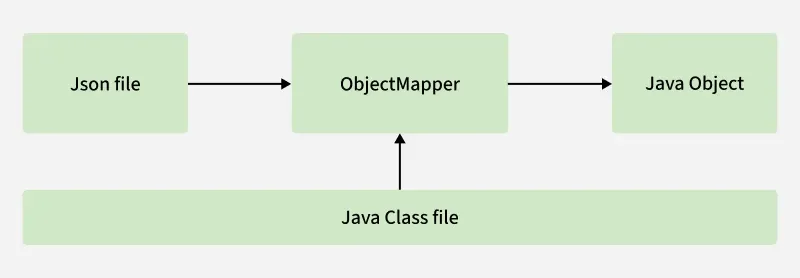
JSON (JavaScript Object Notation) is the most commonly used format for exchanging data between clients and servers in REST APIs. Spring Boot simplifies working with JSON by automatically converting Java objects to JSON (serialization) and JSON to Java objects (deserialization) using the Jackson library.
Workflow:
Client JSON -> Jackson deserialization -> Request DTO -> Validation -> Service logic -> Response DTO -> Jackson serialization -> JSON response
Validation
Validating user input is essential for building secure and reliable applications. Spring Boot simplifies validation by using Hibernate Validator, allowing developers to apply rules using simple annotations.
If request body validation fails, a MethodArgumentException will be thrown.
<dependency>
  <groupId>org.springframework.boot</groupId>
  <artifactId>spring-boot-starter-validation</artifactId>
</dependency>| Annotation | What it does | Common use case | Example |
|---|---|---|---|
@Valid | Triggers Jakarta Bean Validation | Validate request body DTO | @Valid @RequestBody CreateUserRequest request |
@Validated | Enables Spring method/class-level validation | Validate path/query params or config properties | @Validated |
@NotNull | Value cannot be null | Required field | @NotNull private Long userId; |
@NotBlank | String cannot be null or blank | Required text field | @NotBlank private String username; |
@Email | Must be valid email format | User email field | @Email(message = "Email should be valid") private String email; |
@Size | Checks string/collection size | Username/password length | @Size(min = 3, max = 20) |
@Min / @Max | Checks numeric range | Age, page size, quantity | @Min(1) private int quantity; |
@Pattern | Checks regex pattern | Phone number, custom code | @Pattern(regexp = "...") |
Exception Handling
In a Spring Boot REST API, exception handling means converting Java exceptions into clean HTTP responses. Without proper exception handling, clients may receive unclear errors, inconsistent response formats, or even internal implementation details. It also keep controllers clean by avoiding duplicated try-catch blocks.
A common professional pattern is:
- Controller returns success responses.
- Service throws business exceptions.
- Global exception handler converts exceptions into HTTP responses.
- Default exception handling by Spring Boot
Spring Boot already provides default error handling.
By default, Spring Boot registers an /error mapping that handles errors globally. For machine clients, it can produce a JSON response with error details, HTTP status, and related information; for browser clients, it can render an HTML “whitelabel” error page.
Spring Boot and Spring MVC already handle many framework-level errors.
- Wrong URL
- Wrong HTTP method
- Invalid JSON
- Validation failure
Default exception handling is useful, but it is often not enough for real REST APIs.
- Error response format may not match your API standard
- Custom business exceptions may become 500 Internal Server Error
- Frontend may receive inconsistent error shapes
- Validation errors may not be formatted clearly
- Internal messages may be exposed if configured carelessly
- Using local
@ExceptionHandler
@ExceptionHandler lets you handle exceptions thrown by controller methods inside a controller.
Spring Framework documents that @Controller and @ControllerAdvice classes can have @ExceptionHandler methods to handle exceptions from controller methods. It means if custom exception is thrown in this controller, run the handler method and use its return values as the HTTP response.
However, a local @ExceptionHandler only applies to the controller where it is declared. It cannot automatically handle the same type of exceptions from other controllers.
- Using
@ControllerAdvicefor global exception handling
@ControllerAdvice lets you define exception handling logic that applies across multiple controllers. It can be used to handle exceptions from any @Controller or handler, and that it is meta-annotated with @Component, so it can be registered as a Spring bean through component scanning.
For REST APIs, we usually use: @RestControllerAdvice, which is a shortcut that combines @ControllerAdvice with @ResponseBody, so handler method return values are written directly to the response body.
- Using
ProblemDetail
Modern Spring supports ProblemDetail, which represents standardized HTTP error details.
ProblemDetail or ErrorResponse can be returned from @ExceptionHandler or @RequestMapping methods to render an RFC 9457 error response; the status property determines the HTTP status, and the response is favored as application/problem+json during content negotiation.
@ExceptionHandler(UserNotFoundException.class)
public ProblemDetail handleUserNotFound(UserNotFoundException ex) {
  ProblemDetail problem = ProblemDetail.forStatus(HttpStatus.NOT_FOUND);
  problem.setTitle("User not found");
  problem.setDetail(ex.getMessage());

  return problem;
}- Use
ProblemDetailif your project wants a standardized error response format. - Use custom
ErrorResponseDTOs if your team wants its own API error format.
Pagination
Pagination means splitting a large collection of data into smaller pages.
Instead of returning all users at once: GET /api/users, you return a small part of the result: GET /api/users?page=0&size=20. This means: give me page 0 with 20 users per page.
Pagination is very common in REST APIs because returning thousands or millions of records at once is slow, expensive, and bad for user experience.
Spring Data uses zero-based page numbers by default.
Pagination Styles
- Page-Size
- Limit-Offset
- Cursor
- Keyset
Note
Test REST API
Manual Testing
- curl
- Test
GET
curl -i http://localhost:8080/api/users/1
- Test
POST
curl -i -X POST http://localhost:8080/api/users \
  -H "Content-Type: application/json" \
  -d '{
    "username": "david",
    "email": "david@example.com"
}'- Postman
CORS
CORS stands for: Cross-Origin Resource Sharing. CORS is a browser security mechanism that controls whether a web page from one origin is allowed to access resources from another origin.
API Versioning
APIs change over time. Versioning helps avoid breaking old clients.
Common style:
- /api/v1/users
- /api/v2/users
API Documentation
REST APIs should be documented. A common tool is OpenAPI/Swagger. In Spring Boot, many projects use springdoc-openapi.
<dependency>
    <groupId>org.springdoc</groupId>
    <artifactId>springdoc-openapi-starter-webmvc-ui</artifactId>
    <version>2.8.13</version>
</dependency>
Then visit: /swagger-ui.html, or /swagger-ui/index.html.
Good API documentation should include:
- endpoint path
- HTTP method
- request body
- response body
- status codes
- validation rules
- auth requirement
- error response format