
Spring Boot
Spring is one of the most popular frameworks for building enterprise applications, but traditional Spring projects require heavy XML configuration, making them complex for beginners. Spring Boot solves this problem by providing a ready-to-use, production-grade framework on top of Spring, eliminating boilerplate configuration and enabling rapid development.
Spring Boot provides all the features of Spring while being significantly easier to use. Here are its key features:
- Auto-Configuration: Spring Boot automatically configures the application based on the dependencies present in the project.
- Embedded Server: Spring Boot includes embedded servers like Tomcat, Jetty, or Undertow, allowing applications to run without external server installation.
- Easy Deployment: Spring Boot applications can be packaged as JAR or WAR files and deployed directly to servers or cloud environments. It offers seamless integration with Docker and Kubernetes for easier cloud-native deployment and scaling.
- Standalone Application: Applications can run as executable JAR files using a simple main() method.
- Microservice-Based Architecture: Spring Boot supports building independent, modular services instead of a monolithic application, improving scalability, maintainability, and deployment flexibility.
Spring vs. Spring Boot
| Feature | Spring Framework | Spring Boot |
|---|---|---|
| Definition | A comprehensive framework for Java enterprise applications. | A framework built on top of Spring that simplifies application setup and development. |
| Configuration | Requires a lot of manual XML or Java-based configuration. | Comes with auto-configuration to reduce boilerplate code. |
| Standalone Applications | Needs an external server (e.g., Tomcat, Jetty) for deployment. | Embedded servers (Tomcat, Jetty, Undertow) allow applications to run standalone. |
| Dependency Management | Requires developers to manually manage dependencies. | Provides "starters" (e.g., spring-boot-starter-web) to simplify dependency management. |
| Complexity | More flexible but requires more setup and understanding of components. | Opinionated defaults make development faster and easier. |
| Microservices | Can be used for microservices but requires additional configuration. | Designed with microservices in mind, making development smoother. |
| Production Readiness | Requires additional setup for metrics, logging, and monitoring. | Includes built-in support for monitoring, metrics, and externalized configuration. |
Spring Boot Architecture
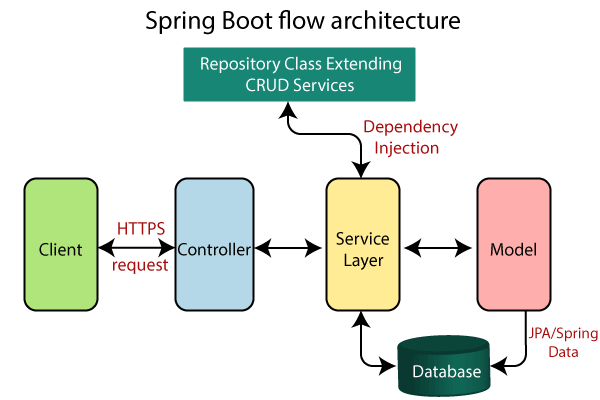
- Client Layer
- The external user or system that sends HTTP/HTTPS requests to interact with the application.
- Controller Layer (Presentation Layer)
- Handles HTTP methods such as GET, POST, PUT, DELETE
- Exposes RESTful APIs using controllers
- Performs request validation
- Manages authentication entry points
- Converts Java objects to JSON and vice versa
- Forwards validated requests to the Business Layer
- Service Layer (Business Logic Layer)
- Implements business rules and workflows
- Processes and validates data
- Handles authentication and authorization logic (using Spring Security if required)
- Manages transactions using @Transactional
- Communicates with the Persistence Layer to retrieve or store data
- Persistence Layer
- Maps Java objects to database tables using ORM frameworks
- Performs CRUD (Create, Read, Update, Delete) operations
- Manages database transactions
- Supports both relational and NoSQL databases
- Database Layer
- The storage system where application data is permanently stored and retrieved.
Request flow in spring boot: Client ->Controller ->Service ->Repository ->Database ->Response.
- A Client makes an HTTPS request (GET/POST/PUT/DELETE).
- The request is handled by the Controller, which is mapped to the corresponding route.
- If business logic is required, the Controller calls the Service Layer.
- The Service Layer processes the logic and interacts with the Repository Layer to retrieve or modify data in the Database.
- The data is mapped using JPA with the corresponding Model/Entity class.
- The response is sent back to the client. If using Spring MVC with JSP, a JSP page may be returned as the response if no errors occur.
Auto-Configuration
Auto-configuration works using the @EnableAutoConfiguration annotation. Spring Boot tries to automatically configure your Spring application based on
- Dependencies on your classpath
- Existing beans in the application context
- Application properties
For example, if a database library is on the classpath and you have not manually defined a DataSource, Spring Boot may configure one for you. Spring Boot’s official docs describe auto-configuration as automatically configuring your application based on the JAR dependencies you have added.
Why Auto Configuration Exists
Without Spring Boot, you often need a lot of manual configuration:
@Configuration
public class WebConfig {

    @Bean
    public DispatcherServlet dispatcherServlet() {
        return new DispatcherServlet();
    }

    @Bean
    public TomcatServletWebServerFactory servletContainer() {
        return new TomcatServletWebServerFactory();
    }
}
With Spring Boot, you can often just add a starter:
<dependency>
    <groupId>org.springframework.boot</groupId>
    <artifactId>spring-boot-starter-web</artifactId>
</dependency>
and write:
@SpringBootApplication
public class DemoApplication {
  public static void main(String[] args) {
    SpringApplication.run(DemoApplication.class, args);
  }
}
Spring Boot sees spring-boot-starter-web, detects web-related classes on the classpath, and auto-configures the web application infrastructure.
@SpringBootApplication
Most Spring Boot applications start with @SpringBootApplication, it includes several important behaviors:
@Configuration
- Tags the class as a source of bean definitions for the application context.
@EnableAutoConfiguration
- Tells Spring Boot to start adding beans based on classpath settings, other beans, and various property settings. For example, if
spring-webmvcis on the classpath, this annotation flags the application as a web application and activates key behaviors, such as setting up aDispatcherServlet.
@ComponentScan
- Tells Spring to look for other components, configurations, and services in the
com/examplepackage, letting it find the controllers.
How Does Auto Configuration Work
Auto configuration is conditional. Spring Boot does not blindly create every possible bean. It asks questions like:
- Is this class on the classpath?
- Is this property enabled?
- Has the user already defined this bean?
- Is this a web application?
- Is this a servlet app or reactive app?
Auto-configuration classes usually use @ConditionalOnClass and @ConditionalOnMissingBean, so they apply only when relevant classes are found and when the user has not declared their own configuration. Auto-configuration provides defaults, but your own configuration wins.
The workflow:
- Load your application configuration.
- Register your
@Beanmethods and@Componentclasses. - Consider auto-configuration classes.
- Apply only auto-configurations whose conditions match.
- Back away when your beans already exist.
Best Practice
- Trust auto-configuration first
Start simple:
@SpringBootApplication
public class DemoApplication {
}
Add dependencies and properties. Only customize when necessary.
- Use properties before custom beans
- Prefer:
server.port=9090over manually customizing the embedded server. - Prefer:
spring.jackson.default-property-inclusion=non_nullover creating a full customObjectMapper, unless you need more control.
- Define your own bean when behavior truly needs customization
@Bean
public PaymentClient paymentClient() {
    return new PaymentClient("custom");
}
This is clean because it uses Spring Boot’s “back away” design.
- Use exclusions carefully
Excluding auto-configuration is useful, but it is more aggressive. Use it when you are sure you do not want that whole auto-configuration.
@SpringBootApplication(exclude = DataSourceAutoConfiguration.class)`- Use
/actuator/conditionsor--debugto understand decisions
Do not guess why a bean exists or does not exist. Check the conditions report.
Starter Dependencies
A Spring Boot starter is a convenient dependency bundle. Instead of manually adding many related dependencies one by one, you add one starter, and it brings the common libraries needed for that feature.
For example, instead of manually adding:
spring-web
spring-webmvc
jackson
tomcat
validation
logging
you usually add:
<dependency>
    <groupId>org.springframework.boot</groupId>
    <artifactId>spring-boot-starter-web</artifactId>
</dependency>
Spring Boot manages dependency versions for you through a curated dependency list, and in practice you do not need to provide versions for those dependencies because Boot manages them. When you upgrade Spring Boot, those dependencies are upgraded consistently. Especially avoid manually specifying Spring Framework versions in a Boot project unless you have a strong reason.
Starter vs. Auto-configuration
The starter itself is not magic. The real mechanism is:
- Add starter.
- Starter adds dependencies.
- Dependencies put classes on the classpath.
- Auto-configuration sees those classes.
- Conditions match.
- Spring Boot creates useful default beans.
Common Spring Boot Starters
| Starter | What it is for | Common use case |
|---|---|---|
spring-boot-starter | Core Spring Boot starter | Basic Spring Boot app with auto-configuration and logging |
spring-boot-starter-web | Spring MVC + embedded servlet server | REST APIs, traditional web apps |
spring-boot-starter-webflux | Reactive web stack | Reactive REST APIs, WebClient, non-blocking services |
spring-boot-starter-data-jpa | Spring Data JPA + Hibernate | Relational database apps using entities/repositories |
spring-boot-starter-data-jdbc | Spring Data JDBC | Simpler relational persistence without full JPA/Hibernate |
spring-boot-starter-jdbc | JDBC support | Direct SQL using JdbcTemplate |
spring-boot-starter-data-mongodb | Spring Data MongoDB | Document database applications |
spring-boot-starter-data-redis | Redis support | Cache, session storage, distributed locks, fast key-value access |
spring-boot-starter-security | Spring Security | Authentication, authorization, password protection, API security |
spring-boot-starter-oauth2-client | OAuth2 client support | Login with Google, GitHub, or SSO providers |
spring-boot-starter-oauth2-resource-server | OAuth2 resource server support | JWT-protected REST APIs |
spring-boot-starter-validation | Bean Validation support | Validate request DTOs with @Valid, @NotBlank, @Email, etc. |
spring-boot-starter-test | Testing support | Unit tests, integration tests, Spring Boot tests |
spring-boot-starter-actuator | Production monitoring and management | Health checks, metrics, info endpoints, operational visibility |
spring-boot-starter-cache | Spring cache abstraction | @Cacheable, @CacheEvict, @CachePut |
spring-boot-starter-aop | Aspect-oriented programming | Logging, auditing, metrics, cross-cutting concerns |
spring-boot-starter-amqp | RabbitMQ / AMQP support | Message queues, async event processing |
spring-boot-starter-mail | Email support | Sending emails through SMTP |
spring-boot-starter-thymeleaf | Thymeleaf template engine | Server-side rendered HTML pages |
spring-boot-starter-websocket | WebSocket support | Real-time communication, chat, notifications |
spring-boot-starter-json | JSON serialization support | Jackson-based JSON handling |
spring-boot-starter-logging | Logging with Logback | Application logging |
spring-boot-starter-log4j2 | Logging with Log4j2 | Replace default Logback with Log4j2 |
spring-boot-starter-quartz | Quartz scheduler support | Scheduled jobs with persistence or more control |
spring-boot-starter-batch | Spring Batch support | Batch jobs, ETL, large data processing |
spring-boot-starter-rsocket | RSocket support | Reactive messaging over TCP/WebSocket |
spring-boot-starter-graphql | Spring GraphQL support | GraphQL APIs |
application.properties & application.yml
In Spring Boot, application.properties and application.yml are the main configuration files for your application.
They let you externalize configuration so that the same code can run in different environments, such as local, dev, test, staging, and production. Spring Boot supports many external configuration sources, including Java properties files, YAML files, environment variables, and command-line arguments. Values can be injected with @Value, accessed through Environment, or bound to structured objects with @ConfigurationProperties.
Where Should These Files Be Placed
Most commonly: src/main/resources/application.properties, or: src/main/resources/application.yml.
Spring Boot automatically looks for application.properties and application.yml from several locations, including the classpath root, classpath /config, the current directory, ./config/, and immediate child directories of ./config/. Later locations can override earlier ones.
application.properties Syntax
application.properties uses flat key-value pairs.
server.port=8080
spring.application.name=order-service

spring.datasource.url=jdbc:postgresql://localhost:5432/orders
spring.datasource.username=postgres
spring.datasource.password=password
application.yml Syntax
The application.properties file is not very readable when dealing with complex configurations. Most developers prefer using application.yml (YAML format) instead. YAML is a superset of JSON and provides a more structured and readable way to define hierarchical configuration data. (Indentation-sensitive)
server:
  port: 8080

spring:
  application:
    name: order-service

  datasource:
    url: jdbc:postgresql://localhost:5432/orders
    username: postgres
    password: password

logging:
  level:
    org.springframework.web: DEBUG
Spring Boot recommends sticking with one format for the whole application. If both .properties and YAML files exist in the same location, .properties takes precedence.
Best practice:
- Use
application.propertiesfor small demos. - Use
application.ymlfor larger real-world applications with nested configuration.
Reading Properties
- With
@Value
For a small number of simple properties, use @Value
@Component
public class AppInfo {
  @Value("${app.name}")
  private String appName;

  @Value("${app.timeout}")
  private int timeout;

  @Value("${app.region:us-east}")
  private String region;
}- With
Environment
Use Environment when you need dynamic property lookup by key.
@Component
public class AppInfo {
  private final Environment environment;

  public AppInfo(Environment environment) {
    this.environment = environment;
  }

  public void printConfig() {
    String appName = environment.getProperty("spring.application.name");
    String port = environment.getProperty("server.port");
  }
}- With
@ConfigurationProperties
For real projects, prefer @ConfigurationProperties when you have grouped config.
payment:
  provider: stripe
  timeout: 3s
  retry-count: 3
  supported-currencies:
    - GBP
    - USD
- EURimport java.time.Duration;
import java.util.List;
import org.springframework.boot.context.properties.ConfigurationProperties;
@ConfigurationProperties(prefix = "payment")
public class PaymentProperties {
private String provider;
private Duration timeout;
private int retryCount;
private List<String> supportedCurrencies;
public String getProvider() { return provider; }
public void setProvider(String provider) { this.provider = provider; }
public Duration getTimeout() { return timeout; }
public void setTimeout(Duration timeout) { this.timeout = timeout; }
public int getRetryCount() { return retryCount; }
public void setRetryCount(int retryCount) { this.retryCount = retryCount; }
public List<String> getSupportedCurrencies() { return supportedCurrencies; }
public void setSupportedCurrencies(List<String> supportedCurrencies) { this.supportedCurrencies = supportedCurrencies; } }// Enabling scanning
@SpringBootApplication
@ConfigurationPropertiesScan
public class OrderApplication {
public static void main(String[] args) {
SpringApplication.run(OrderApplication.class, args);
}
}// Use it in a service
@Service
public class PaymentService {
private final PaymentProperties properties;
public PaymentService(PaymentProperties properties) { this.properties = properties; }
public void pay() { System.out.println(properties.getProvider()); }
}Spring Boot supports relaxed binding for @ConfigurationProperties. That means property names do not need to exactly match Java field names. For example, context-path can bind to contextPath, and uppercase environment variables such as PORT can bind to port. We recommend kebab-case for .properties and YAML files, such as my.main-project.person.first-name.
Profile-specific Config
Profiles let you use different config in different environments. Base file: application.yml. Profile-specific files: application-dev.yml, application-test.yml, application-prod.yml.
Activate profile:
java -jar app.jar --spring.profiles.active=devmvn spring-boot:run -Dspring-boot.run.profiles=dev
Configuration Precesence
- Command-line arguments
- Java system properties
- OS environment variables
- External
application-prod.yml - External
application.yml - Packaged
application-prod.yml - Packaged
application.yml - Default properties
Environment Variables
In production, configuration often comes from environment variables. Spring Boot’s relaxed binding supports environment variable naming conventions. Because most operating systems do not allow period-separated environment variable names, you can use underscores instead, such as SPRING_CONFIG_NAME for spring.config.name.
spring:
  datasource:
    url: jdbc:postgresql://localhost:5432/orders
    username: ${DB_USERNAME}
    password: ${DB_PASSWORD}
Then set environment variables:
DB_USERNAME=postgres
DB_PASSWORD=secret
Avoid this in Git:
spring:
  datasource:
password: real-production-password| File type | Where to place it | Commit to Git? | Purpose |
|---|---|---|---|
application.yml | src/main/resources/application.yml | Yes | Safe default config |
application-dev.yml | src/main/resources/application-dev.yml | Yes, if no secrets | Local/dev profile defaults |
application-test.yml | src/test/resources/application-test.yml or src/main/resources | Yes | Test config |
application-prod.yml | Usually external to the JAR, or safe defaults only in src/main/resources | Usually no, if it contains secrets | Production config |
.env | Project root for local development | No | Local environment variables |
.env.example | Project root | Yes | Documents required to know what env vars are included, only store keys |
secrets.yml / secrets.properties | Outside project root, or ignored local file | No | Local secret values |
| Kubernetes Secrets / cloud secret manager | Deployment platform | No | Production secrets |
Validating Configuration
You can validate configuration at startup. If required config is missing, the application fails fast at startup.
Spring Boot validates @ConfigurationProperties classes when they are annotated with @Validated, and you can use Jakarta validation constraints directly on the configuration class.
@ConfigurationProperties(prefix = "payment")
@Validated
public class PaymentProperties {

  @NotBlank
  private String provider;
  @NotBlank
  private String apiKey;

  // getters and setters
}
Where to Find Properties
| Source | What to look for | When to use it |
|---|---|---|
| Official Spring Boot Common Application Properties | Built-in properties like server.port, spring.datasource.url, logging.level.*, management.endpoints.* | First place to check for standard Spring Boot config |
| Your starter dependency documentation | Properties introduced by specific starters, e.g. JPA, Redis, Security, Actuator | When you add a new starter |
| IDE autocomplete | Property suggestions inside application.properties / application.yml | Fastest daily-development method |
Your own @ConfigurationProperties classes | Custom project-specific properties such as payment.provider, app.upload-limit | When defining your own app config |
Actuator
Spring Boot Actuator is a Spring Boot module that provides production-ready monitoring and management features for your application.
Spring Boot describes Actuator as a set of production-ready features that help you monitor and manage applications through HTTP endpoints or JMX, with support for health checks, metrics, and auditing.
The main dependency is:
<dependency>
    <groupId>org.springframework.boot</groupId>
    <artifactId>spring-boot-starter-actuator</artifactId>
</dependency>
Why Do We Need Actuator
In real projects, writing business logic is not enough. Once the app is deployed, we need to observe and manage it.
Common production questions:
| Question | Actuator feature |
|---|---|
| Is the app alive? | /actuator/health |
| What version/build is running? | /actuator/info |
| How many requests are coming in? | /actuator/metrics |
| What beans exist in the container? | /actuator/beans |
| Which properties are active? | /actuator/env |
| Why did auto-configuration happen? | /actuator/conditions |
| What loggers are active? | /actuator/loggers |
| Can Prometheus scrape metrics? | /actuator/prometheus |
Actuator endpoints let you monitor and interact with your application, and Spring Boot includes built-in endpoints while also allowing custom endpoints.
Endpoint Availability
There are two states of Actuator endpoints availability:
- Enabled: Whether the endpoint exists inside the application
- Exposed: Whether the endpoint is accessible through web/JMX
An endpoint can be enabled but not exposed over HTTP.
To expose more endpoints:
management:
  endpoints:
    web:
      exposure:
        include: health,info,metrics,beans,env,conditions,loggers
But avoid exposing all endpoints in production unless they are properly secured.
DevTools
Spring Boot DevTools is a module provided by Spring Boot to enhance the developer experience during application development. It helps improve productivity by reducing manual effort and speeding up the development cycle.
<dependency>
  <groupId>org.springframework.boot</groupId>
  <artifactId>spring-boot-devtools</artifactId>
  <optional>true</optional>
</dependency>| Feature | What it does | Common use case |
|---|---|---|
| Automatic restart | Restarts the app when classpath files change | Backend code changes |
| Property defaults | Applies development-friendly defaults | Disable template/static cache |
| LiveReload | Refreshes browser after resource changes | HTML/CSS/template development |
| Global settings | Shared DevTools settings across projects | Same trigger file for all projects |
| Restart exclusions | Avoid full restart for static/template resources | Faster frontend changes |
| Additional paths | Watch files outside classpath | Monorepo or generated resources |
| Remote support | DevTools connection to remote app | Rare; trusted environments only |
LiveReload is marked as deprecated as of Spring Boot 4.1.0 with no replacement.