
Process
The Abstraction: A Process
The OS creates the illusion by virtualizing the CPU. By running one process, then stopping it and running another, and so forth, the OS can promote the illusion that many virtual CPUs exist when in fact there is only one physical CPU (or a few). This technique, known as time sharing of the CPU, allows users to run as many concurrent processes as they would like; the potential cost is performance, as each will run more slowly if the CPU must be shared.
Each running program, called a process, has its machine state, what a program can read or update when it is running. One component of a process's machine state is user-space memory containing instructions, data, and a stack. The instructions implement the program's computation. The data are the variables on which the computation acts. The stack organizes the program's procedure calls. Another part are registers. Finally, programs often access persistent storage devices.
The kernel associates a process identifier, or PID, with each process.
Process API
- Create: An operating system must include some method to create new processes. When you type a command into the shell, or double-click on an application icon, the OS is invoked to create a new process to run the program you have indicated.
- Destroy: As there is an interface for process creation, systems also provide an interface to destroy processes forcefully. Of course, many processes will run and just exit by themselves when complete; when they don’t, however, the user may wish to kill them, and thus an interface to halt a runaway process is quite useful.
- Wait: Sometimes it is useful to wait for a process to stop running; thus some kind of waiting interface is often provided.
- Miscellaneous Control: Other than killing or waiting for a process, there are sometimes other controls that are possible. For example, most operating systems provide some kind of method to suspend a process (stop it from running for a while) and then resume it (continue it running).
- Status: There are usually interfaces to get some status information about a process as well, such as how long it has run for, or what state it is in.
Process Creation
The first thing that the OS must do to run a program is to load its code and any static data (e.g., initialized variables) into memory, into the address space of the process. Programs initially reside on disk in some kind of executable format; thus, the process of loading a program and static data into memory requires the OS to read those bytes from disk and place them in memory somewhere.
Once the code and static data are loaded into memory, there are a few other things the OS needs to do before running the process. Some memory must be allocated for the program’s run-time stack (or just stack).C programs use the stack for local variables, function parameters, and return addresses; the OS allocates this memory and gives it to the process. The OS will also likely initialize the stack with arguments; specifically, it will fill in the parameters to the main() function, i.e., argc and the argv array.
The OS may also allocate some memory for the program’s heap. In C programs, the heap is used for explicitly requested dynamically-allocated data; programs request such space by calling malloc() and free it explicitly by calling free(). The heap is needed for data structures such as linked lists, hash tables, trees, and other interesting data structures. The heap will be small at first; as the program runs, and requests more memory via the malloc() library API, the OS may get involved and allocate more memory to the process to help satisfy such calls.
The OS will also do some other initialization tasks, particularly as related to input/output (I/O). For example, in UNIX systems, each process by default has three open file descriptors, for standard input, output, and error; these descriptors let programs easily read input from the terminal as well as print output to the screen.
By loading the code and static data into memory, by creating and initializing a stack, and by doing other work as related to I/O setup, the OS has now (finally) set the stage for program execution. It thus has one last task: to start the program running at the entry point, namely main(). By jumping to the main() routine, the OS transfers control of the CPU to the newly-created process, and thus the program begins its execution.
Memory Layout
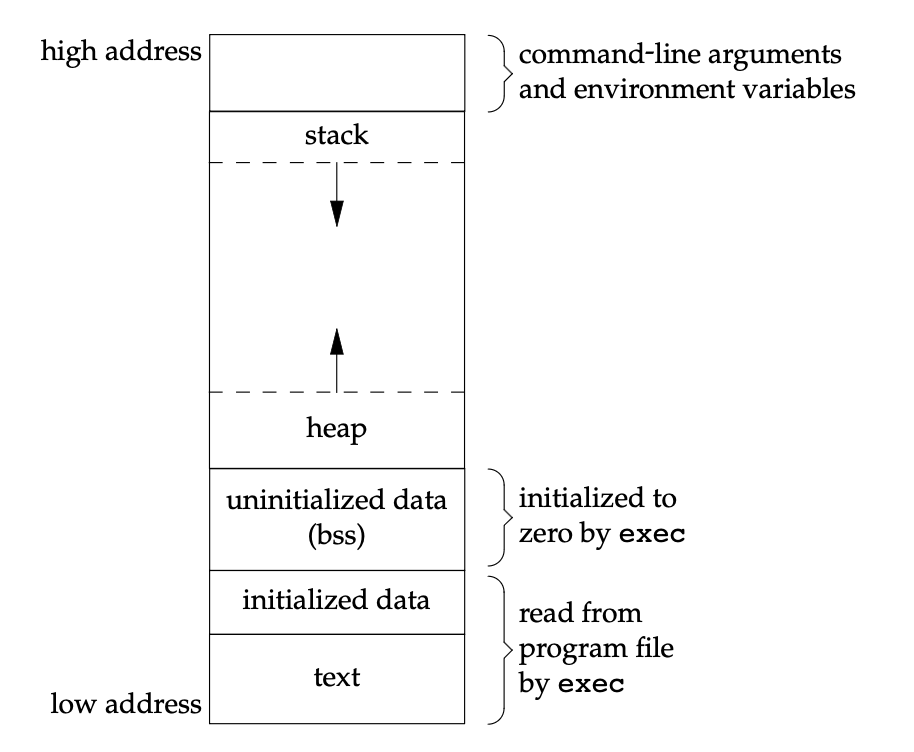
Process State
- Unused: The process slot is completely free and not being used by any process.
- EMBRYO (胚胎): The state when the process is being created, but not fully initialized yet. The OS has allocated a process slot and a PID has been assigned, but memory is not fully set up yet.
- Ready: In the ready state, a process is ready to run but for some reason the OS has chosen not to run it at this given moment.
- Running: In the running state, a process is running on a processor. This means it is executing instructions.
- Blocked: In the blocked state, a process has performed some kind of operation that makes it not ready to run until some other event takes place. A common example: when a process initiates an I/O request to a disk, it becomes blocked and thus some other process can use the processor.
- Zombie: A process has exited but has not yet been cleaned up. This final state can be useful as it allows other processes (usually the parent process) to examine the return code of the process abd see if the just-finished process executed successfully.
Process Identifier
Every process has a unique process ID, a non-negative integer. Because the process ID is the only well-known identifier of a process that is always unique, it is often used as a piece of other identifiers, to guarantee uniqueness. For example, applications sometimes include the process ID as part of a filename in an attempt to generate unique filenames.
Although unique, process IDs are reused. As processes terminate, their IDs become candidates for reuse. Most UNIX systems implement algorithms to delay reuse, however, so that newly created processes are assigned IDs different from those used by processes that terminated recently. This prevents a new process from being mistaken for the previous process to have used the same ID.
There are some special processes, but the details differ from implementation to implementation. Process ID 0 is usually the scheduler process and is often known as the swapper. No program on disk corresponds to this process, which is part of the kernel and is known as a system process. Process ID 1 is usually the init process and is invoked by the kernel at the end of the bootstrap procedure. The init process never dies. It is a normal user process, not a system process within the kernel, like the swapper, although it does run with superuser privileges.
Each UNIX System implementation has its own set of kernel processes that provide operating system services. For example, on some virtual memory implementations of the UNIX System, process ID 2 is the pagedaemon. This process is responsible for supporting the paging of the virtual memory system.
In addition to the process ID, there are other identifiers for every process. The following functions return these identifiers. Note that none of these functions has an error return.
#include <unistd.h>

pid_t getpid(void);   // Returns: process ID of calling process
pid_t getppid(void);  // Returns: parent process ID of calling process
uid_t getuid(void);   // Returns: real user ID of calling process
uid_t geteuid(void);  // Returns: effective user ID of calling process
gid_t getgid(void);   // Returns: real group ID of calling process
gid_t getegid(void);  // Returns: effective group ID of calling process
Process Control Primitives API
The fork() System Call
#include <unistd.h>

pid_t fork(void);   // Returns: 0 in child, process ID of child in parent,−1 on error
The fork() system call is used to create a new process. The process that is created is an (almost) exact copy of the calling process. That means that to the OS, it now looks like there are two copies of the program p1 running, and both are about to return from the fork() system call. The newly-created process (called the child, in contrast to the creating parent) doesn’t start running at main(), rather, it just comes into life as if it had called fork() itself.
The child isn’t an exact copy. Specifically, although it now has its own copy of the address space (i.e., its own private memory), its own registers, its own PC, and so forth, the value it returns to the caller of fork() is different. Specifically, while the parent receives the PID of the newly-created child, the child is simply returned a 0. This differentiation is useful, because it is simple then to write the code that handles the two different cases.
Modern implementations don’t perform a complete copy of the parent’s data, stack, and heap, since a fork is often followed by an exec. Instead, a technique called copy-on-write (COW) is used. These regions are shared by the parent and the child and have their protection changed by the kernel to read-only. If either process tries to modify these regions, the kernel then makes a copy of that piece of memory only, typically a ‘page’ in a virtual memory system.
The output is not deterministic. When the child process is created, there are now two active processes in the system that we care about: the parent and the child. Assuming we are running on a system with a single CPU (for simplicity), then either the child or the parent might run at that point. The CPU scheduler, determines which process runs at a given moment in time; because the scheduler is complex, we cannot usually make strong assumptions about what it will choose to do, and hence which process will run first. This non-determinism, as it turns out, leads to some interesting problems, particularly in multi-threaded programs.
#include <stdio.h>
#include <stdlib.h>
#include <unistd.h>

int main(int argc, char *argv[]) {
  printf("hello world (pid:%d)\n", (int) getpid());
  int rc = fork();
  if (rc < 0) { // fork failed; exit
    fprintf(stderr, "fork failed\n");
    exit(1);
  }
  else if (rc == 0) { // child (new process)
    printf("hello, I am child (pid:%d)\n", (int) getpid());
  }
  else { // parent goes down this path (main)
    printf("hello, I am parent of %d (pid:%d)\n", rc, (int) getpid());
  }
  return 0;
}prompt> ./p1
hello world (pid:29146)
hello, I am parent of 29147 (pid:29146)
hello, I am child (pid:29147)
prompt>There are two uses for fork:
- When a process wants to duplicate itself so that the parent and the child can each execute different sections of code at the same time. This is common for network servers—the parent waits for a service request from a client. When the request arrives, the parent calls
forkand lets the child handle the request. The parent goes back to waiting for the next service request to arrive. - When a process wants to execute a different program. This is common for shells. In this case, the child does an
execright after it returns from thefork.
The two main reasons for fork to fail:
- if too many processes are already in the system, which usually means that something else is wrong.
- if the total number of processes for this real user ID exceeds the system’s limit.
The wait() System Call
#include <sys/wait.h>

pid_t wait(int *statloc);
pid_t waitpid(pid_t pid, int *statloc, int options);
// Both return: process ID if OK, 0, or −1 on error
Sometimes, as it turns out, it is quite useful for a parent to wait for a child process to finish what it has been doing. This task is accomplished with the wait() system call (or its more complete sibling waitpid()).
When a process terminates, either normally or abnormally, the kernel notifies the parent by sending the § signal to the parent. Because the termination of a child is an asynchronous event—it can happen at any time while the parent is running — this signal is the asynchronous notification from the kernel to the parent. The parent can choose to ignore this signal, or it can provide a function that is called when the signal occurs: a signal handler. The default action for this signal is to be ignored. We need to be aware that a process that calls wait or waitpid can
- Block, if all of its children are still running
- Return immediately with the termination status of a child, if a child has terminated and is waiting for its termination status to be fetched
- Return immediately with an error, if it doesn’t have any child processes
If the process is calling wait because it received the SIGCHLD signal, we expect wait to return immediately. But if we call it at any random point in time, it can block.
If a child has already terminated and is a zombie, wait returns immediately with that child’s status. Otherwise, it blocks the caller until a child terminates. If the caller blocks and has multiple children, wait returns when one terminates. We can always tell which child terminated, because the process ID is returned by the function.
For both functions, the argument statloc is a pointer to an integer. If this argument is not a null pointer, the termination status of the terminated process is stored in the location pointed to by the argument. If we don’t care about the termination status, we simply pass a null pointer as this argument.
The differences between these two functions are as follows:
- The
waitfunction can block the caller until a child process terminates, whereaswaitpidhas an option that prevents it from blocking. - The
waitpidfunction doesn’t wait for the child that terminates first; it has a
number of options that control which process it waits for.
Adding a wait() call to the code can make the output deterministic. However, There are a few cases where wait() returns before the child exits.
The exec() System Call
#include <unistd.h>

int execl(const char *pathname, const char *arg0, ... /* (char *)0 */ );
int execv(const char *pathname, char *const argv[]);
int execle(const char *pathname, const char *arg0, ... /* (char *)0, */ char *const envp[] );
int execve(const char *pathname, char *const argv[], char *const envp[]);
int execlp(const char *filename, const char *arg0, ... /* (char *)0 */ );
int execvp(const char *filename, char *const argv[]);
int fexecve(int fd, char *const argv[], char *const envp[]);
// All seven return: −1 on error, no return on success
A final and important piece of the process creation API is the exec() system call. This system call is useful when you want to run a program that is different from the calling program. For example, calling fork() is only useful if you want to keep running copies of the same program. However, often you want to run a different program; exec() does just that.
The fork() system call is strange; its partner in crime, exec(), is not so normal either. What it does: given the name of an executable (e.g., wc), and some arguments, it loads code (and static data) from that executable and overwrites its current code segment (and current static data) with it; the heap and stack and other parts of the memory space of the program are re-initialized. Then the OS simply runs that program, passing in any arguments as the argv of that process. Thus, it does not create a new process; rather, it transforms the currently running program into a different running program. After the exec() in the child, it is almost as if the past program never ran; a successful call to exec() never returns.
The arguments for these seven exec functions are difficult to remember. The letters in the function names help somewhat. The letter p means that the function takes a filename argument and uses the PATH environment variable to find the executable file. The letter l means that the function takes a list of arguments and is mutually exclusive with the letter v, which means that it takes an argv[] vector. Finally, the letter e means that the function takes an envp[] array instead of using the current environment.
#include <stdio.h>
#include <stdlib.h>
#include <unistd.h>
#include <string.h>
#include <sys/wait.h>

int main(int argc, char *argv[]) {
  printf("hello world (pid:%d)\n", (int) getpid());
  int rc = fork();
  if (rc < 0) { // fork failed; exit
    fprintf(stderr, "fork failed\n");
    exit(1);
  }
  else if (rc == 0) { // child (new process)
    printf("hello, I am child (pid:%d)\n", (int) getpid());
    char *myargs[3];
    myargs[0] = strdup("wc"); // program: "wc" (word count)
    myargs[1] = strdup("p3.c"); // argument: file to count
    myargs[2] = NULL; // marks end of array
    execvp(myargs[0], myargs); // runs word count
    printf("this shouldn’t print out");
  }
  else { // parent goes down this path (main)
    int wc = wait(NULL);
    printf("hello, I am parent of %d (wc:%d) (pid:%d)\n", rc, wc, (int) getpid());
  }
  return 0;
}prompt> ./p3
hello world (pid:29383)
hello, I am child (pid:29384)
29 107 1030 p3.c
hello, I am parent of 29384 (wc:29384) (pid:29383)
prompt>Why? Motivating the API
One big question: why would we build such an odd interface to what should be the simple act of creating a new process? Well, as it turns out, the separation of fork() and exec() is essential in building a UNIX shell, because it lets the shell run code after the call to fork() but before the call to exec(); this code can alter the environment of the about-to-be-run program, and thus enables a variety of interesting features to be readily built.
The shell is just a user program. It shows you a prompt and then waits for you to type something into it. You then type a command (i.e., the name of an executable program, plus any arguments) into it; in most cases, the shell then figures out where in the file system the executable resides, calls fork() to create a new child process to run the command, calls some variant of exec() to run the command, and then waits for the command to complete by calling wait(). When the child completes, the shell returns from wait() and prints out a prompt again, ready for your next command.
The separation of fork() and exec() allows the shell to do a whole bunch of useful things rather easily. For example:prompt> wc p3.c > newfile.txt
In the example above, the output of the program wc is redirected into the output file newfile.txt (the greater-than sign is how said redirection is indicated). The way the shell accomplishes this task is quite simple: when the child is created, before calling exec(), the shell closes standard output and opens the file newfile.txt. By doing so, any output from the soon-to-be-running program wc are sent to the file instead of the screen.
#include <stdio.h>
#include <stdlib.h>
#include <unistd.h>
#include <string.h>
#include <fcntl.h>
#include <sys/wait.h>

int main(int argc, char *argv[]) {
  int rc = fork();
  if (rc < 0) { // fork failed; exit
    fprintf(stderr, "fork failed\n");
    exit(1);
  }
  else if (rc == 0) { // child: redirect standard output to a file
    close(STDOUT_FILENO);
    open("./p4.output", O_CREAT|O_WRONLY|O_TRUNC, S_IRWXU);

    // now exec "wc"...
    char *myargs[3];
    myargs[0] = strdup("wc"); // program: "wc" (word count)
    myargs[1] = strdup("p4.c"); // argument: file to count
    myargs[2] = NULL; // marks end of array
    execvp(myargs[0], myargs); // runs word count
  }
  else { // parent goes down this path (main)
    int wc = wait(NULL);
  }
  return 0;
}prompt> ./p4
prompt> cat p4.output
32 109 846 p4.c
prompt>Does fork() + exec() violate pure stateless design principle?
- Understanding
forkandexec
fork(): Creates a new process (child) as a copy of the parent. Initially, the child has the same memory space and file descriptors, i.e., the same state as the parent at that moment.exec(): Replaces the child process’s memory space with a new program. Afterexec, the child’s state is no longer a copy of the parent, except for certain things inherited (like open file descriptors if not closed).
So the typical pattern is:
- Parent forks a child.
- Parent may set up some state (like file descriptors, environment variables).
- Child execs a new program, which uses that inherited state to run.
⸻
- Stateless Design Principle
Statelessness in design usually means:
- A component does not rely on shared state from outside to function correctly.
- Behavior is determined entirely by inputs (parameters, environment variables) rather than external mutable state.
- This principle is often emphasized in REST APIs, functional programming, and distributed systems.
⸻
- Does
fork + execbreak statelessness?
- Inherited state: When a child process inherits state from the parent (open file descriptors, environment variables, or memory before exec), the parent does affect the child’s behavior indirectly. From a purist stateless perspective, this is shared state, so in a strict sense, yes—it introduces coupling.
- Environment variables as parameters: However, if you treat the environment variables or file descriptors as explicit inputs, then the child can be considered stateless relative to its execution.
exectakes an explicit argument list and environment array, which is essentially giving the child all the parameters it needs. forkitself: Beforeexec, the child is a full copy of the parent, including its state. This is technically stateful, but it’s transient—the child usually immediately callsexecto replace its state. So, the state-sharing is brief and mostly an implementation artifact, not a semantic necessity.
⸻
- GETTING IT RIGHT (LAMPSON’S LAW)
As Lampson states in his well-regarded “Hints for Computer Systems Design”, “Get it right. Neither abstraction nor simplicity is a substitute for getting it right.” Sometimes, you just have to do the right thing, and when you do, it is way better than the alternatives. There are lots of ways to design APIs for process creation; however, the combination of fork() and exec() are simple and immensely powerful. Here, the UNIX designers simply got it right.
Trade‑off 1: Full inheritance of the parent process state → in exchange for simple implementation and I/O redirection
- Choice:
forkduplicates file descriptors, environment variables, permissions, and signal masks directly. - Benefit: The shell can easily redirect file descriptors after forking, enabling pipelines.
- Cost: Implicit state inheritance, resource leaks, privilege leaks, and a non‑pure stateless model.
- Choice:
Trade‑off 2: Splitting
forkandexec→ in exchange for a programmable window- Choice: Two separate system calls to reserve an intermediate modification phase.
- Benefit: The child process can adjust I/O, permissions, and working directories before executing a new program.
- Cost: Higher programming complexity, mandatory zombie‑process handling, and logical fragmentation.
Trade‑off 3: Copy‑on‑Write (COW) → in exchange for lightweight forking
- Choice: fork copies only page tables, not physical memory.
- Benefit: Ultra‑fast process creation, ideal for high‑concurrency scenarios.
- Cost: Memory thrashing, deadlock risks in multi‑threaded programs, and a complex memory model.
Trade‑off 4: File descriptors remain open by default → in exchange for convenient context inheritance
- Choice:
execdoes not automatically close open file descriptors. - Benefit: Child processes inherit standard input/output and network connections seamlessly.
- Cost: File descriptor leaks, security vulnerabilities, and uncontrolled resource usage.
- Choice:
In summary, Unix is victory for pragmatism, a casualty of theoretical design。
IPC
Pipes
#include <unistd.h>

int pipe(int fd[2]);
// Returns: 0 if OK, −1 on error
Pipes are the oldest form of UNIX System IPC and are provided by all UNIX systems. Pipes have two limitations.
- Historically, they have been half duplex (i.e., data flows in only one direction). Some systems now provide full-duplex pipes, but for maximum portability, we should never assume that this is the case.
- Pipes can be used only between processes that have a common ancestor. Normally, a pipe is created by a process, that process calls fork, and the pipe is used between the parent and the child.
Despite these limitations, half-duplex pipes are still the most commonly used form of IPC. Every time you type a sequence of commands in a pipeline for the shell to execute, the shell creates a separate process for each command and links the standard output of one process to the standard input of the next using a pipe.
Two file descriptors are returned through the fd argument: fd[0] is open for reading, and fd[1] is open for writing. The output of fd[1] is the input for fd[0].
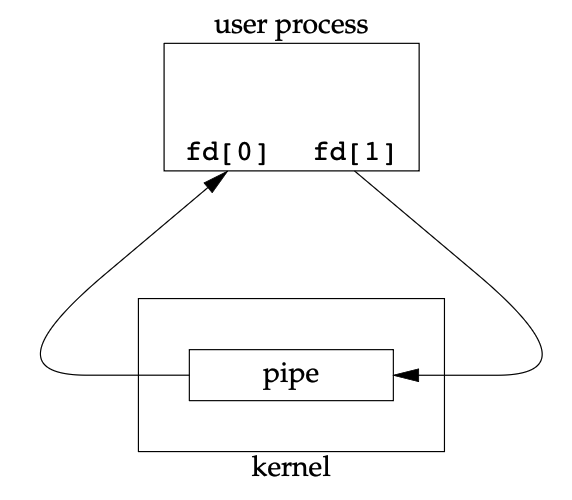
A pipe in a single process is next to useless. Normally, the process that calls pipe then calls fork, creating an IPC channel from the parent to the child, or vice versa. What happens after the fork depends on which direction of data flow we want. For a pipe from the parent to the child, the parent closes the read end of the pipe (fd[0]), and the child closes the write end (fd[1]). For a pipe from the child to the parent, the parent closes fd[1], and the child closes fd[0].
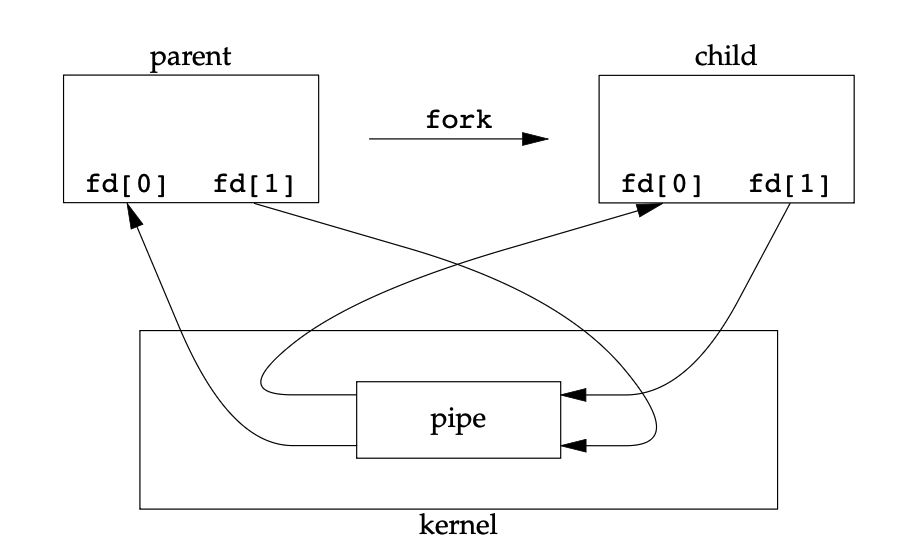
forkWhen one end of a pipe is closed, two rules apply.
- If we
readfrom a pipe whose write end has been closed,readreturns 0 to indicate an end of file after all the data has been read. - If we
writeto a pipe whose read end has been closed, the signalSIGPIPEis generated. If we either ignore the signal or catch it and return from the signal handler,writereturns −1 witherrnoset toEPIPE.
We can call read and write directly on the pipe descriptors. What is more interesting is to duplicate the pipe descriptors onto standard input or standard output. Often, the child then runs some other program, and that program can either read from its standard input (the pipe that we created) or write to its standard output (the pipe).