
Java IO Streams
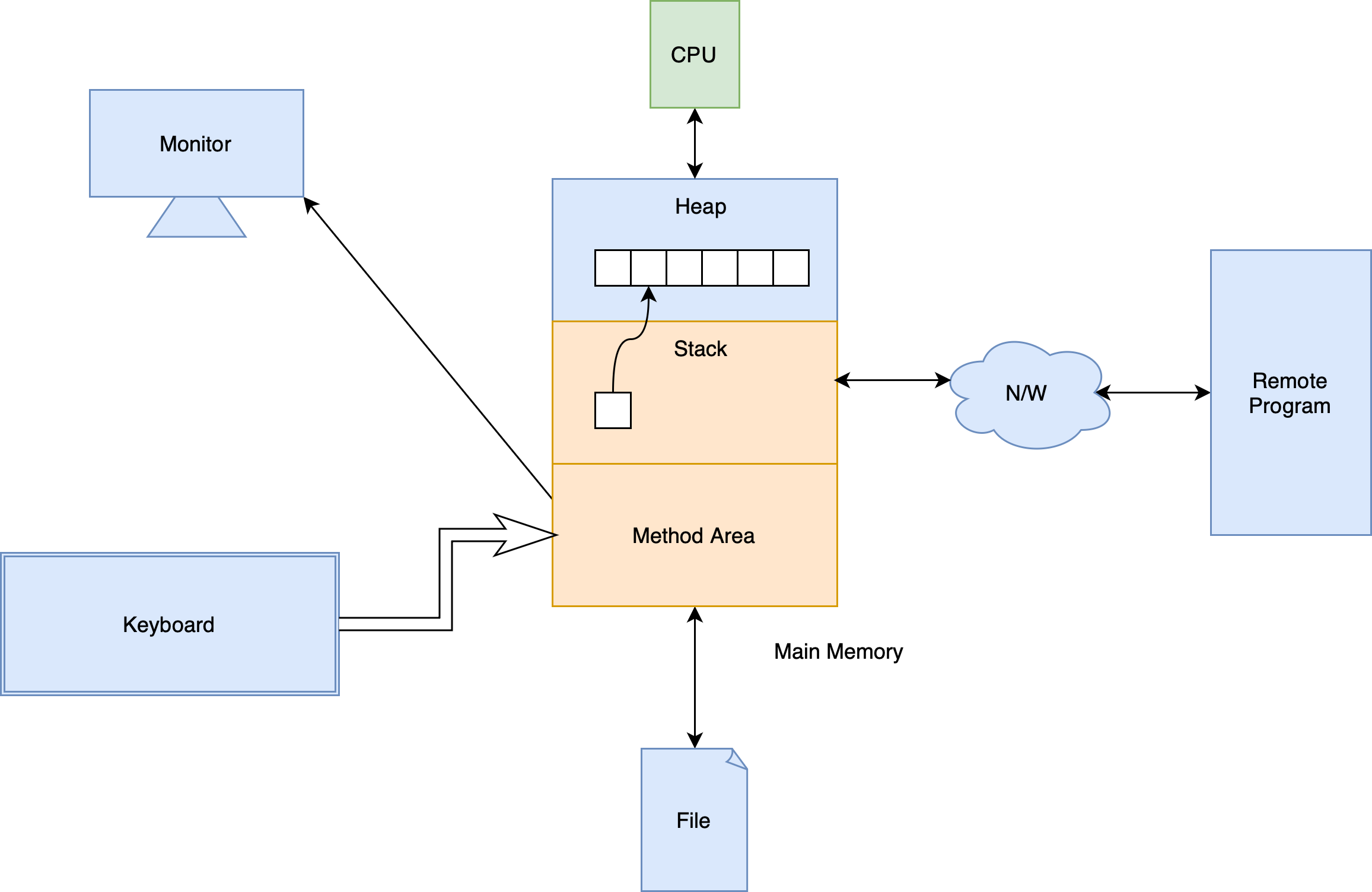
- Stack and method area is the context of a program; others are the resources
java.iopackage hierarchy- Java Stream Tutorial
Stream
- Stream is a flow of data
- An I/O Stream represents an input source or an output destination
- Streams support many different kinds of data, including simple bytes, primitive data types, localized characters, and objects
- Some streams simply pass on data; others manipulate and transform the data in useful ways
- The basic principle
- A stream is a sequence of data
- A program uses an input stream to read data from a source, one item at a time
- A program uses an output stream to write data to a destination, one item at time
Byte Streams
- Handle I/O of raw binary data
- All byte stream classes are descended from
InputStreamandOutputStream(abstract class) InputStreammethodsint read()- Reads the next byte of data from the input stream
- The only abstract method
- Returns the next byte of data, or
-1if the end of the stream is reached - This method blocks until input data is available, end of file is detected, or an exception is thrown
int read(byte[] b)- Reads some number of bytes from the input stream and stores them into the buffer array
b
- Reads some number of bytes from the input stream and stores them into the buffer array
int read(byte[]b, int off, int len)- Reads up to
lenbytes of data from the input stream into buffer arrayb - The first byte read is stored into element
b[off], the next one intob[off+1], and so on
- Reads up to
byte[] readAllBytes()- Reads all remaining bytes from the input stream
long transferTo(OutputStream out)- Reads all bytes from this input stream and writes the bytes to the given output stream in the order that they are read
- Returns the number of bytes transferred
int available()- Returns an estimate of the number of bytes that can be read (or skipped over) from this input stream without blocking or
0when it reaches the end of the input stream
- Returns an estimate of the number of bytes that can be read (or skipped over) from this input stream without blocking or
long skip(long n)- Skips over and discards
nbytes of data from this input stream - Returns the actual number of bytes skipped
- Skips over and discards
void mark(int limit)- Marks the current position in this input stream. A subsequent call to the
resetmethod repositions this stream at the last marked position so that subsequent reads re-read the same bytes - Only works for buffered streams
- Marks the current position in this input stream. A subsequent call to the
void reset()- Repositions this stream to the position at the time the
markmethod was last called on this input stream
- Repositions this stream to the position at the time the
boolean markSupported()- Tests if this input stream supports the
markandresetmethods
- Tests if this input stream supports the
void close()- Closes this input stream and releases any system resources associated with the stream
OutputStreammethodsvoid write(int b)- Writes the specified byte to this output stream
- The byte to be written is the eight low-order bits of the argument
b. The 24 high-order bits ofbare ignored - The only abstract method
void write(byte[] b)- Writes
b.lengthbytes from the specified byte array to this output stream
- Writes
void write(byte[] b, int off, int len)- Writes
lenbytes from the specified byte array starting at offsetoffto this output stream
- Writes
void flush()- Flushes this output stream and forces any buffered output bytes to be written out
- Only works for buffered streams
void close()- Closes this output stream and releases any system resources associated with this stream
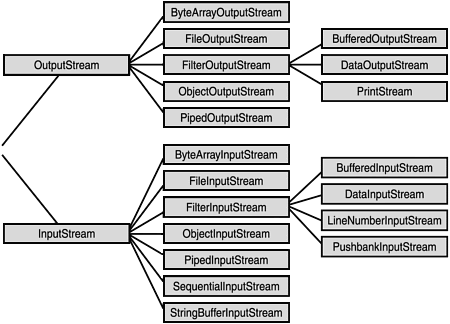
- Hierarchy of byte streams
ByteArrayInputStreamByteArrayInputStream(byte[] buf)- Creates a
ByteArrayInputStreamso that it usesbufas its buffer array
- Creates a
ByteArrayInputStream(byte[] buf, int offset, int length)
ByteArrayOutputStreamByteArrayOutputStream()ByteArrayOutputStream(int size)byte[] toByteArray()void writeTo(OutputStream out)- Writes the complete contents of this byte array output stream to the specified output stream argument
FileInputStreamandFileOutputStream
Character Streams
- Working with that Java stores character in 2 bytes
- Character streams are often "wrappers" for byte streams
- The character stream uses the byte stream to perform the physical I/O, while the character stream handles translation between characters and bytes
Readermethods- Similar to
InputStream - Don't have
available()
- Similar to
WritermethodsWriter append(char c)- Appends the specified character to this writer
out.append(c)behaves exactly the same asout.write(c)
Writer append(CharSequence csq)Writer append(CharSequence csq, int start, int end)
- Hierarchy of character stream
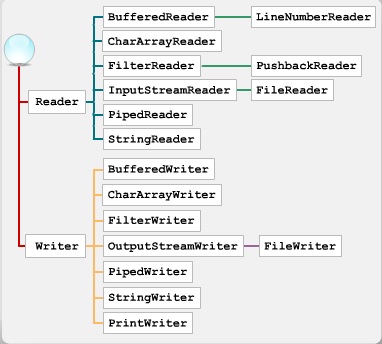
reader_writer
CharArrayReaderandCharArrayWriterFileReaderandFileWriter
Buffered Streams
For unbuffered steams, each read or write request is handled directly by the underlying OS
This can make a program much less efficient, since each such request often triggers disk access, network activity, or some other operation that is relatively expensive
Buffer
- A temporary memory object for holding the data
- The native input and output APIs are called only when the buffer is empty or full
- It often makes sense to write out a buffer at critical points, without waiting for it to fill. This is known as flushing the buffer
A program can convert an unbuffered stream into a buffered stream using the wrapping idiom
in = new BufferedReader(new FileReader("xanadu.txt"));
out = new BufferedWriter(new FileWriter("characteroutput.txt"));
BufferedInputStreamandBufferedOutputStreamBufferedReaderandBufferedWriter
Formatting Streams
PrintWriter,PrintStream- The only
PrintStreamobjects you are likely to need areSystem.outandSystem.error - When you need to create a formatted output stream, instantiate
PrintWriter, notPrintStream PrintStreamnever throws anIOExceptionPrintStreamcan be created so as to flush automatically; this means that theflushmethod of the underlying output stream is automatically invoked after a byte array is written, one of theprintlnmethods is invoked, or a newline character or byte ('\n') is writtenvoid print()String.valueOf()is invoked, and then the string's characters are converted into bytes according to the default charset, and these bytes are written in exactly the manner of thewrite(int).
void println()PrintStream printf(),PrintStream format()- They behave the same
- The only
Scanner- Useful for breaking down formatted input into tokens and translating individual tokens according to their data type
- By default, a scanner uses white space (include blanks, tabs, and line terminators) to separate tokens
Scanner useDelimiter(String pattern)Scanner useDelimiter(Pattern pattern)
- A scanning operation (
next()orhasNext()) may block waiting for input - Even though a scanner is not a stream, you need to close it to indicate that you're done with its underlying stream
Data Streams
DataInputStream,DataOutputStream- Created as a wrapper for an existing byte stream object
- The input stream consists of simple binary data, with nothing to indicate the type of individual values, or where they begin in the stream (not readable)
- Each specialized
writeinDataStreamsis exactly matched by the corresponding specializedread. It is up to the programmer to make sure that output types and input types are matched in this way DataStreamsuses one very bad programming technique: it uses floating point numbers to represent monetary values
Object Streams
- Serialisation and deserialisation
- Serialization in Java is a mechanism of writing the state of an object into a byte stream
- Storing and retrieving the state of an object
- Most, but not all, standard classes support serialization of their objects
- Rules
- Implement the marker interface
Serializable - There must be a non-parametarized constructor
staticortransientmembers will not be serialised
- Implement the marker interface
ObjectInputStream,ObjectOutputStream- A single invocation of
writeObject()can cause a large number of objects to be written to the stream - A stream can only contain one copy of an object, though it can contain any number of references to it
- If a single object is written to two different streams, it is effectively duplicated
- Type casting after
readObject()is needed
- A single invocation of
RandomAccessFile
A random access file behaves like a large array of bytes stored in the file system
There is a kind of cursor, or index into the implied array, called the file pointer
Implements
DataInputandDataOutputConstructor
RandomAccessFile(File file, String mode)RandomAccessFile(String name, String mode)Value Meaning "r"Open for reading only. Invoking any of the writemethods of the resulting object will cause anIOExceptionto be thrown."rw"Open for reading and writing. If the file does not already exist then an attempt will be made to create it. "rws"Open for reading and writing, as with "rw", and also require that every update to the file's content or metadata be written synchronously to the underlying storage device."rwd"Open for reading and writing, as with "rw", and also require that every update to the file's content be written synchronously to the underlying storage device.
Methods
long getFilePointer()- Returns the current offset in this file
void seek(long pos)- Sets the file-pointer offset, measured from the beginning of this file, at which the next read or write occurs
long length()- Returns the length of this file, measured in bytes
Piped Streams
- Communicate producer and consumer instead of using shared objects
- Typically, data is written to a
PipedOutputStreamobject by one thread and data is read from the connectedPipedInputStreamby some other thread connect()
File I/O
PathA
Pathis NOT system independentYou can think of the
Pathas storing these name elements as a sequencePaths.get(String first, String... more)Creating a
PathPath p1 = Paths.get("/tmp/foo"); // Paths.get() is a shorthand of Path p2 = FileSystems.getDefault().getPath("/tmp/foo");
Path getFileName()Path getName(int index)int getNameCount()Path subpath(int beginIndex, int endIndex)- Not including a root element
Path getParent()Path getRoot()URI toUri()Path toAbsolutePath()- The file does not need to exist for this method to work
Path toRealPath(LinkOption... option)- If
trueis passed to this method and the file system supports symbolic links, this method resolves any symbolic links in the path - If the
Pathis relative, it returns an absolute path - If the
Pathcontains any redundant elements, it returns a path with those elements removed - This method throws an exception if the file does not exist or cannot be accessed
- If
Path resolve(Path p)Path resolve(String s)- Join two paths
Path relativize(Path other)- Constructs a relative path between this path and a given path
FileFiles