
Maven
Project management tool
Handle dependencies and building process of Java-based projects
How Maven works
Read config file
Check local repo
.m2Get from remote repo
Save in local repo
Standrad directory structure
mvnw- Allows you to run a Maven project
- No need to have Maven installed or present on your path
- If correct version of Maven is not found on the computer, it will automatically download it and run it
- Two files are provided
mvnw.cmdfor Windowsmvnw.shfor Unix-like
pom.xml- Maven config file
src/main/java- Java source code
src/main/resources- Properties and config files used by your app
src/main/webapp- JSP files and web config files, other web assets
- DON'T use this directory if your package is packed as a JAR
- Only work with WAR packaging
src/test- Unit testing code and properties
target- Destination directory for compiled code
- Automatically created by Maven
pom.xmlProject Object Model file
File structure
Project metadata
- Project name, version, output file type, etc.
Dependencies
Dependencies are Maven artifacts/components required for the project
Plugins
Plugins perform tasks for a Maven build. These are not packaged in the application
Project coordinates
Uniquely identify a project
<dependencies>
  <dependency>
      <!--Name of company, group, or organisation-->
      <groupId>org.hibernate.orm</groupId>
      <!--Name of the project-->
      <artifactId>hibernate-core</artifactId>
      <version>6.1.4.Final</version>
    </dependency>
 </dependencies>
Maven archetype
- Prototype
pom.xml
- Prototype
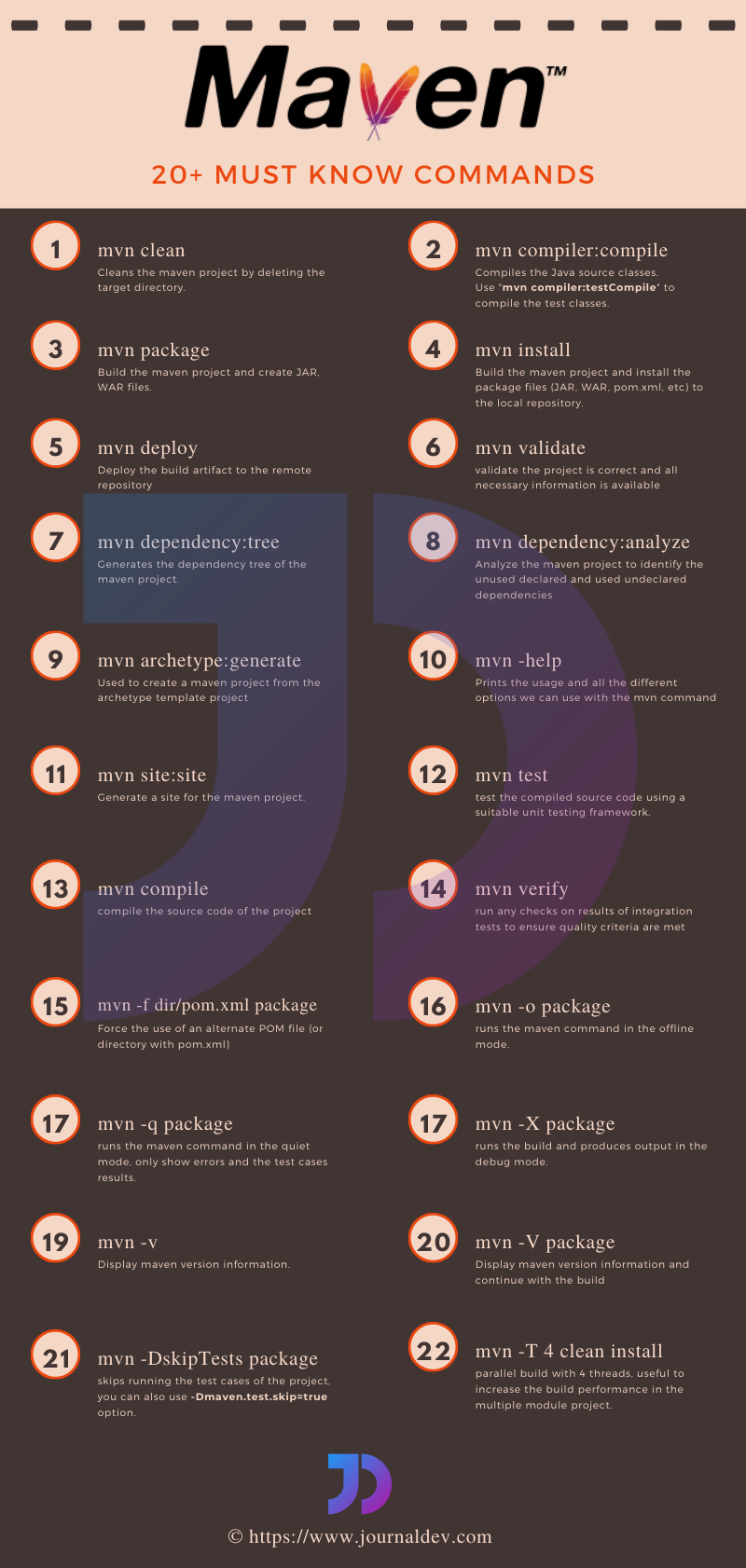
maven spring-boot:run
Spring Core
Spring vs. Spring Boot
Feature Spring Framework Spring Boot Definition A comprehensive framework for Java enterprise applications. A framework built on top of Spring that simplifies application setup and development. Configuration Requires a lot of manual XML or Java-based configuration. Comes with auto-configuration to reduce boilerplate code. Standalone Applications Needs an external server (e.g., Tomcat, Jetty) for deployment. Embedded servers (Tomcat, Jetty, Undertow) allow applications to run standalone. Dependency Management Requires developers to manually manage dependencies. Provides "starters" (e.g., spring-boot-starter-web) to simplify dependency management.Complexity More flexible but requires more setup and understanding of components. Opinionated defaults make development faster and easier. Microservices Can be used for microservices but requires additional configuration. Designed with microservices in mind, making development smoother. Production Readiness Requires additional setup for metrics, logging, and monitoring. Includes built-in support for monitoring, metrics, and externalized configuration.
Write code as POJOs (Plain Old Java Objects)
Spring Beans
A Spring Bean is simply a Java object created and managed by Spring IoC container
Why do we need Beans?
- Without Spring Beans, developers must manually create and manage objects, leading to tight coupling
- Spring Beans allow dependencies to be injected instead of instantiated inside a class, which enables loose coupling, easier unit testing, and better code reusability
How to create bean
XML-based configuration
<!--/src/main/resources/spring.xml-->
<bean id="laptop" class="com.example.Laptop" scope="singleton"/>
// src/main/java/com.example/App.java ApplicationContext context = new ClassPathXmlApplicationContext("spring.xml"); Laptop l1 = (Laptop) context.getBean("laptop"); // or Laptop l2 = context.getBean(Laptop.class);
Java-based configuration
// src/main/java/com.example/config/AppConfig.java

@Configuration
public class AppConfig {

  // the name of the bean is the method name by default
  @Bean(name={"machine1", "beast"})
  @Scope("prototype")
  public Laptop laptop() {
    return new Laptop();
  }
}
// src/main/java/com.example/App.java ApplicationContext context = new AnnotationConfigApplicationContext(AppConfig.class); Laptop l = context.getBean(Laptop.class);
Spring Boot Component Scanning
Stereotype annotations
Annotation Description @ComponentGeneric stereotype for any Spring-managed bean. @ServiceSpecialized for service layer components (business logic). @RepositorySpecialized for DAO (Data Access Object) layer (database interactions). @ControllerSpecialized for web controllers in Spring MVC. @RestControllerCombines @Controllerand@ResponseBodyfor REST APIs.
@Component @Scope("prototype") public class Laptop {}@SpringBootApplication public class SpringBootDemoApplication { public static void main(String[] args) { ApplicationContext context = SpringApplication.run(SpringBootDemoApplication.class, args); Laptop l = context.getBean(Laptop.class); } }Spring automatically scans packages for stereotype annotations using
@ComponentScan@SpringBootApplicationis a convenience annotation that adds all of the following:@Configuration: Tags the class as a source of bean definitions for the application context@EnableAutoConfiguration: Tells Spring Boot to start adding beans based on classpath settings, other beans, and various property settings. For example, ifspring-webmvcis on the classpath, this annotation flags the application as a web application and activates key behaviors, such as setting up aDispatcherServlet@ComponentScan: Tells Spring to look for other components, configurations, and services in thecom/examplepackage, letting it find the controllers
Scope
- Singleton
- By default beans are singleton scope (no matter what type of application is)
- Prototype
- A new instance is created everytime it is requested
- Request
- A new instance is created for each HTTP request (Web Applications)
- Session
- A new instance is created per HTTP session
- Application
- A single instance shared across the entire web application
- Singleton
Beans can be initialised lazily when they are created not at application startup but only when they are first needed
XML-based Config
<bean id="laptop" class="com.example.Laptop" lazy-init="true"/>
Java-based Config
@Configuration
public class AppConfig {

  @Bean
  @Lazy
  public Laptop laptop() {
    return new Laptop();
  }
}
When to use lazy initialisation
- The bean is rarely used
- The bean is resource-heavy (e.g., database connections, third-party APIs)
- You want faster application startup
Inversion of Control
- Inversion of Control (IoC) is a design principle in which a software component is designed to receive its dependencies from an external source, rather than creating them itself. This is in contrast to traditional software design, where a component is responsible for creating and managing its own dependencies
- Focusing on business logic instead of managing objects (creating, maintaining, destroying) as a programmer
Container
- The
org.springframework.context.ApplicationContextinterface represents the Spring IoC container and is responsible for instantiating, configuring, and assembling the beans - The container gets its instructions on the components to instantiate, configure, and assemble by reading configuration metadata
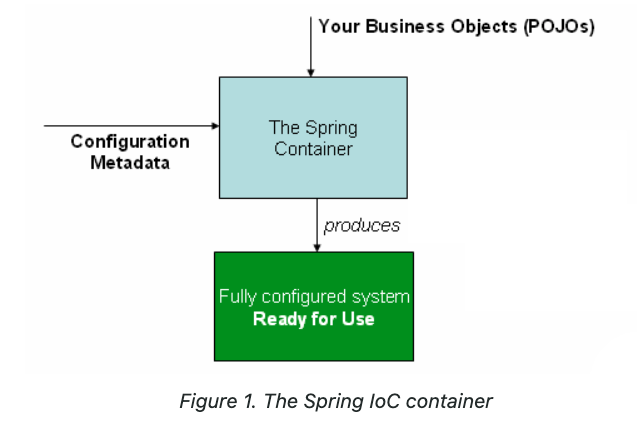
ioc_container
Dependency Injection
- In order to achieve IoC we use this design pattern DI
Construction Injection
It is the recommended approach for injecting mandatory dependencies because it ensures that an object is always created with its required dependencies
Steps
- Spring creates an instance of the dependent class
- It injects dependencies via the constructor
- The bean is then ready for use
XML-based Config
<bean id="laptop" class="com.example.Laptop">
  <!--Must follow the sequence in the parameter list of the constructor-->
  <!--primitive fields-->
	<constructor-arg name="price" value="100"/>
  <!--references-->
  <constructor-arg name="compiler" ref="compiler"/>

  <!--Or use index-->
  <constructor-arg index="1" ref="compiler"/>
  <constructor-arg index="0" value="100"/>
</bean>

<bean id="compiler" class="com.example.Compiler"/>
Java-based Config
@Configuration
public class AppConfig {

  @Bean
  public Compiler compiler() {
    return new Compiler();
  }

  @Bean
  public Laptop laptop(Compiler compiler) {
    return new Laptop(compiler);
  }
}
Setter Injection
Setter injection is accomplished by the container calling setter methods on your beans after invoking a no-argument constructor to instantiate your bean
If the dependencies is not found, the dependent object will be null, so null check is required
Steps
- Spring creates an instance of the dependent class
- It injects dependencies using setter methods
- The bean is then ready for use
XML-based Config
<bean id="laptop" class="com.example.Laptop">
  <!--primitive fields-->
	<property name="price" value="100"/>
  <!--references-->
  <property name="compiler" ref="compiler"/>
</bean>

<bean id="compiler" class="com.example.Compiler"/>
Java-based Config
@Configuration
public class AppConfig {

  @Bean
  public Compiler compiler() {
    return new Compiler();
  }

  @Bean
  public Laptop laptop(Compiler compiler) {
    Laptop l = new Laptop();
    l.setCompiler(compiler);
    return l;
  }
}
Use Setter Injection When... Use Constructor Injection When... Dependency is optional (not always needed). Dependency is mandatory for the object to function. You want to allow modification after object creation. You want to ensure immutability (no changes after construction). The class has many dependencies, making constructor injection harder to manage. The class has few dependencies, making constructor injection clearer. It is not recommended to use both Constructor Injection and Setter Injection for the same field in a Spring Bean
if you define both Constructor Injection and Setter Injection for the same field, Spring will prioritize Constructor Injection if both are present
Autowiring
Autowiring is a mechanism that automatically injects dependencies into Spring Beans, reducing the need for manual bean wiring in configuration files
Whenever we use
@Autowired, Spring makes sure the relevant bean existed and gets injected for use. If this cannot be done, Spring throws an exception and the application fails to startXML-based Config
class Student {
  private Computer computer;
}

interface Computer {}
class Laptop implements Computer {}
class Desktop implements Computer {}
<!--Autowiring by name--> <!--Works when the bean name matches the field name--> <bean id="computer" class="com.example.Laptop"/> <bean id="Student" class="com.example.Student" autowire="byName"/> <!--The field must be named computer in Student--><!--Autowiring by type--> <!--Injects a bean if only one bean of that type exists--> <!--Set a primary bean when there is a conflict--> <bean id="laptop" class="com.example.Laptop" primary="true"/> <bean id="desktop" class="com.example.Desktop"/> <bean id="Student" class="com.example.Student" autowire="byType"/> <!--The field must be named computer in Student-->
Java-based Config
@Configuration
public class AppConfig {

  @Bean
  @Primary
  public Laptop laptop() {
    return new Laptop();
  }

  @Bean
  public Desktop desktop() {
    return new Desktop();
  }

  @Bean
  public Student student(@Qualifier("desktop") Computer computer) {
    return new Student(computer);
  }
}
Spring Boot Style
@Component
public class Student {
  // Field injection (least recommended)
  @Autowired
  private Card IdCard;
  private final Computer computer;
  private Bag bag;

  // Constructor injection
  @Autowired
  public Student(@Qualifier("laptop") Computer computer) {
    this.computer = computer;
  }

  // Setter injection
  // If a dependency may not always be available, set required = false
  // If no bean is found, Spring will not throw an error
  @Autowired(required = false)
  public void setBag(Bag bag) {
    this.bag = bag;
  }
}
Spring Boot Web
Servlet (Old way)
A Servlet is a Java-based server-side class used to handle requests and generate dynamic responses for web applications
The servlet must be run on the servlet container (e.g., Apache Tomcat) instead of directly on JVM
External or embedded server
Servlet lifecycle
Loading and initialisation
When a servlet is requested for the first time or after a container restart, the servlet container loads the servlet class into memory
The container calls the
init()method, which is used to initialize the servletinit()is called only once during the servlet’s lifecycle and is used to perform any initializations required for the servlet
Request handling
service()method is called for each request made to the servletIt is responsible for processing the client request and generating the response
The container calls
service()whenever it receives an HTTP request (usually viadoGet(),doPost(), etc.)In the case of
HttpServlet, theservice()method delegates the request to specific methods based on the HTTP method (GET, POST, etc.):doGet(): Handles HTTP GET requests (commonly used for retrieving data from the server).doPost(): Handles HTTP POST requests (commonly used for submitting data to the server).doPut(),doDelete(): Handle PUT and DELETE requests, respectively.doHead(),doOptions(): Handle other HTTP request types like HEAD and OPTIONS.
Destroying the servlet
When the servlet container decides to unload the servlet (typically when the server shuts down or the servlet is no longer needed), it calls the
destroy()methodThis is where cleanup tasks such as releasing resources (like database connections or file handles) should be done
How to create a servlet?
- Extend
HttpServlet - Override
doGet(),doPOst(), etc. - Configure using
web.xmlorWebServletannotation
- Extend
import java.io.IOException;
import javax.servlet.ServletException;
import javax.servlet.annotation.WebServlet;
import javax.servlet.http.HttpServlet;
import javax.servlet.http.HttpServletRequest;
import javax.servlet.http.HttpServletResponse;

// Annotation-based servlet mapping
@WebServlet("/hello")
public class HelloServlet extends HttpServlet {

    @Override
    public void init() throws ServletException {
        System.out.println("Servlet Initialized");
    }

  	@Override
    protected void doGet(HttpServletRequest request, HttpServletResponse response)
            throws ServletException, IOException {
        response.setContentType("text/html");
        response.getWriter().println("<h1>Hello, Servlet!</h1>");
    }

  	@Override
  	protected void doPost(HttpServletRequest request, HttpServletResponse response)
      			throws ServletException, IOException {
        // Handle POST request
        String data = request.getParameter("data");
        response.getWriter().write("Received POST data: " + data);
		}

  	@Override
    public void destroy() {
        System.out.println("Servlet Destroyed");
    }
}
Spring MVC with Spring Boot
MVC (Model-View-Controller)
- View
- Displays data received from the Controller
- UI presentation
- JSP, Thymeleaf, React, Angular, etc.
- Controller
- Maps HTTP requests to specific handler methods
- Validates input data (optional, but often delegated to validation mechanisms)
- Calls the service layer for business logic execution
- Returns responses (JSON, XML, View)
- Model
@Service- Implements business logic
- Calls data access layer (repository/DAO)
- Ensures transaction management (e.g.,
@Transactional)
@Repository- Interacting with the database
- Spring JDBC, Hibernate, Spring Data JPA, etc.
@Component- Representing and managing application data
- View
Spring Boot MVC has an embedded Tomcat server
Work flow
[Client] → [DispatcherServlet] → [Controller] → [Service] → [DAO] → [Database]
              ↓
      [View Resolver] → [View]
Annotation Description @ControllerDefines a web controller @RestControllerHandles RESTful APIs @RequestMapping("/path")Maps request URLs @GetMapping("/path")Maps GET requests @PostMapping("/path")Maps POST requests @PutMapping("/path")Maps PUT requests @DeleteMapping("/path")Maps DELETE requests @RequestParamGets request parameters @PathVariableExtracts values from URL @ResponseBodySends data as JSON Controller for view (skipped)
ModelAndViewclass- JSP is a servlet in the end
REST API
REpresentational State Transfer
A key difference between a traditional MVC controller and the RESTful web service controller is the way that the HTTP response body is created
Rather than relying on a view technology to perform server-side rendering of the greeting data to HTML, this RESTful web service controller populates and returns an object. The object data will be written directly to the HTTP response as JSON
jacksonlibrary converts Java objects to JSON@RestController @RequestMapping("/posts") // Base URI for all endpoints @CrossOrigin(origins = "http://localhost:3000") public class JobController { private JobService service; @Autowired public JobController(JobService service) { this.service = service; } public JobController() { } @GetMapping public List<JobPost> getAllJobs() { return service.getAllJobs(); } // You can specify which format you want to produce or consume @GetMapping(path = "/{postId}", produces = {"application/json"}) // @PathVariable indicates that a method parameter should be bound to a URI template variable // If the path variable name is the same as the parameter name, you don't have to specify it public ResponseEntity<JobPost> getJobById(@PathVariable int postId) { JobPost job = service.getJobById(postId); return job != null ? new ResponseEntity<JobPost>(job, HttpStatus.OK) : new ResponseEntity<>(HttpStatus.NOT_FOUND); } // If @GetMapping is differentiated by @RequestParam only, then add params element specifying which query parameters are gonna be received @GetMapping(params = "keyword") public List<JobPost> searchJob(@RequestParam(name = "keyword", defaultValue = "nothing") String keyword) { return service.search(keyword); } @PostMapping(consumes = {"application/json"}) public JobPost addJob(@RequestBody JobPost job) { service.addJob(job); return job; } // @RequestBody read the request body and deserialised it into an Object @PutMapping("/{postId}") public JobPost updateJob(@RequestBody JobPost job) { service.updateJob(job); return service.getJobById(job.getPostId()); } // @RequestParam binds the value of the query String parameter into the method parameter // If the query parameter is absent in the request, then defaultValue is used // Type conversion is automatically applied if the target method parameter type is not String // If the conversion is falied, then respond bad request @DeleteMapping public void deleteJob(@RequestParam(name = "id", defaultValue = "1") int jobId) { service.deleteJob(jobId); } }
Spring JDBC
- Spring JDBC is a lightweight module in the Spring Framework that simplifies database interaction using JDBC
- For larger applications, Spring Data JPA (with Hibernate) might be preferable, but for simple use cases, Spring JDBC is lightweight and efficient
Key Components
DataSourceA
DataSourceobject provides database connection poolingInstead of creating a new connection for every request, Spring uses a connection pool to reuse existing connections efficiently
# application.properties
spring.datasource.url=jdbc:mysql://localhost:3306/mydb
spring.datasource.username=root
spring.datasource.password=secret
spring.datasource.driver-class-name=com.mysql.cj.jdbc.Driver
spring.datasource.hikari.maximum-pool-size=10
// or programmatically using DataSource @Bean public DataSource getDataSource() { HikariDataSource dataSource = new HikariDataSource(); dataSource.setDriverClassName("com.mysql.cj.jdbc.Driver"); dataSource.setJdbcUrl("jdbc:mysql://localhost:3306/mydb"); dataSource.setUsername("root"); dataSource.setPassword("secret"); return dataSource; }
JdbcTemplateJdbcTemplateis the core class in Spring JDBC that provides methods to execute SQL queries. It internally manages:- Connection establish
- Statement preparation
- Query execution
- Exception handling
- Resource cleanup
CRUD Operations
Insert
public void save(Employee e) {
    String sql = "INSERT INTO employees (id, name, department) VALUES (?, ?, ?)";
    jdbcTemplate.update(sql, e.getId(), e.getName(), e.getDepartment());
}
Select
A
RowMapperis used to map database rows to Java objectsRowMapperis a functional interface with an abstract methodT mapRow(ResultSet rs, int rowNum)public List<Student> findAll() { String sql = "select * from student"; public class StudentRowMapper implements RowMapper<Student> { @Override public Student mapRow(ResultSet rs, int rowNum) throws SQLException { Student student = new Student(); student.setRollNo(rs.getInt("rollno")); student.setName(rs.getString("name")); student.setMarks(rs.getInt("marks")); return student; } } return jdbc.query(sql, new StudentRowMapper()); }// lambda expression public List<Student> findAll() { String sql = "select * from student"; return jdbc.query(sql, (rs, rowNum) -> new Student(rs.getInt("rollno"), rs.getString("name"), rs.getInt("marks")) ); }// query for one object public Student find(int no) { String sql = "select * from student where rollno = ?"; return jdbc.queryForObject(sql, (rs, rowNum) -> new Student(rs.getInt("rollno"), rs.getString("name"), rs.getInt("marks")), no); }
Update
public void update(int id, String name, String department) {
    String sql = "UPDATE employees SET name = ?, department = ? WHERE id = ?";
    jdbcTemplate.update(sql, name, department, id);
}
Delete
public void delete(int id) {
    String sql = "DELETE FROM employees WHERE id = ?";
    jdbcTemplate.update(sql, id);
}
Transaction Management
@Transactional
Exception Handling
Spring JDBC translates
SQLExceptionsintoDataAccessException, which is a runtime exception hierarchyException Description DataAccessExceptionRoot exception for Spring JDBC EmptyResultDataAccessExceptionThrown when queryForObject()returns no resultIncorrectResultSizeDataAccessExceptionThrown when an unexpected number of rows are returned
Spring Data JPA
JPA
- Java Persistence API
- JPA is a Java specification that provides an ORM (Object-Relational-Mapping) framework to manage data in Java application
- The common interface for different providers like Hibernate, ExlipseLink, etc.
- JPA architecture
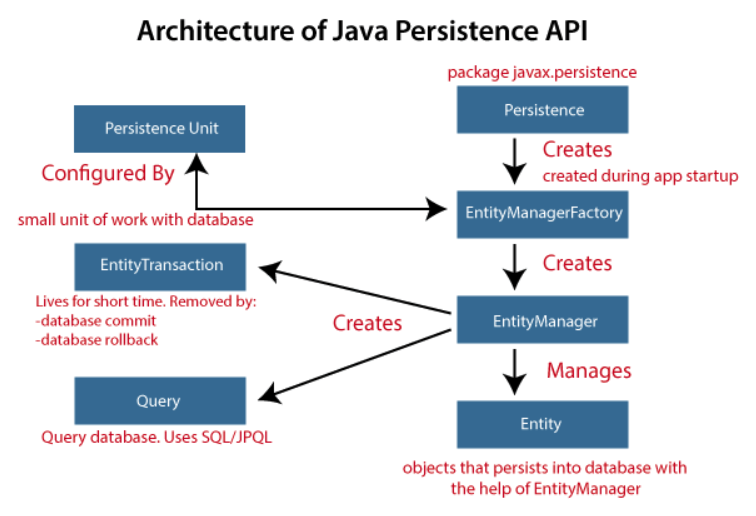
jpa_architecture
Spring Data JPA
Spring Data JPA is built as an abstract layer over the JPA
It has all features of JPA plus the Spring ease of development
For years, developers have written boilerplate code to create a JPA DAO for basic functionalities. Spring helps to significantly reduce this amount of code by providing minimal interfaces and actual implementations
Spring Data JPA uses Hibernate under the hood
How to use Spring Data JPA?
Config database in
application.propertiesspring.datasource.url=jdbc:postgresql://localhost:5432/jobApp spring.datasource.username=postgres spring.datasource.password=**** spring.datasource.driver-class-name=org.postgresql.Driver spring.jpa.hibernate.ddl-auto=update spring.jpa.show-sql=true
Define an entity
package com.hadjshell.JobAd.model;

import jakarta.persistence.Entity;
import jakarta.persistence.Id;
import org.springframework.context.annotation.Scope;
import org.springframework.stereotype.Component;

@Component
@Scope("prototype")
@Entity
@Table(name = "jobPost")
public class JobPost implements Serializable {

    @Id		// primary key
  	// Indicate that ID should be generated automatically
  	@GeneratedValue(strategy=GenerationType.AUTO)
    private int postId;
    private String postProfile;
    private String postDesc;
  	@Column(nullable = false)
    private int reqExperience;
    private List<String> postTechStack;

    public JobPost(int postId, String postProfile, String postDesc, int reqExperience, List<String> postTechStack) {
        this.postId = postId;
        this.postProfile = postProfile;
        this.postDesc = postDesc;
        this.reqExperience = reqExperience;
        this.postTechStack = postTechStack;
    }

    protected JobPost() {
    }

		// getter and setter
}
Build repository layer and create queries
package com.hadjshell.JobAd.repo;

import com.hadjshell.JobAd.model.JobPost;
import org.springframework.data.jpa.repository.JpaRepository;
import org.springframework.data.jpa.repository.Query;
import org.springframework.stereotype.Repository;

import java.util.List;

@Repository
// Specify the stored object's type and its pk's type
public interface JobRepo extends JpaRepository<JobPost, Integer> {

    @Query("SELECT j FROM JobPost j WHERE j.reqExperience >= :year")
    List<JobPost> findByReqExperienceGreaterOrEqualThan(@Param("year") int year);

  	List<JobPost> findByPostProfileContaining(String keyword);
}
Spring Data JPA uses JPA to store data in a relational database
It is able to create repository implementations automatically, at runtime, from a repository interface
Spring Data JPA creates a bunch of
findBy_methods for you behind the scene when you specify them in the@Repositorywithout specifying@QueryfindByIdreturns anOptionalobject
Build service layer and controller layer
Spring AOP
AOP Concepts
Aspect Oriented Programming
AOP complements OOP by providing another way of thinking about program structure
The key unit of modularity in OOP is the class, whereas in AOP the unit of modularity is the aspect
Spring IoC container does not depend on AOP (meaning you do not need to use AOP if you don't want to)
The problem trying to solve - Crosscutting concerns
- Service layer can be lengthy due to extra functionalities such as logging, security, validation, etc. instead of fully focusing on business logic
- Separate those functionalities from business logic into other classes, framework decides when and where to call them automatically
Terminologies
Aspect (Where-Conceptual): A modularization of a concern that cuts across multiple classes
Joint point (When): A point during the execution of a program, such as the excution of a method or the handling of an exception
Advice (What): logics taken by an aspect at a particular joint point
Pointcut (Where-Operational): Advice is associated with a pointcut expression and runs at any joint point matched by the pointcut
- Spring uses the AspectJ pointcut expression language by default
Target object (Whom): An object being advised by one or more aspects
- Since Spring AOP is implemented by using runtime proxies, this object is always a proxied object
Proxy: An object created by the AOP framework in order to implement the aspect contracts (advice method executions and so on)
Weaving (How): Linking aspects with other application types or objects to create a proxy
- Spring AOP performs weaving at runtime
Type of Advice
- Before: Advice that runs before a join point but that does not have the ability to prevent execution flow proceeding to the join point (unless it throws an exception)
- **After returning **: Advice to be run after a join point completes normally
- After throwing: Advice to be run if a method exits by throwing an exception
- After (finally): Advice to be run regardless of the means by which a join point exits (normal or exceptional return)
- Around: Advice that surrounds a join point such as a method invocation
- Around advice can perform custom behavior before and after the method invocation
- It is also responsible for choosing whether to proceed to the join point or to shortcut the advised method execution by returning its own return value or throwing an exception
How to use AOP
Enabling
@ASpectJsupport- It is included in the Spring Boot Web module
Declaring an Aspect
- In Spring AOP, aspects themselves cannot be the targets of advice from other aspects
Declaring a Pointcut
- Spring AOP only supports method execution join points for Spring beans
- The method serving as the advice must have a
voidreturn type - A well written pointcut should include at least kinded and scoping designators
Decalring Advice
package com.hadjshell.ecom.aop;

import org.aspectj.lang.JoinPoint;
import org.aspectj.lang.annotation.*;
import org.slf4j.Logger;
import org.slf4j.LoggerFactory;
import org.springframework.stereotype.Component;

@Component
@Aspect
public class LoggingAspect {

    private static final Logger LOGGER = LoggerFactory.getLogger(LoggingAspect.class);

    // Pointcut expression: designator(return-type class-name.method-name(args))
  	// Pointcut expressions can be combined by using && || !
  	// Pointcut expression may be either an inline pointcut or a reference to a named pointcut
    @Before("within(com.hadjshell.ecom.controller..*) && execution(* com.hadjshell.ecom.controller.ProductController.*(..))")
    public void logMethodCall(JoinPoint jp) {
        LOGGER.info("Method called: " + jp.getSignature().getName());
    }

    // Access current JoinPoint or return value in the advice body
  	// JointPoint must be the first parameter of the advice
  	@AfterReturning(pointcut = "execution(* com.hadjshell.ecom.controller.ProductController.*(..))",
                   returning = "result")
    public void logMethodExecution(JoinPoint jp, Object result) {
        LOGGER.info("Method executed successfully: " + jp.getSignature().getName());
      	LOGGER.info(result.toString());
    }

    // Access exception in the advice body
  	@AfterThrowing(pointcut = "com.hadjshell.aop.CommonPointCuts.loggingOperation()",
                  throwing = "e")
    public void logMethodCrash(JoinPoint jp, Exception e) {
        LOGGER.info("Method has some issues: " + jp.getSignature().getName());
      	LOGGER>info(e.getMessage());
    }
}
package com.hadjshell.ecom.aop; import org.aspectj.lang.ProceedingJoinPoint; import org.aspectj.lang.annotation.Around; import org.aspectj.lang.annotation.Aspect; import org.slf4j.Logger; import org.slf4j.LoggerFactory; import org.springframework.stereotype.Component; @Component @Aspect public class PerformanceMonitorAspect { private static final Logger LOGGER = LoggerFactory.getLogger(PerformanceMonitorAspect.class); // Around advice should declare Object as its return type, and the first parameter of the method must be of type ProceedingJoinPoint // Within the advice body, you must invoke proceed() on that object in order for the underlying method to run // The value returned by the around advice is the return value seen by the caller of the method @Around("execution(* com.hadjshell.ecom.controller.ProductController.*(..))") public Object monitorTime(ProceedingJoinPoint jp) throws Throwable { long startTime = System.currentTimeMillis(); Object obj = jp.proceed(); long endTime = System.currentTimeMillis(); LOGGER.info("Execution time: " + (endTime - startTime) + "ms"); return obj; } }@Component @Aspect public class ValidationAspect { public static final Logger LOGGER = LoggerFactory.getLogger(ValidationAspect.class); // Access arguments in the advice body @Around("execution (* com.hadjshell.ecom.service.ProductService.findProductById(..)) && args(id)") public Object validateAndUpdate(ProceedingJoinPoint jp, int id) throws Throwable { if (id < 0) { LOGGER.info("ID is negative, updating it"); id = -id; LOGGER.info("New Value: " + id); } Object obj = jp.proceed(new Object[] {postId}); return obj; } }
Spring Security
OWASP Top 10 Web Application Security Risks (2021)
- Broken Access Control
- Cryptographic Failures
- Injection
- Insecure Design
- Security Misconfiguration
- Vulnerable and Outdated Components
- Identification and Authentication Failures
- Software and Data Integrity Failures
- Security Logging and Monitoring Failures
- Server-side Request Forgery
Spring Security
- Security filter chain
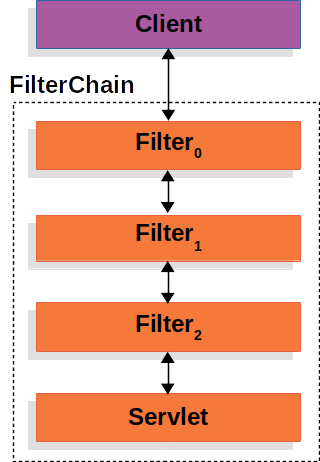
- Adding a custom filter
SecurityContextis loaded from the session- Request is protected from common exploits; secure headers, CORS, CSRF
- Request is authenticated
- Request is authorized
- What Spring Boot enables in Spring Security by default
- Requires an authenticated user for any endpoint (including Boot’s
/errorendpoint) - Registers a default user with a generated password at startup (the password is logged to the console; in the preceding example, the password is
8e557245-73e2-4286-969a-ff57fe326336) - Protects password storage with BCrypt as well as others
- Provides form-based login and logout flows
- Authenticates form-based login as well as HTTP Basic
- Provides content negotiation; for web requests, redirects to the login page; for service requests, returns a
401 Unauthorized - Mitigates CSRF attacks
- Mitigates Session Fixation attacks
- Writes Strict-Transport-Security to ensure HTTPS
- Writes X-Content-Type-Options to mitigate sniffing attacks
- Writes Cache Control headers that protect authenticated resources
- Writes X-Frame-Options to mitigate Clickjacking
- Integrates with
HttpServletRequest's authentication methods - Publishes authentication success and failure events
- Requires an authenticated user for any endpoint (including Boot’s
CSRF
- Cross-Site Request Forgery
- An attack that forces an end user to execute unwanted actions on a web application in which they’re currently authenticated
- For most sites, browser requests automatically include any credentials associated with the site, such as the user’s session cookie, IP address, Windows domain credentials, and so forth. Therefore, if the user is currently authenticated to the site, the site will have no way to distinguish between the forged request sent by the victim and a legitimate request sent by the victim
- Solution one: CSRF token
- Everytime you send a request which is not a GET request, you have to send a CSRF token with the request
- Solution two: Stateless API
- EVerytime you send a request, you have to send username and password with it, there is no session then
Authentication Mechanisms
Username and Password
Password storage
In memory
package com.hadjshell.springsecdemo.config;

import org.springframework.context.annotation.Bean;

import org.springframework.context.annotation.Configuration;
import org.springframework.security.config.Customizer;
import org.springframework.security.config.annotation.web.builders.HttpSecurity;
import org.springframework.security.config.annotation.web.configuration.EnableWebSecurity;
import org.springframework.security.config.http.SessionCreationPolicy;
import org.springframework.security.core.userdetails.User;
import org.springframework.security.core.userdetails.UserDetails;
import org.springframework.security.core.userdetails.UserDetailsService;
import org.springframework.security.provisioning.InMemoryUserDetailsManager;
import org.springframework.security.web.SecurityFilterChain;

@Configuration
@EnableWebSecurity
public class SecurityConfig {

	// Custom security filter chain
  @Bean
	public SecurityFilterChain securityFilterChain(HttpSecurity http) throws Exception {

		http.csrf(customizer -> customizer.disable())
				.authorizeHttpRequests(request -> request.anyRequest().authenticated())
				.httpBasic(Customizer.withDefaults())
				.sessionManagement(session -> session.sessionCreationPolicy(SessionCreationPolicy.STATELESS));

		return http.build();
	}

		@Bean
		public UserDetailsService userDetailsService() {

			UserDetails user = User
					// this method is deprecated
        	.withDefaultPasswordEncoder()		// encrypt password
					.username("navin")
					.password("n@123")
					.roles("USER")
					.build();

			UserDetails admin = User
					.withDefaultPasswordEncoder()
					.username("admin")
					.password("admin@789")
					.roles("ADMIN")
					.build();

			return new InMemoryUserDetailsManager(user,admin);
		}
}
In database
package com.telusko.springsecdemo.service;

import org.springframework.beans.factory.annotation.Autowired;
import org.springframework.security.core.userdetails.UserDetails;
import org.springframework.security.core.userdetails.UserDetailsService;
import org.springframework.security.core.userdetails.UsernameNotFoundException;
import org.springframework.stereotype.Service;

import com.hadjshell.springsecdemo.repo.UserRepo;
import com.hadjshell.springsecdemo.model.User;
import com.hadjshell.springsecdemo.model.UserPrincipal;

@Service
public class MyUserDetailsService implements UserDetailsService {

	@Autowired
	private UserRepo repo;

	@Override
	public UserDetails loadUserByUsername(String username) throws UsernameNotFoundException {
    User user= repo.findByUsername(username);

    if (user==null) {
      System.out.println("User 404");
      throw new UsernameNotFoundException("User 404");
    }
       return new UserPrincipal(user);
    }
}
package com.hadjshell.springsecdemo.model; import java.util.Collection; import java.util.Collections; import org.springframework.security.core.GrantedAuthority; import org.springframework.security.core.authority.SimpleGrantedAuthority; import org.springframework.security.core.userdetails.UserDetails; public class UserPrincipal implements UserDetails{ private static final long serialVersionUID = 1L; private User user; public UserPrincipal(User user) { this.user = user; } @Override public Collection<? extends GrantedAuthority> getAuthorities() { return Collections.singleton(new SimpleGrantedAuthority("USER")); } @Override public String getPassword() { return user.getPassword(); } @Override public String getUsername() { return user.getUsername(); } @Override public boolean isAccountNonExpired() { return true; } @Override public boolean isAccountNonLocked() { return true; } @Override public boolean isCredentialsNonExpired() { return true; } @Override public boolean isEnabled() { return true; } }@Configuration @EnableWebSecurity public class SecurityConfig { @Autowired private UserDetailsService userDetailsService; @Bean public AuthenticationProvider authProvider() { DaoAuthenticationProvider provider = new DaoAuthenticationProvider(); provider.setUserDetailsService(userDetailsService); provider.setPasswordEncoder(NoOpPasswordEncoder.getInstance()); return provider; } @Bean public SecurityFilterChain securityFilterChain(HttpSecurity http) throws Exception { http.csrf(customizer -> customizer.disable()) .authorizeHttpRequests(request -> request.anyRequest().authenticated()) .httpBasic(Customizer.withDefaults()) .sessionManagement(session -> session.sessionCreationPolicy(SessionCreationPolicy.STATELESS)); return http.build(); } }
In LDAP
Encrypt password
OAuth 2.0 Login
Remember Me
Docker
The problem
- Make your project which is working on your machine work on other people's machines
Solution one: Virtualization
- Add a layer - virtual machine between host OS and guest OS
- Deliver the whole OS image including your software to other teams
- It can also help isolate different applications running on the same large-scale server back in 1960s - 1970s
- But this solution is very costly
Solution two: Containerization
- Instead running your application on the OS, you run it inside the container
- Deliver the container
Basics
Container
- Containers are isolated processes for each of your app's components. Each components (frontend, backend, database) runs in its own isolated environment, completely isolated from everything on your machine
- Self-contained
- Isolated
- Independent
- Portable
Image
- A container image is a standardized package that includes all of the files, binaries, libraries, and configurations to run a container
- One container has one image
- Images are immutable. Once an image is created, it can't be modified. You can only make a new image or add changes on top of it
- Container images are composed of layers. Each layer represents a set of file system changes that add, remove, or modify files
- Docker Hub is the default global marketplace for storing and distributing images
Registry
- An image registry is a centralized location for storing and sharing your container images
- It can be either public or private
- Registry can have multiple repositories; repository can have multiple images
Docker compose
- One best practice for containers is that each container should do one thing and do it well
- With Docker Compose, you can define all of your containers and their configurations in a single YAML file, running a multi-container application
docker compose up
Building images
Image layers
Writing a Dockerfile
A Dockerfile is a text-based document that's used to create a container image
It provides instructions to the image builder on the commands to run, files to copy, startup command, and more
FROM python:3.12
WORKDIR /usr/local/app

# Install the application dependencies
COPY requirements.txt ./
RUN pip install --no-cache-dir -r requirements.txt

# Copy in the source code
COPY src ./src
EXPOSE 5000

# Setup an app user so the container doesn't run as the root user
RUN useradd app
USER app

CMD ["uvicorn", "app.main:app", "--host", "0.0.0.0", "--port", "8080"]
Common instructions
FROM <image>- this specifies the base image that the build will extend.WORKDIR <path>- this instruction specifies the "working directory" or the path in the image where files will be copied and commands will be executed.COPY <host-path> <image-path>- this instruction tells the builder to copy files from the host and put them into the container image.RUN <command>- this instruction tells the builder to run the specified command.ENV <name> <value>- this instruction sets an environment variable that a running container will use.EXPOSE <port-number>- this instruction sets configuration on the image that indicates a port the image would like to expose.USER <user-or-uid>- this instruction sets the default user for all subsequent instructions.CMD ["<command>", "<arg1>"]- this instruction sets the default command a container using this image will run.
Build, tag, and publish an image
- Building images - the process of building an image based on a
Dockerfiledocker build .- When you run a build, the builder pulls the base image, if needed, and then runs the instructions specified in the Dockerfile
- Tagging images - the process of giving an image a name, which also determines where the image can be distributed
- Image name structure:
[HOST[:PORT_NUMBER]/]PATH[:TAG] HOST: The optional registry hostname where the image is located. If no host is specified, Docker's public registry atdocker.iois used by default.PORT_NUMBER: The registry port number if a hostname is providedPATH: The path of the image, consisting of slash-separated components. For Docker Hub, the format follows[NAMESPACE/]REPOSITORY, where namespace is either a user's or organization's name. If no namespace is specified,libraryis used, which is the namespace for Docker Official Images.TAG: A custom, human-readable identifier that's typically used to identify different versions or variants of an image. If no tag is specified,latestis used by default.docker build -t my-username/my-image .docker image tag my-username/my-image another-username/another-image:v1
- Image name structure:
- Publishing images - the process to distribute or share the newly created image using a container registry
docker push my-username/my-image
- Building images - the process of building an image based on a
Using the build cache
Multi-stage builds
# Stage 1: Build Environment
FROM builder-image AS build-stage
# Install build tools (e.g., Maven, Gradle)
# Copy source code
# Build commands (e.g., compile, package)

# Stage 2: Runtime environment
FROM runtime-image AS final-stage
#  Copy application artifacts from the build stage (e.g., JAR file)
COPY --from=build-stage /path/in/build/stage /path/to/place/in/final/stage
# Define runtime configuration (e.g., CMD, ENTRYPOINT)
Running containers
Publishing and exposing ports
- Publishing a port provides the ability to break through a little bit of networking isolation by setting up a forwarding rule
docker run -d -p HOST_PORT:CONTAINER_PORT nginx
Overriding container defaults
Persisting container data
- Volumes are a storage mechanism that provide the ability to persist data beyond the lifecycle of an individual container
Sharing local files with containers
Multi-container applications